Industrial Fan Maintenance: Common Failure Modes and PM Best Practices
Exhaust, supply, and process fans run for years with little attention, until a worn belt, an imbalanced wheel, or a failed bearing takes one down without warning. This guide covers the main fan types, the failure modes that actually take them out of service, and the inspection and spare-parts practices that keep a fan running instead of forcing an emergency roof trip.
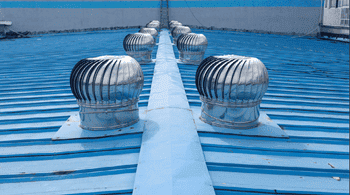
Why Fan Maintenance Matters
Fans move air for ventilation, cooling, and process systems, and they’re often the kind of equipment that’s forgotten until it stops working. A failed exhaust fan on a cold day means no ventilation; a failed process fan can mean a full production stop. Because fans have a handful of well-known failure points, belts, bearings, and balance chief among them, most failures are preventable with a basic inspection routine rather than a surprise roof call.
Common Types of Industrial Fans
| Type | How It Moves Air | Typical Use |
|---|---|---|
| Axial | Blades rotate around a central axis, pushing air in a straight line through the housing | General ventilation, cooling towers, condenser and exhaust applications |
| Centrifugal | A rotating impeller throws air outward, changing its direction roughly 90 degrees | HVAC systems, dust collection, and applications needing higher pressure than axial fans provide |
| Inline / duct | Mounted directly in ductwork, moving air in a straight path through the duct run | Bathroom and kitchen exhaust, spot ventilation where a roof-mounted unit isn’t practical |
| Roof exhaust | Mounted on a roof curb, typically belt- or direct-driven, venting air upward | Bathroom, kitchen, and general building exhaust |
Common Fan Failure Modes
| Failure Mode | What Causes It | Warning Signs |
|---|---|---|
| Belt wear or breakage | Normal wear, incorrect tension, or age, belts can crack and crumble even in storage if kept too long | Squealing on startup, visible cracking or glazing, the fan running slow or not at all |
| Bearing wear | Inadequate lubrication, contamination, or normal fatigue over time | Increased noise or vibration, rising bearing temperature |
| Imbalance | Dust or debris buildup on the fan wheel, or a damaged blade | Vibration, audible wobble, accelerated bearing wear over time |
| Motor issues | Overheating, electrical faults, or a worn capacitor on single-phase motors | Humming without rotation, tripped breaker, unusually hot motor housing |
| Damper or backdraft issues | A stuck or corroded damper that won’t open or close fully | Reduced airflow, unexpected drafts when the fan is off |
Inspection and PM Tasks
- Visual and listening check. Look for belt wear, debris on the wheel, and listen for new noise or vibration.
- Belt condition and tension. Check for cracking, glazing, or fraying, and confirm tension is within the manufacturer’s spec.
- Bearing lubrication. Grease per the manufacturer’s schedule, not more often than specified, over-greasing causes its own problems.
- Wheel and blade cleaning. Clear dust and debris buildup that can throw the fan out of balance.
- Electrical check. Confirm motor amperage is within rated range and connections are tight.
- Damper operation. Confirm dampers open and close fully and aren’t corroded or stuck.
Spare Parts Strategy
Belts and bearings are the parts most likely to force an unplanned repair, and they’re inexpensive enough to stock proactively. A few practices make a real difference:
- Stock belts by fan model, not generically, so the correct replacement is on hand rather than discovered missing mid-repair.
- Watch shelf life. Belts stored too long can crack and crumble before they’re ever installed, so rotate stock rather than letting it sit indefinitely.
- Batch PM by location. If several fans share a roof or mechanical room, schedule their belt and bearing checks together so one site visit covers all of them instead of several separate trips.
- Record belt specifications (size, type) in the fan’s asset record so a replacement can be ordered correctly without needing the old belt in hand.
How a CMMS Helps Manage Fan Maintenance
A CMMS keeps fan maintenance from depending on whoever happens to remember the last belt change.
Scheduled PM. Belt and bearing checks can be generated automatically as recurring work orders, batched by building or roof section so one trip covers every fan in that area.
Spare parts tracking. Belts and bearings can be tracked with reorder points tied to the specific fan model, so the right part is on hand before it’s needed.
Asset history. Every fan builds its own maintenance record, making it easy to see which units are failing more often than others.
Frequently Asked Questions
What’s the most common cause of fan failure?
Belt wear and bearing wear are among the most common, often from normal use, inadequate lubrication, or belts that have aged past their useful life in storage. Most show warning signs before a full failure.
How often should fan belts be checked?
A visual check for cracking or glazing should be part of routine PM, with intervals set by the manufacturer’s recommendation and how heavily the fan runs. Stored spare belts should also be rotated, since they can degrade even unused.
What causes fan vibration?
Dust or debris buildup on the fan wheel is a common cause, along with a damaged blade or worn bearings. Vibration left unaddressed accelerates bearing wear.
Why batch fan maintenance by location?
When several fans share a roof or mechanical room, checking them together in one visit is far more efficient than making separate trips for each one as it happens to fail.
How can a CMMS help with fan maintenance?
A CMMS can schedule recurring belt and bearing checks batched by location, track spare parts like belts and bearings against the specific fan model, and keep a maintenance history for every fan in the building.
Final Thoughts
Most fan failures come down to one of a few predictable causes, a worn belt, a dirty wheel, a bearing that’s gone too long without lubrication. Checking for them on a real schedule, and keeping the right spare parts on hand, turns an emergency roof trip into a routine part swap.
Keep Every Fan on a Predictable Maintenance Schedule
Set up belt checks, bearing inspections, and vibration readings as PM checklist items or meter readings in eWorkOrders, and every inspection gets scheduled, documented, and easy to follow up on — no more guessing whether last month’s check actually happened. That’s what preventive maintenance software is for. eWorkOrders has supported maintenance operations for over 30 years, serving teams at Honda, King River Packaging, McDonald’s, and KFC, rated 4.9 on Capterra and G2.
About the author: Janet Jaquis is Marketing Director at eWorkOrders, where she writes about maintenance strategy, asset reliability, and CMMS software for maintenance and facility teams.


