Schedule a Free Demo
No obligation • Takes less than a minute
GIS Asset Management in CMMS
Put any asset on the map instead of in a spreadsheet. Techs stop chasing buried valves, rooftop units, and the forklift that’s overdue for service. Managers see failure patterns a list view will never show. The map and the CMMS data are the same system — no second platform to keep in sync.
- ✅ Any asset pinned to a location — clickable on the map
- ✅ Mobile map access on iOS and Android — any connected device
- ✅ Click any pin to create a work order with history pre-filled
- ✅ Layered maps — toggle utilities, buildings, and risk zones on or off
- ✅ Live GPS tracking for moving vehicles and equipment
- ✅ GPS location history — keep each asset’s location history for a retention period you set

Customers Love Us!















GIS Asset Management Features
What the GIS module does inside eWorkOrders CMMS.
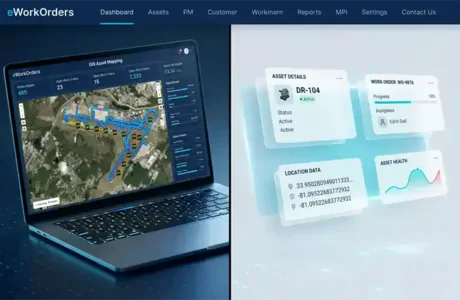
Interactive GIS Asset Map with Real-Time Sync
Any asset can sit on the interactive map, pinned to its location. Click any pin to open the full asset record — installation dates, parts lists, inspection photos, and work order history in one view.
Field updates flow straight into the system. When a technician closes a work order in the field, supervisors see the updated status on the map in real time — no batch uploads, no end-of-shift reconciliation.
- ✓ Any asset pinned to its location, clickable on the map
- ✓ Full asset record opens from any pin — history, parts, photos
- ✓ Real-time sync between field and office
- ✓ Zoom from district-wide view down to a single rooftop unit

Mobile GIS Map — Built for the Field
Field crews pull up the map on phones or tablets wherever they have a connection — across plants, campuses, and remote sites. Assets stay clickable, work orders stay current, and every update posts straight to the cloud.
Crews collect GPS coordinates and snap photos in the field, and everything flows back to the office in real time — no end-of-shift paperwork, no missing updates.
- ✓ Map view on any phone or tablet — desktop not required
- ✓ Cloud-based access from any connected device, anywhere
- ✓ Field crews collect GPS coordinates and photos on the spot
- ✓ Real-time updates post to the office instantly — no sync delay
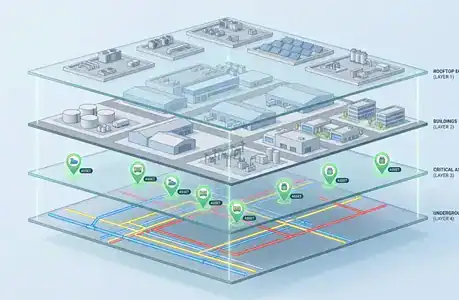
Toggle Map Layers — Utilities, Buildings, and Risk Zones
Toggle underground utilities, buildings, rooftop equipment, and risk zones as independent layers — view one, view all, or any combination. Zoom from an entire district down to a single rooftop unit without extra software.
Turn layers on or off to match the task at hand. Field crews can focus on just the assets they’re working on, while planners pull up the full operational picture when they need the bigger view.
- ✓ Independent layers for utilities, buildings, equipment, and risk zones
- ✓ Toggle any combination of layers on or off
- ✓ Focus the map on just the assets relevant to the task
- ✓ Zoom from district-wide to a single rooftop unit in one click
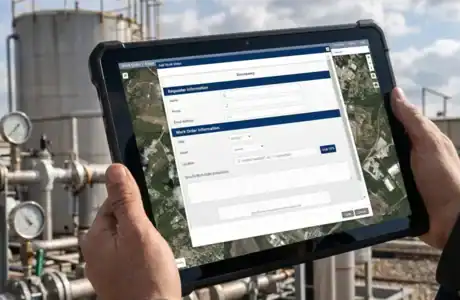
Create Work Orders Directly from the Map
Click any asset pin on the map to generate a work order. The work order opens pre-populated with the asset data you’d otherwise have to re-key — location, asset record, and history are all there.
The system also creates work orders automatically when an asset falls below a condition threshold — the task is created, assigned, and pinned on the map without anyone lifting a finger.
- ✓ Click any pin to create a work order on that asset
- ✓ Asset data and history pre-populate — no re-keying
- ✓ Automatic work order creation when condition thresholds trigger
- ✓ New work orders pin on the map for immediate visibility
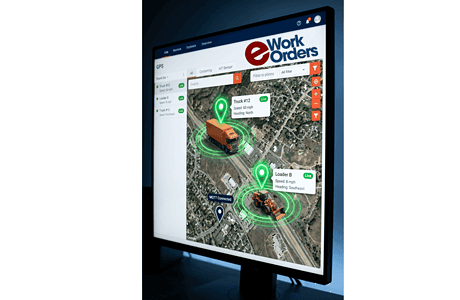
Real-Time GPS Tracking for Vehicles and Equipment
Live asset GPS tracking monitors moving vehicles and equipment using IoT trackers and GPS sensors.
Each asset transmits latitude/longitude, speed, and direction (heading).
GPS readings reach eWorkOrders two ways: over an MQTT-compliant connection to Amazon Web Services that updates the database, or through the eWorkOrders API.
Assets appear on a live map with continuous movement updates and stored location history.
- ✓ MQTT-compliant connection to Amazon Web Services
- ✓ GPS readings ingested through the eWorkOrders API
- ✓ Real-time latitude / longitude tracking
- ✓ Speed and direction (heading) monitoring
- ✓ Live map asset movement tracking
- ✓ GPS location history storage
What Is GIS Asset Management?
GIS asset management links maintenance assets to geographic coordinates. Each asset record contains latitude/longitude data that displays on interactive maps. Location data integrates with work order history, inspection records, parts inventory, and maintenance schedules.
For maintenance operations, this means techs can find assets on a map instead of chasing them down, and managers can see where failures keep happening instead of digging through spreadsheets.
Integration approach: When the GIS module is enabled in eWorkOrders, asset location and maintenance data live in the same CMMS records — not in a separate mapping system that has to be kept in sync. The map and the work order are views of the same data.
See eWorkOrders GIS in Action — Live Demo, No Commitment
Walk through a live demo of the GIS module with our US-based team. See the map, the asset records, and the mobile experience — then bring your questions.
A GIS-Driven Maintenance Workflow in eWorkOrders
From loading asset data through the daily map-based workflow technicians and managers use.
Existing asset records are loaded into eWorkOrders with latitude and longitude — imported from a spreadsheet with lat/long columns, entered manually, or captured by GPS from a mobile device while standing at the asset. Once an asset is in the system with coordinates, it stays on the map.
Assets are organized into map layers — underground utilities, buildings, rooftop equipment, risk zones, and any custom categories the team needs. Layers are independent and can be toggled on or off to match the task at hand, so field crews focus on just the assets relevant to their work while planners can pull up the full operational picture when they need it.
A maintenance manager opens the map view at the start of the day. Open work orders and recurring failure clusters are visible immediately. Click any asset pin to create a new work order pre-populated with the asset data — no re-keying. The system also creates work orders automatically when an asset crosses a condition threshold. Field crews pull up the same map on phones or tablets and open the full asset record from any pin.
As the technician works, status updates, photos, and parts usage sync from the field to the map view in real time — no batch uploads, no end-of-shift reconciliation. If a new asset is discovered in the field, the technician adds it to the map with a fresh GPS pin captured by the device. Over time, recurring failure clusters and risk zones become visible on the map — patterns that stayed invisible in list views feed capital planning and inspection scheduling with location built in.
IoT trackers and GPS sensors on vehicles and mobile equipment send latitude/longitude, speed, and heading to eWorkOrders — over an MQTT-compliant connection to Amazon Web Services that updates the database, or through the eWorkOrders API. The pin moves on the map about every 30 seconds while the vehicle drives. The history of locations, speed, and heading is saved and retained for the number of days set on the asset (Retention Days). A regular reading is recorded only when the asset has moved at least the configured minimum distance (Min Distance, in feet); a heartbeat reading is recorded after the configured interval (Heartbeat seconds) regardless of movement, confirming the GPS sensor is still working. Example: with readings set every 2 minutes, a truck parked in a lot overnight does not record a reading every 2 minutes — only the heartbeat reading (for example, once an hour).
Why Maintenance Teams Choose eWorkOrders for GIS Asset Management
Built for maintenance since 1995. GIS that’s part of the CMMS — not a second system you have to keep in sync.
eWorkOrders treats the map as a first-class view of the CMMS data. The asset on the map is the asset record. Update it in either view and both reflect the change. No reconciliation, no sync jobs, no two systems telling you different things about the same valve.
Field crews open the map on the iOS or Android device they already carry — no separate GIS app, no extra license, no rugged-tablet purchase order. The map is the same map managers see, accessible on any connected device with every update posting back to the office in real time.
Have asset data in a spreadsheet? eWorkOrders imports spreadsheet data with lat/long columns directly, so years of asset records carry over. You can also enter coordinates manually or capture them by GPS from a mobile device in the field — no starting from scratch.
Founded 1995. Built for customers, not investors. 120+ industry awards on Capterra, G2, GetApp, and Software Advice — including Best Ease of Use, Best Support, and Best Value. Decisions driven by what makes the product better for maintenance teams.
Questions about setting up GIS, configuring map layers, or importing asset data? You reach a person on our US-based technical team — not a chatbot, not an offshore handoff. Same team that built the software. This is the primary reason customers stay for decades.
Independently A-rated by SecurityScorecard. SSO with Microsoft Active Directory and enterprise identity providers. The same security controls that protect the CMMS apply to the map, so your asset and location data stay safe across desktop and mobile access.
Common GIS Asset Management Challenges — and How eWorkOrders Solves Them
Most maintenance teams know location matters — the challenge is finding a system where location is built in, not bolted on, and where the GIS doesn’t drift out of sync with the CMMS the moment someone updates an asset record. The result of leaving location out of daily operations: technicians lose hours each week locating distributed infrastructure, managers can’t see failure patterns by zone, and asset knowledge walks out the door when long-tenured staff retire. eWorkOrders solves each of these problems with GIS as a native part of the CMMS, not an afterthought.

Asset Locations Live in Spreadsheets, PDFs, and People’s Heads
Buried valves, rooftop equipment, distribution panels, and remote pump stations get tracked in a spreadsheet, a PDF drawing, or the institutional memory of a long-tenured technician. When that person retires or leaves, the location knowledge leaves with them. eWorkOrders pins any asset to a GPS coordinate that lives in the CMMS — location knowledge is in the system, not in someone’s head.
When location data lives inside the CMMS instead of trapped in spreadsheets, teams stop losing hours hunting for distributed assets — and that location knowledge stays in the system when long-tenured staff retire.
A Standalone GIS That Drifts Out of Sync with the CMMS
Many organizations run a separate GIS alongside their CMMS. Updates happen in one but not the other. Asset records get edited in the CMMS without updating the map. New assets get pinned on the map without a CMMS record. Within a year the two systems disagree on basic facts. eWorkOrders treats the map and the CMMS as the same data, eliminating reconciliation work entirely.
95% of organizations report challenges integrating their systems and applications into cohesive operations — and siloed GIS and CMMS platforms are one of the most common examples (MuleSoft).
Failure Patterns by Location Are Invisible in a List View
A spreadsheet of work orders shows that you had 47 valve failures last quarter. It does not show that 31 of them were on the same utility run, suggesting a systemic issue. eWorkOrders highlights clusters of recurring failures on the map — so root causes get spotted earlier, and capital planning is based on where the problems actually are instead of numbers in a report.
Once crews can see where problems keep happening on the map, the operation shifts from reactive firefighting toward proactive, planned maintenance — fixing root causes instead of repeating the same repairs.
Field Updates Wait Until End of Shift to Reach the Office
When field updates happen on paper or in a disconnected mobile app, the office sees yesterday’s picture today. Supervisors dispatch work based on stale status. Planners schedule inspections on assets that were fixed that morning. eWorkOrders syncs field updates to the map in real time — the moment a technician saves an update on a connected device, the office sees it. The map a supervisor sees is the map the technician just updated.
Real-time sync eliminates the reconciliation work between field and office — no batch uploads, no end-of-shift paperwork, no two systems telling you different things about the same asset.
GIS Asset Management for Every Industry with Distributed Infrastructure
Anywhere assets are spread across more than one building, lot, or service area, GIS turns asset management from list-based to location-based.
Distribution networks, lift stations, valves, hydrants, and treatment plant equipment span miles of service area. eWorkOrders GIS pins any asset to a coordinate and lets crews access a buried shut-off or a remote lift station from a connected mobile device — so location knowledge lives in the CMMS instead of in someone’s head.
Multi-building campuses hide equipment in basements, on rooftops, and in utility tunnels. eWorkOrders GIS layers building footprints, rooftop units, mechanical rooms, and electrical infrastructure on one map — so a technician dispatched to a chiller knows exactly where to go without calling the building engineer.
Streets, signs, signals, storm drains, parks equipment, and public infrastructure all need location-tied maintenance records. eWorkOrders GIS ties any public works asset to its work order history on a single map, with layered views that let each department see the assets relevant to their work.
Generation sites, substations, transmission infrastructure, and remote field assets need location-aware maintenance. eWorkOrders GIS supports the layered map views these operations require, with mobile map access for crews working across large industrial sites.
Runways, taxiways, lighting, fueling infrastructure, and terminal equipment all live across hundreds of acres. eWorkOrders GIS lets airfield maintenance teams pin any asset by coordinate, access it from mobile, and tie every inspection and work order to the exact location where it happened.
University and K-12 campuses with dozens of buildings, athletic fields, parking lots, and outdoor equipment use eWorkOrders GIS to pin any asset by location. Field crews access the map from any phone or tablet, and asset history stays tied to a coordinate even as buildings change names or get renumbered.
Proven Results — Real Customers
“They love the eWorkOrders GIS feature and use it consistently to pinpoint and track assets throughout their facility — valuable when responding to issues and locating assets across 125+ acres, 50 buildings, and 2,000 animals.”

Aaron

eWorkOrders: Best CMMS for Easy Work Orders & Accurate Inventory
Creating and monitoring work orders is very intuitive and valuable. The ability to verify what work was done and what parts were used is priceless. The inventory and purchase orders are intuitive and ...

eWorkOrders: Best CMMS for Easy Work Orders & Accurate Inventory
Creating and monitoring work orders is very intuitive and valuable. The ability to verify what work was done and what parts were used is priceless. The inventory and purchase orders are intuitive and a must as well. Being able to track on-hand inventory and how it flows is extremely valuable.
We chose eWorkOrders due to its superior ability to record the purchase and tracking of inventory. Also, the work order information was much more detailed and easy to use than anything on the market. The tech support is amazing as well! They ALWAYS respond to any issue or suggestion that we have in a timely and professional manner.
The implementation of this system has allowed us to document the work we perform on our plant equipment, both for maintenance and for safety records. We can now historically track all parts used and time spent on assets. We also have detailed records of the company assets as well.
The inventory portion allows us to order and track inventory as well as accurately cost what we use and check vendor pricing.
Aaron

Rhett

Saved $150,000! eWorkOrders Understands Customer Requirements
eWorkOrders saved my client (Virginia Department of Transportation) over $150,000 a year in headcount alone! Before they implemented eWorkOrders, VDOT was managing multiple systems, with multiple plat...

Saved $150,000! eWorkOrders Understands Customer Requirements
eWorkOrders saved my client (Virginia Department of Transportation) over $150,000 a year in headcount alone! Before they implemented eWorkOrders, VDOT was managing multiple systems, with multiple platforms. Being a government facility, they are very conscious of budgets and expenses. With the eWorkOrders CMMS solution, they have all of their inventory and asset information, documents, schedules, and information stored in one centralized location that can be accessed from anywhere, at any time! Through the implementation and the ease of use of eWorkOrders CMMS centralized solution, they no longer needed multiple people managing multiple legacy systems and were able to reduce their headcount and utilize these employees in another area. Overall, the system saved time, money, and increased productivity and efficiency.
It has been great working with the eWorkOrders Team! They understood my customers’ needs and requirements, budget constraints, and worked with them to quickly get them up and running on the software.
I highly recommend this team for any company that really wants to achieve success with a new CMMS solution. It is really nice to work with a team that listens to what you want and need and delivers a solution with an exceptional outcome! eWorkOrders is in the business of successfully assisting organizations through the implementation process and making sure that customers are comfortable with their system. eWorkOrders has the best professional, technical, and management team who all work together to ensure customer satisfaction!
Rhett

Nick

eWorkOrders CMMS Boosted Maintenance and Cut Downtime at 5 Plants
On behave of The OPs VP, Myself, the Managers and the Maintenance teams across 5 very different plants, thank you all for bringing our PM programs from nearly non-existent in some cases, to a full-fle...

eWorkOrders CMMS Boosted Maintenance and Cut Downtime at 5 Plants
On behave of The OPs VP, Myself, the Managers and the Maintenance teams across 5 very different plants, thank you all for bringing our PM programs from nearly non-existent in some cases, to a full-fledged “well-oiled machine” also Special Thanks to the team for all his hard work and time spent guiding us and the Hrs spent teaching us and always giving us the right tools we need to succeed!! I could not imagine a better group of guys to work with than these
The System has drastically changed the way our maintenance team operates! cutting down on downtime and making sure that our teams are out in the field and focusing on the issues that really keep our plants running, and minimizing breakdowns by scheduling maintenance rather than waiting around for things to break.
Nick
Ready to Put Your Assets on the Map?
See how eWorkOrders GIS works — schedule a free demo with our US-based team.
Common Questions About GIS Asset Management
The questions maintenance teams ask most about GIS in a CMMS.
What is GIS asset management?
GIS asset management is the practice of tracking maintenance assets by their geographic location. Any asset can be pinned to a point on an interactive map, and that point is tied to the asset’s full record — work order history, inspections, parts, and photos. Instead of looking assets up in a list, teams find and manage them on a map.
Is GIS the same as GPS?
No. GPS is the satellite technology that pinpoints a location as latitude and longitude. GIS is the system that places those coordinates on a map and connects each one to real data — in a CMMS, the asset’s maintenance record. In short, GPS supplies the coordinates and GIS gives them meaning.
How does GIS asset management work?
Each asset record is given latitude and longitude coordinates — imported from a spreadsheet, entered manually, or captured by GPS in the field. Those coordinates place the asset on an interactive map. Clicking a pin opens the full asset record, and field updates sync back to the map in real time, so the office always sees current status.
Can a CMMS track moving vehicles and equipment with GPS?
Yes. With live GPS tracking, IoT trackers and GPS sensors on vehicles and mobile equipment report latitude/longitude, speed, and heading. In eWorkOrders, those readings reach the system two ways — over an MQTT-compliant connection to Amazon Web Services that updates the database, or through the eWorkOrders API. The asset’s pin moves on the live map about every 30 seconds while it’s in motion, and the location history is saved per asset.
What industries use GIS asset management?
Any operation with assets spread across more than one building, lot, or service area. Common examples include water and wastewater utilities, facilities management, public works and municipalities, power and energy plants, airports and airfields, and educational campuses — anywhere location-based maintenance beats a list view.
GIS & Asset Management Resources
Guides, templates, and tools to help your team get the most out of GIS asset management.
Highly Rated on Capterra, G2, GetApp & Software Advice
120+ Industry Awards · SecurityScorecard A-Rated
See All Awards →













Your Assets Have Locations. Your CMMS Should Know Every One of Them
Join Honda, McDonald’s, and thousands of maintenance teams running their distributed assets on eWorkOrders GIS.
All third-party statistics on this page are sourced from publicly available, independently published research. Capterra, G2, GetApp, and Software Advice badge imagery is the intellectual property of their respective owners, displayed consistent with each platform’s standard badge-use policies. eWorkOrders images used on this page are owned by Information Services Group LLC and used with permission. eWorkOrders® is a registered trademark of Information Services Group LLC. |
1. McKinsey & Company. “Manufacturing: Analytics unleashes productivity and profitability.” Analytics-driven maintenance is associated with a 30–50% reduction in machine downtime and a 20–40% increase in machine life. Read the McKinsey report |
2. IMARC Group. “Geographic Information System Market Report 2025–2033.” Global GIS market projected to reach $37.1B by 2033, up from $14.4B in 2024, at an 11.1% CAGR. View market report |
3. MuleSoft. “2025 Connectivity Benchmark Report.” 95% of organizations report challenges integrating their systems and applications into cohesive operations. Read the MuleSoft report


