Schedule a Free Demo
No obligation • Takes less than a minute
Small Tools Tracking & Management for CMMS
Small Tools Tracking & Management is the CMMS capability that puts every drill, wrench, torque tool, gas detector, and instrument into one tracked inventory — with barcode check-in/check-out, assigned ownership, and a full custody record for every tool on site.
Your asset register tracks the million-dollar equipment. But the $400 impact driver that walked off three months ago? Nobody knows. The drill that someone took home in a work truck? Still missing. Small tools are the blind spot that quietly drains budgets, burns wrench time, and puts accountability at risk — and most CMMS platforms ignore them completely.
eWorkOrders closes that gap. Every tool gets a barcode, an owner, a location, and a history — tracked in the same system as the assets they maintain.
Stop re-buying tools you already own. Stop losing hours to the hunt. Start tracking what your techs actually use every day.

Customers Love Us!















Small Tools Tracking & Management Features in eWorkOrders
Each section below describes what the feature does and how it works in eWorkOrders.
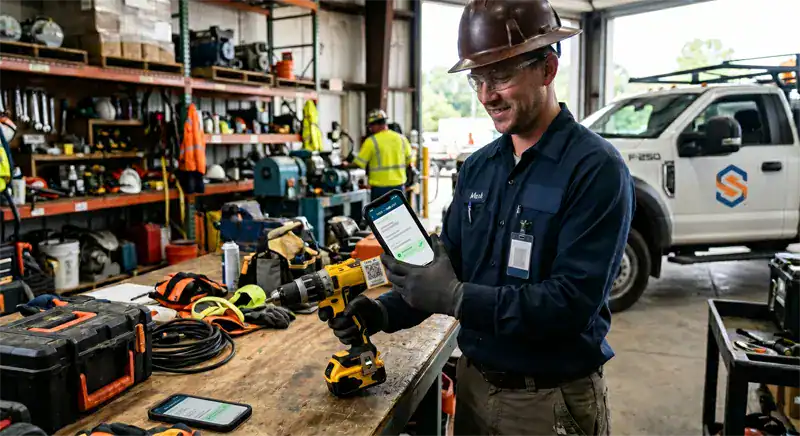
Every Tool Scanned, Signed Out, and Tied to a Person
Every tool gets a barcode or QR label — drills, saws, torque wrenches, gas detectors, confined-space kits. At check-out, the technician scans the tool with the phone they already carry, and eWorkOrders records who took it and which work order it’s going to. At return, a second scan closes the loop. No paper sign-out sheets. No "who had the impact driver last Tuesday?" No borrowed tools disappearing into trucks for three months.
The tool checkout record is linked to the work order that needed it and the user who carried it. Every tool keeps a full custody record, so accountability runs back to a person and a job — not a blank line on a whiteboard. This works on the same device your team already uses for mobile maintenance.

Put Tools on a PM Schedule — Not a Repair-When-It-Dies Schedule
Small tools fail exactly like big assets fail — brush wear on drills, battery degradation, calibration drift on torque tools, blade wear on saws. Most organizations don’t find out until the tool dies mid-job. In eWorkOrders, tools can be set up as assets with their own PM schedules — so inspections, calibrations, and scheduled services get generated as work orders the same way they do for a major piece of equipment.
Because tools live in the same system as your major assets, you can apply the same preventive maintenance workflow — a generated PM work order for every scheduled tool service, complete with the checklist the technician runs through. Repair history on a tool lives alongside its custody record, so the data to make a replace-vs-repair decision is in one place, not scattered across spreadsheets.
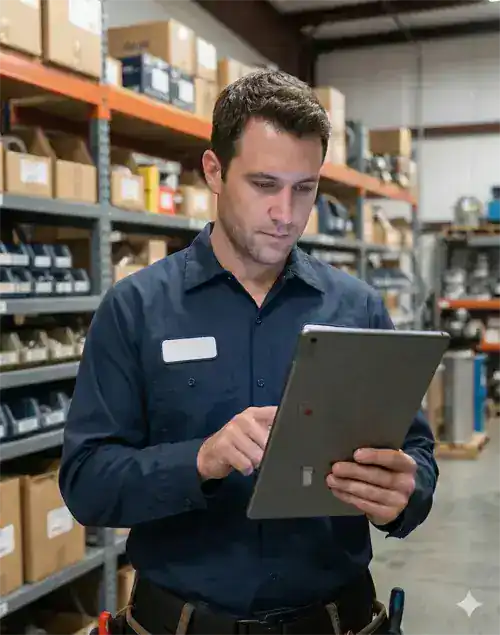
Know Who Has Every Tool — and Who Had It Last
Each tool gets a record in the CMMS the same way a major asset does: serial number, assigned area, purchase date, purchase cost, warranty, and a full custody history. When a technician asks where the 3/8 impact is, the answer is one search away — "checked out by M. Patel at 06:42, linked to WO #4417." That’s the difference between five minutes and fifty.
Because each tool is a real record in asset tracking, tools inherit the same search, filtering, and reporting that your major assets get. Find every tool last checked out to a specific technician. Pull every drill over 4 years old. Pull a list of every tool assigned to an area. The answer comes from a query, not an email chain.

Stop Guessing What Tools Cost You — Measure It
Most maintenance teams don’t actually know their tool situation. They know the purchasing line looks too high, and they know certain areas seem to burn through drills faster than others — but there’s no defensible data anyone can point to. eWorkOrders reporting shows what’s currently checked out, who has what, and which tools have been in and out the most. Gut feel becomes a number. The number becomes a conversation.
The same reporting supports the replace-vs-repair call. A power drill that’s been in for repair four times in twelve months is almost certainly cheaper to replace — and the repair work orders tied to that tool make the case on paper. A $1,400 laser alignment tool with one repair in five years is worth fixing. The data to make that call lives in the tool record, not in someone’s head.
What Is Small Tools Tracking in a CMMS?
Small tools tracking is the CMMS capability that pulls portable, easily-lost items — power tools, hand tools, torque wrenches, gas detectors, instruments, PPE kits — into the same tracked inventory as your major assets. Every tool gets a barcode or QR code, an assigned area, and a full check-in/check-out history. Same workflow for a $40 torque driver and a $4,000 vibration analyzer.
A paper sign-out sheet isn’t tool tracking. A clipboard captures who took what — until it goes missing, the entries stop being legible, or nobody fills it in. A CMMS enforces the scan at checkout, links the tool to the work order, and keeps a full custody record. Studies show workers lose about 38 hours a year searching for tools — nearly a full workweek, per worker. That’s the cost of tracking tools on paper, or not at all.
Ready to See eWorkOrders in Action?
What Kinds of Tools eWorkOrders Can Track
Every tool — hand, power, instrument, PPE, or specialty — fits the same tracking workflow, with the same check-in/check-out, custody history, and work-order linkage as your major assets.
| Tool category | Typical checkout pattern | How eWorkOrders handles it |
|---|---|---|
| Power ToolsDrills, saws, grinders, impact drivers | Daily checkout — return at shift end | Cordless drills, impact drivers, reciprocating saws, angle grinders, rotary hammers, nail guns. Each tool has a barcode, an assigned area, and a full custody history. Scan-out captures the user and the work order. Repair history against the tool record supports the replace-vs-repair decision. |
| Hand Tools & Wrench SetsIndividual & kit-level tracking | Individual checkout or kit-level handoff | Socket sets, wrench sets, plumbers tool kits, electrician rolls, pipefitter kits. Kits can be tracked as a single record or down to the individual tool inside. Every checkout is a scan with a user and a work order — so a missing kit points back to a specific job and a specific person. |
| Instruments & Specialty ToolsTorque tools, test & measurement | Job-specific checkout | Torque wrenches, multimeters, pressure gauges, micrometers, calipers, laser alignment tools, vibration analyzers, thermography cameras. Each tool can be set up as an asset with its own PM schedule — so scheduled inspections and calibrations generate work orders through the standard PM engine. Documents such as cal certificates can be attached to the tool record. |
| Safety Equipment & PPE KitsDetectors, harnesses, respirators | Per-job checkout | Gas detectors, confined-space entry kits, fall-arrest harnesses, SCBA units, arc-flash suits, respirators. Scheduled inspections are run through PM work orders on the tool record. Every checkout captures the user and the work order. |
| Grounds, Landscape & Small EngineChainsaws, mowers, blowers, generators | Seasonal or per-assignment checkout | Chainsaws, trimmers, blowers, portable generators, pressure washers, pumps. Small engines carry PM schedules tied to service intervals — oil change, air filter, spark plug — through the same preventive maintenance workflow used for major assets. |
| Automotive & Shop ToolsTire changers, diagnostic scanners | Shop-floor checkout — return to bay | Tire changers, balancers, diagnostic scanners, OBD readers, transmission jacks, engine hoists, portable lifts. Shop-floor tools often move between bays during a shift — the barcode scan at checkout captures the next user, so the following technician isn’t walking the shop. |
| Assigned Tool KitsPer-technician permanent issue | Long-term assignment to a named user | Tools permanently issued to a named technician — a pipefitter’s personal wrench kit, a millwright’s toolbox, an electrician’s meter bag. The tool record shows the assigned user and the last scan. When a technician leaves or changes role, every tool they’re accountable for is one search away — not a hunt through three trucks and four lockers. |
Every Tool Tracking Capability Your Team Needs
From barcode scanning and check-in/check-out through PM schedules, repair history, custody accountability, and multi-site visibility — eWorkOrders covers the small tools workflows maintenance teams actually run.
Every tool gets a durable barcode or QR label. Check-out and check-in are done by scanning the tool with any iOS or Android phone — no dedicated scanner hardware required. Works seamlessly with mobile maintenance on the same device your team already carries.
Every scan records the user and the work order the tool is going to. Tools in circulation always show who has them right now. The "who had the grinder last?" question becomes a lookup instead of a twenty-minute walk around the shop.
Tools can be tied to an area — Building B, the shop, tool crib A — so each tool record carries where it belongs. Combined with the custody record, "where does this live and who has it now?" is answered in the tool record itself.
Check a tool out from the phone in the technician’s pocket. No clipboard, no scanner gun, no trip back to the tool room computer. The friction of proper checkout drops, which is the only way adoption actually happens in a busy shop or active jobsite.
Each tool carries the full record of who has checked it out, when, and against what work order. If a tool goes missing, the last scan is the starting point for the conversation — not a guess. The custody record accrues across every check-in and check-out.
Tools set up as assets can carry their own PM schedules — inspections, calibrations, service intervals. The PM engine generates work orders on schedule the same way it does for a pump, compressor, or HVAC unit. Tool servicing moves from ad-hoc to scheduled.
Pull tool lists by area, by user, by class, by age, by acquisition cost, or by custody history. Export for reviews, inventories, or budgeting conversations. The raw data for "which tools go missing most" and "which users have the longest holds" comes from the checkout record itself.
Every repair work order against a tool is kept in its record. Total repairs and their cost surface in the tool history. A $180 drill that’s had $320 in repairs across fourteen months is a buy-new case — and the data to prove it is already captured, not reconstructed from memory.
Receipt, warranty card, manual, calibration certificate, MSDS — every document attached to the tool record. When warranty work is needed, the purchase date and warranty terms are right there. When a cal certificate needs to be produced, it’s one click away, not in a file cabinet across the facility.
Tools permanently assigned to a named technician show up on that technician’s record. When someone leaves or changes roles, a list of tools accountable to that person can be pulled in seconds. No more surprise when a $600 impact driver is missing from the shop and the last person who had it left the company in March.
Every tool checkout is attached to the work order driving the job. The tool record shows which work orders have used it over time, and the work order record shows which tools were on that job. Labor and parts drive work order cost — and the tool usage context is there in the same record.
Tool inventory across multiple sites in a single search. Before ordering a new thermal camera for the north plant, check whether the south plant has one in its inventory. Large organizations stop buying the same $2,000 tool four times across four sites because nobody knew it already existed.
How a Tool Moves from Label to Tool Report
This is what the tool tracking workflow actually looks like in eWorkOrders — from the moment a new drill gets labeled to the moment tool-history numbers land in a management review.
The maintenance manager does an initial inventory of every small tool that should be tracked — drills, saws, torque tools, gas detectors, harnesses, kits. Each tool gets a record with serial number, purchase date, cost, assigned area, and any associated documents (warranty, calibration certificate, manual). A durable barcode or QR label is applied. For kits, the manager decides whether to track as a single unit or down to the individual tool inside.
When the technician picks up a tool for a job, they scan its barcode with their phone. The checkout prompts for who is taking the tool and which work order the tool is needed for. The scan closes, the record is written, and the technician walks out with it. No paper sign-out sheet, no desk stop, no clipboard.
The technician completes the work order with the tool in hand. The tool checkout is tied to the job — so if the work order gets reviewed later, the tools that were on the job are part of the record. If the tool breaks during the job, the technician flags it on the same work order and a repair ticket gets generated.
At end of shift or end of job, the technician scans the tool back in. The checkout is closed, the tool is back in inventory, and the custody record grows by one more complete entry. If a repair is needed, that work order is raised separately through the standard work-order workflow — not buried inside the check-in.
Across every checkout, the tool’s history record grows — every user, every job, every repair. Scheduled preventive maintenance and calibration work orders generate automatically on their schedule. When a PM is approaching, the tool surfaces in the PM backlog so it can be rotated out, serviced, and returned to circulation.
Tool lists and history roll up to the reporting module — showing who currently has what, repair history per tool, and custody patterns across technicians and areas. The list of tools assigned to a departing employee is one query. Repair cost against a specific tool drives the replace-vs-repair call. Guesswork becomes data; data becomes a budget conversation that actually moves.
Why Maintenance Teams Choose eWorkOrders for Small Tools Tracking
Built for maintenance since 1995. Small tools tracking is integrated with work orders, PM, and asset tracking — not a bolt-on tool inventory app that lives in its own silo.
A $180 drill and a $180,000 mill live in the same asset database, with the same history, PM, and reporting. Work orders pull tools, PM, parts, and labor from a single system — not four applications that claim to be integrated through a nightly CSV.
The single biggest reason tool tracking systems fail is adoption — technicians won’t stop to fill in a paper log or walk back to a desktop. eWorkOrders checkout is a barcode scan from the phone already in the technician’s pocket. Friction drops, and compliance follows. No clipboards, no scanner guns, no exceptions.
When finance asks what’s happening with the tools budget, "about $30K, I think" isn’t an answer. eWorkOrders produces current tool-out lists, custody history, and repair history by tool — drawn from actual checkout data, not memory. The numbers become a conversation; the conversation becomes a change in behavior.
Founded 1995. Built around how maintenance teams actually work — manufacturers, utilities, healthcare systems, fleets, facilities, construction. 120+ industry awards. 4.9 stars on Capterra, G2, and GetApp. The tool tracking workflows are shaped by three decades of watching teams lose five figures a year to tools that walked away one cordless drill at a time.
Initial tool inventory is where most tracking rollouts stall. You call a person who picks up — to plan the bulk labeling, define tool classes, import the existing inventory from spreadsheets, set up check-out workflows, and train the tool-crib attendants. Not a chatbot, not a ticket queue, not a vendor in a different time zone.
Every plan includes unlimited users. Every technician, supervisor, contractor, and tool-crib attendant who needs to scan a tool in or out has access — without another invoice. Organizations don’t have to ration who can check out a tool to control cost, which is exactly the wrong incentive when you’re trying to get every tool scanned every time.
Common Small Tools Challenges — and How eWorkOrders Solves Them
Most maintenance teams know they have a small tools problem — the challenge is that the problems are mostly invisible until you add up a year’s worth of purchases. Industry studies estimate jobsite theft and tool loss cost the U.S. construction industry alone as much as $1 billion a year, with fewer than 25% of stolen equipment ever recovered. Meanwhile, workers across trades spend roughly 38 hours a year searching for tools — nearly a full workweek, per person. eWorkOrders solves each of these with an integrated tool tracking workflow built into the CMMS your team already uses.
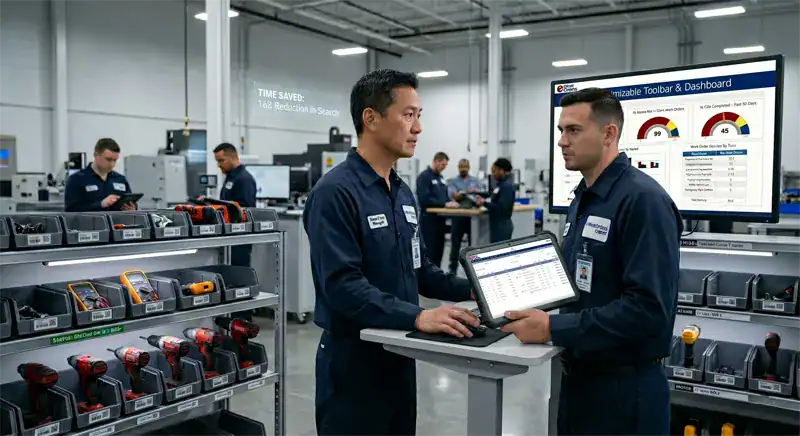
Duplicate Tool Purchases Because Nobody Can Find the First One
A technician needs a 1/2-inch impact driver. The one in Bay 3 is "probably still here somewhere." The supervisor approves a new one instead of burning an hour looking. A month later the original resurfaces in the back of a service truck. Across a year, the pattern repeats enough times to add a zero to the tools line. eWorkOrders makes the search a quick lookup: tool, holder, last work order.
Mid-size builders typically lose $20,000–$50,000 per year in misplaced or stolen tools — with 50–70% reductions reported after barcode-based tool tracking is implemented.
38 Hours a Year, Per Worker, Spent Searching for Tools
Ten minutes here to find a drill. Fifteen minutes there to track down a torque wrench. A trip to another building to retrieve a laser level someone else had. Across a year, the hunt adds up to roughly 38 hours per worker — nearly a full workweek of labor that never turns a wrench. On a ten-person crew, that’s 380 hours a year poured into searching. eWorkOrders turns the hunt into a scan.
Construction workers spend an average of 38 hours per year looking for tools — nearly one hour every week, per worker according to ABAX tool loss analysis, with significant cumulative impact on project timelines and billable hours across construction and maintenance trades.
Low Wrench Time Caused by Tool Hunting & Paperwork
If a technician’s wrench time is 30%, the other 70% is lost to travel, waiting, paperwork, and searching for tools and parts. A ten-person crew at 30% wrench time is effectively running as three technicians. Every unnecessary walk to the tool crib, every paper sign-out sheet, every "has anyone seen the impact driver" pushes wrench time down. Tracking tools on the same device the technician already uses for work orders recovers that capacity without adding headcount.
Industry-wide maintenance wrench time averages 25–35% of the shift — with 55% considered world-class. Much of the gap is attributed to tool searching, parts hunting, and administrative friction that digital tool tracking and mobile workflow directly address.
Tool Theft & Jobsite Loss with No Custody Record
When a tool goes missing off a jobsite or out of a truck, most organizations have nothing to start with: no serial number on file, no purchase record, no last-known holder. The conversation ends at a shrug, the tool isn’t recovered, and the budget absorbs the hit. eWorkOrders keeps serial numbers, purchase records, and custody history on every tool — so a missing-tool report has a starting point the moment it’s filed.
Construction equipment theft costs the U.S. industry $300 million to $1 billion annually, with fewer than 25% of stolen equipment ever recovered — per the National Equipment Register and National Insurance Crime Bureau, underscoring why prevention and documentation are the primary defense.
Small Tools Tracking for Every Industry
Every industry that runs a maintenance team runs tools. Here’s how small tools tracking fits the specific tool inventories of the industries we serve most.
Torque wrenches for bolt patterns on regulated equipment, sanitation tools, metal-detectable kits for food-contact areas. PM schedules for inspections and calibrations run through the standard work-order engine. Tool history and document attachments support internal audit trails.
Biomedical service tools, test equipment, facilities maintenance kits, and environmental-services supplies across a hospital or health system. eWorkOrders tracks every tool with its documents, PM history, and assigned technician — supporting internal quality reviews without a paper chase.
Millwright tool kits, electrical test gear, alignment tools, vibration analyzers, torque tools, and the millions of dollars of small instruments that keep a plant running. Tool check-out integrated with work orders keeps accountability on the shop floor. Used by Honda, Siemens, and manufacturing plants worldwide.
HVAC tools, plumbing kits, electrical meters, ladders, floor equipment, and the grounds crew’s small-engine inventory across multi-site FM operations. Each tool is scanned out against the work order that needs it, keeping the portfolio accountable across every site and every contractor.
Gas detectors with calibration cycles, confined-space harnesses with inspection intervals, pump pullers, SCBA units, and specialty fittings distributed across pump stations and remote sites. Scheduled inspections run as PM work orders. Every tool carries its documentation and PM history.
Shop tools, diagnostic scanners, OBD readers, tire changers, balancers, and the technician-assigned tool boxes that live in every service bay. Tool records support accountability when a technician transfers between depots or leaves the organization.
Proven Results — Real Customers
"The ability to verify what work was done and what parts were used is priceless."

Aaron

eWorkOrders: Best CMMS for Easy Work Orders & Accurate Inventory
Creating and monitoring work orders is very intuitive and valuable. The ability to verify what work was done and what parts were used is priceless. The inventory and purchase orders are intuitive and ...

eWorkOrders: Best CMMS for Easy Work Orders & Accurate Inventory
Creating and monitoring work orders is very intuitive and valuable. The ability to verify what work was done and what parts were used is priceless. The inventory and purchase orders are intuitive and a must as well. Being able to track on-hand inventory and how it flows is extremely valuable.
We chose eWorkOrders due to its superior ability to record the purchase and tracking of inventory. Also, the work order information was much more detailed and easy to use than anything on the market. The tech support is amazing as well! They ALWAYS respond to any issue or suggestion that we have in a timely and professional manner.
The implementation of this system has allowed us to document the work we perform on our plant equipment, both for maintenance and for safety records. We can now historically track all parts used and time spent on assets. We also have detailed records of the company assets as well.
The inventory portion allows us to order and track inventory as well as accurately cost what we use and check vendor pricing.
Aaron

Devree

eWorkOrders CMMS: Fast Support, Full Customization, No Hidden Fees
I really enjoyed eWorkOrders and like that they are on top of everything, and provide fast service. They make you feel #1, and if there is a problem, they will go out of their way to fix it or customi...

eWorkOrders CMMS: Fast Support, Full Customization, No Hidden Fees
I really enjoyed eWorkOrders and like that they are on top of everything, and provide fast service. They make you feel #1, and if there is a problem, they will go out of their way to fix it or customize the layouts to help. I like that they can help you during implementation and during the first 6 months of using the new eWorkOrders software; they do not charge or have hidden fees when you need help.
I like that it is customizable for you and the company’s needs. You can ask for a customization, and eWorkOrders will accommodate. Very fast service and even after hours and weekends.
Devree

Nick

eWorkOrders CMMS Boosted Maintenance and Cut Downtime at 5 Plants
On behave of The OPs VP, Myself, the Managers and the Maintenance teams across 5 very different plants, thank you all for bringing our PM programs from nearly non-existent in some cases, to a full-fle...

eWorkOrders CMMS Boosted Maintenance and Cut Downtime at 5 Plants
On behave of The OPs VP, Myself, the Managers and the Maintenance teams across 5 very different plants, thank you all for bringing our PM programs from nearly non-existent in some cases, to a full-fledged “well-oiled machine” also Special Thanks to the team for all his hard work and time spent guiding us and the Hrs spent teaching us and always giving us the right tools we need to succeed!! I could not imagine a better group of guys to work with than these
The System has drastically changed the way our maintenance team operates! cutting down on downtime and making sure that our teams are out in the field and focusing on the issues that really keep our plants running, and minimizing breakdowns by scheduling maintenance rather than waiting around for things to break.
Nick
Ready to See eWorkOrders in Action?
Common Questions About Small Tools Tracking
Everything maintenance managers ask before choosing a CMMS for small tools, instruments, and shared equipment tracking.
What is small tools tracking in a CMMS?
Small tools tracking is the CMMS capability that extends asset management down to mobile, easily-lost tools — power drills, saws, wrenches, instruments, safety kits, and specialty tools — by giving each one a barcode, a record in the asset database, and a full custody history. In eWorkOrders, every tool has an assigned area, a current holder, and a linked work order on every checkout, all tied into the same work order, PM, and reporting workflows as your major assets.
What kinds of tools can eWorkOrders track?
Any tool you can label. Power tools (drills, saws, grinders, impact drivers), hand tools and kits (socket sets, wrench sets, pipefitter and electrician rolls), instruments (torque wrenches, multimeters, pressure gauges, laser aligners, thermal cameras, vibration analyzers), safety equipment and PPE kits (gas detectors, confined-space kits, harnesses, SCBA units), grounds and small-engine equipment (chainsaws, mowers, generators, pumps), automotive and shop tools, and permanently-assigned tool boxes. Everything lives in the same asset tracking database as your major assets.
How does barcode tool tracking actually work in the field?
Each tool gets a durable barcode or QR label. When a technician picks up the tool, they scan it with their phone — no separate scanner hardware. The checkout prompts for who is taking the tool and which work order it’s needed for. The scan closes the transaction, and the tool now shows as out with that user. At return, a second scan checks it back in. The workflow is the same for a $40 hand tool and a $4,000 instrument.
How are calibrated instruments handled?
Instruments like torque wrenches, multimeters, and gauges can be set up as assets with their own PM schedules. Scheduled calibrations and inspections generate work orders through the standard PM engine — the same way a pump or a compressor gets a scheduled service. The calibration certificate and any supporting documents can be attached to the tool record, so the document is one click away when it’s needed.
Can tools be permanently assigned to individual technicians?
Yes. Tools can be set up for per-checkout use (shared tool crib model) or for permanent assignment to a named technician (personal tool-box model). Permanently-assigned tools show up on the technician’s record, and when a technician transfers roles or leaves the organization, a full list of tools accountable to that person can be pulled in seconds — not after three months of trying to reconstruct who had what. This matters most for pipefitters, millwrights, electricians, and biomedical techs who carry significant personal tool kits.
How are tool checkouts connected to work orders?
Every tool checkout captures the work order the tool is being taken for. The tool record shows which work orders have used it over time, and the work order record shows which tools were on that job. Work order cost in eWorkOrders is driven by labor and parts — the tool usage context is there on the record as part of the audit trail. Where a tool has scheduled preventive maintenance, PM work orders are generated automatically on schedule.
What tool reporting does the system produce?
The reporting module produces current tool-out lists, custody history per tool, repair history per tool, and tool inventories by area, user, or class. Tool lists are exportable for internal reviews and audits. This is the data that turns "we think we spend too much on tools" into a conversation grounded in actual checkout and repair history.
Does eWorkOrders tool tracking work across multiple sites?
Yes. Tool inventories can be viewed at the site, region, or enterprise level. Before approving a new $1,800 thermal camera at the north plant, check whether one at the south plant is sitting idle. Site-level permissions still apply, so access controls and local ownership are preserved where needed.
Which eWorkOrders plan includes small tools tracking?
Small tools tracking — including barcode and QR scanning, check-in/check-out, assigned-tool accountability, custody history, and tool reporting — is included in the eWorkOrders Enterprise plan. All plans include unlimited users, so every technician and tool-crib attendant who needs to scan a tool has access without an additional per-seat fee. See pricing and plans for full details on features by tier.
Small Tools Tracking & Asset Management Resources
Guides, templates, and tools to help your team get the most out of barcode-based tool tracking and maintenance workflows.













Stop Bleeding the Tools Budget. Start Tracking What You Already Own.
Join Honda, McDonald’s, Kings River Packing, and thousands of maintenance teams running their small tools tracking on eWorkOrders.
All third-party statistics are sourced from publicly available, independently published industry research. Capterra, G2, GetApp, and Software Advice badge imagery is the intellectual property of their respective owners, displayed consistent with each platform’s standard badge-use policies. eWorkOrders images used on this page are owned by Information Services Group LLC and used with permission. eWorkOrders® is a registered trademark of Information Services Group LLC. No competitor names or trademarks are referenced on this page. |
1. National Equipment Register & National Insurance Crime Bureau. Construction equipment theft cost estimates & recovery rates. |
2. ABAX. Tool Loss Analysis — 38 hours per worker annually lost to searching for tools. |
3. MaintainX & Reliable Plant. Wrench Time Benchmarks — 25–35% industry average, 55% world-class. |
4. MapTrack / Industry case data. Mid-size contractor annual tool loss estimates & reduction with barcode tracking. |


