One Platform to Manage Every Building, Work Order & Asset on Campus
From leaking roofs to broken lab equipment, campus maintenance piles up fast. eWorkOrders school facilities management software gives your team one CMMS to manage every work order, asset, and safety check — across every building, every shift.
No missed repairs. No chasing updates. Just faster, more accountable school facilities management.
Customers Love Us!




Schedule a Free Demo
No obligation • Takes less than a minute
Features That Solve Real School Maintenance Problems
Real Users – Real Results

Fran

User-Friendly CMMS with Top Support — Simplifies Asset and Preventive Maintenance
I found the training videos and Gerry at the support desk/phone call away, to be VERY helpful in helping me navigate through the system. The videos allowed me to “search by name” and anyway I inputte...

User-Friendly CMMS with Top Support — Simplifies Asset and Preventive Maintenance
I found the training videos and Gerry at the support desk/phone call away, to be VERY helpful in helping me navigate through the system. The videos allowed me to “search by name” and anyway I inputted the subject under “search”, it directed me to a video that helped. Gerry was GREAT, very patient, and knowledgeable both via the phone and emails, so their support is excellent.
At Mount St. Josephs, we only use the asset / preventative maintenance side of the program, but it is easy to input from inside eWorkOrders as well as upload from an Excel spreadsheet. We have over 10 buildings/properties to maintain, so it is very simple to set up each building & assets associated with that building. It allowed me to capture as little or as much data on an asset (boiler, for example), attach manuals, set up a schedule to automatically send a reminder to do the PM, close the PM once the work was completed, along with comments. It allows YOU or maybe a plant manager to see what has been captured. Long-term plans are to have our maintenance crew use the handheld device (IPAD) to access the system remotely. As of now, I print whatever PM is generated and hand it off to the appropriate crew member. You can generate reports to track orders, assets, buildings, etc.
It’s very easy to use to set up your team members for assigning a task and tracking, as well as communicating via email to anyone who needs to be in the know.
The initial setup may take you a little time, depending on how much data you have electronically already. We have over 1000 assets listed. The previous admin had uploaded all of them, and my job was to backfill missing data/ set up the schedule. Due to budget constraints, we are not at full staff, and a real technician inputting some of the data would have been nice (that’s our problem, not eWorkOrders!).
I found the system easy to use, with multiple functions that haven’t even been used yet, but great support to get you what you need.
Fran

Bob

Flexible and Powerful CMMS That Streamlines Work Orders and Improves Communication
We love the flexibility and the power eWork Orders provide for us. Once the system is set up, work orders with great detail can be automatically generated. In addition, as the work orders are being co...

Flexible and Powerful CMMS That Streamlines Work Orders and Improves Communication
We love the flexibility and the power eWork Orders provide for us. Once the system is set up, work orders with great detail can be automatically generated. In addition, as the work orders are being completed, the fulfillers of the work orders can create new work orders to have items addressed that maybe they were not able to complete. The software facilitates a great way of communicating in a decentralized organization to ensure items are completed in a timely fashion, ensuring a quality product for our customers.
Bob

John

Reliable CMMS That Adapts to Your Needs with Responsive Support
It does everything that I want it to do, and when I require a change, the staff at eWorkOrders makes it happen every time.

Reliable CMMS That Adapts to Your Needs with Responsive Support
It does everything that I want it to do, and when I require a change, the staff at eWorkOrders makes it happen every time.
John
Stay Safe. Stay Compliant. Stay Ahead.
eWorkOrders is a comprehensive school maintenance software (CMMS) for K-12 schools and universities. Streamline work orders, preventive maintenance, asset tracking, and compliance reporting across single campuses or multi-school districts. Keep your facilities safe, inspection-ready, and running efficiently while reducing response times and maintenance costs.
Visual Asset Mapping
Map every school asset — from classrooms and gym equipment to HVAC systems and outdoor fields. Track service history, schedule maintenance, and dispatch technicians instantly for faster resolution.
Inspection & Audit Logs
Record inspections, safety audits, and compliance checks. Upload documents, attach photos, and generate OSHA-ready reports instantly to keep your school inspection-ready.
Mobile-Friendly Access
Technicians update work orders, complete checklists, and access service histories from any device. Reduce delays, eliminate paperwork, and keep maintenance operations fully connected.
Preventive Risk Detection
Identify potential HVAC failures, playground hazards, and safety risks before they escalate. Automate preventive maintenance alerts to reduce emergency repairs and protect students and staff.
Work Orders vs. Service Requests — What’s the Difference?
Understanding the difference between service requests and work orders is critical for effective school facilities management. eWorkOrders CMMS helps your team respond faster, prioritize preventive maintenance, reduce downtime, and keep every campus safe, compliant, and running efficiently.
How They Work Together in eWorkOrders
The whole process happens in one platform, taking a request from submission to completion seamlessly.
From K-12 to Universities — Built for Every Campus
eWorkOrders serves K-12 school districts and university campuses across the United States. Whether you’re managing one building or fifty, our school facilities management software gives every maintenance team the tools to reduce downtime, stay OSHA compliant, and keep every campus running safely.
Built for Every Role on Campus
eWorkOrders provides a complete school maintenance software solution for K-12 schools and universities. Designed for every role on campus, our CMMS streamlines preventive maintenance, school work orders, asset tracking, and compliance reporting — all in one centralized facility management system for single campuses or multi-school districts.

Facility Directors & University Leads
View open work orders, asset lifecycles, and preventive maintenance schedules in one centralized CMMS. Fewer surprises, smarter budgeting, full transparency across your district or campus.
Maintenance Technicians
Log tasks, view asset histories, and close work orders from your mobile device. Complete preventive maintenance faster, without desk time or printed checklists.
Admins & Operations Managers
Route requests, prioritize urgent issues, track vendors, and stay inspection-ready — all without chasing staff or paperwork.
Why K-12 Schools & Universities Choose eWorkOrders CMMS
A powerful CMMS built specifically for education facility management — not retrofitted from a generic maintenance platform. Designed to streamline school work orders, preventive maintenance, asset tracking, and compliance reporting across single campuses and multi-school districts.
Built for K-12 & Universities
Education-focused maintenance management software designed around how school facilities teams actually operate. From K-12 districts to higher education campuses, manage work orders, preventive maintenance schedules, building assets, and compliance requirements in one centralized school CMMS platform. Scale easily from a single building to multi-campus university systems.
Mobile-First School Work Order Software
Submit, assign, update, and close school maintenance work orders from any device. Technicians can access asset histories, preventive maintenance checklists, and real-time updates without returning to the office. Improve response times, reduce paperwork, and increase accountability across your campus maintenance operations.
U.S.-Based Support for Education Facilities
Work directly with experienced U.S.-based support specialists who understand school maintenance management, district reporting requirements, and university facility operations. Get fast answers, personalized onboarding, and ongoing guidance to ensure your education CMMS system delivers long-term success.

What You’ll Gain With eWorkOrders
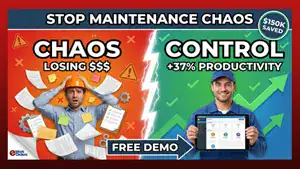
Move from reactive chaos to proactive campus maintenance management with our school CMMS platform.
Maintenance Center
Explore our maintenance management resource center to learn how to improve work order processes, optimize preventive maintenance programs, and choose the right CMMS software for your organization. These guides are designed for maintenance managers, facility directors, and operations teams looking to improve efficiency and reduce downtime.
Frequently Asked Questions
What is school facilities management software?
It’s a centralized digital system that helps school maintenance teams manage work orders, schedule preventive maintenance, track assets, and stay OSHA compliant — all in one place. It replaces spreadsheets, sticky notes, and phone tag with automated workflows your whole team can access from any device.
What is the difference between CMMS and facilities management software for schools?
A CMMS focuses on asset maintenance and work orders, while a Facility Management System (FMS) covers broader operations like space scheduling, energy tracking, and compliance. eWorkOrders combines both — giving school teams a single platform for maintenance, assets, safety, and reporting.
How does a CMMS reduce school maintenance costs?
By automating preventive maintenance schedules, schools catch small problems before they become costly emergency repairs. A CMMS also reduces equipment downtime, eliminates wasted parts spending with inventory tracking, and gives managers the data they need to make smarter budgeting decisions.
How does school CMMS software help with aging buildings?
Most school buildings are decades old and require constant upkeep. A CMMS tracks every asset’s full maintenance history, flags overdue repairs, and automates recurring service intervals — so aging HVAC systems, roofs, and infrastructure get serviced on schedule before they fail.
Can eWorkOrders handle multiple school campuses?
Yes. eWorkOrders is built to scale — whether you’re managing one building or dozens across a district. Assign work orders, track assets, and run reports by building or campus location using GIS asset mapping, giving district administrators full visibility across every site.
How does a CMMS improve school safety and OSHA compliance?
eWorkOrders logs every inspection, safety audit, and maintenance check with a timestamped record. Upload compliance documents, attach photos, and generate OSHA-ready reports on demand — so your school is always audit-ready and never scrambling when an inspector arrives.
Does school maintenance software work on mobile devices?
Yes. Technicians can submit, update, and close work orders from any smartphone or tablet — right from the field. No desk required, no printed checklists, no running back to the office. eWorkOrders is fully mobile-friendly so your team stays connected across every building and campus.
How quickly can a school get started with a CMMS?
Most schools are up and running in days, not weeks. eWorkOrders offers fast implementation with dedicated U.S.-based onboarding support at no extra cost — so your team can start managing work orders, assets, and preventive maintenance right away without a lengthy setup process.
Ready to Transform Your Campus Facilities Management?
Join schools and universities across the U.S. who trust eWorkOrders to keep their campuses running safely and efficiently.


