Document Management Software for Maintenance Teams

📋 GET A DEMO
📅

Schedule a Free Demo

No obligation • Takes less than a minute

Please enter your first and last name
Please enter a valid email address
Please enter your phone number
Please choose a contact reason
Verification failed. Please try again. Sorry, your submission was flagged as spam.
🔒 Your information is secure and never shared
Schedule Your Free Demo

📅

Schedule a Free Demo

No obligation • Takes less than a minute

Please enter your first and last name
Please enter a valid email address
Please enter your phone number
Please choose a contact reason
Verification failed. Please try again. Sorry, your submission was flagged as spam.
🔒 Your information is secure and never shared

Document Management Software for Maintenance Teams

CMMS Document Management is a centralized digital system built into your maintenance software that stores, organizes, and delivers every OEM manual, safety procedure, SDS sheet, inspection record, and compliance document — directly attached to the asset or work order that needs it.

eWorkOrders CMMS puts every document your technicians need at the job site — attached to the right work order, on their phone, before they leave the shop. No calling the office for a manual. No driving back to look something up. No binder hunting before an audit.

✅ Store all documents in one centralized, secure location — attached directly to assets and work orders.
✅ Attach LOTO procedures, OEM manuals, schematics, and SDS sheets to any work order or asset.
✅ Technicians access every document on mobile at the job site — no desk trips, no paper, no delays.
✅ Maintain complete audit trails with role-based access controls and electronic signatures on work orders.
✅ Store the data your team needs to support FDA, OSHA, ISO, JCAHO, and HACCP documentation requirements.

Every document in the right place. Every record complete. Every audit ready — without scrambling.

eWorkOrders CMMS Document Management — centralized maintenance documents attached to assets and work orders
★★★★★
Customers Love Us!
Capterra
Software Advice
GetApp
G2

25–35%
of a technician's shift is spent on actual hands-on repair — the rest is lost to travel, paperwork, and coordination
Industry benchmark — Prometheus Group / Fiix / MaintainX
$16,550
maximum OSHA penalty per serious safety violation — per citation, per occurrence
OSHA.gov (effective January 15, 2025)
27%
average reduction in equipment downtime for organizations using CMMS versus those without it
Aberdeen Group
20%
improvement in labor productivity from connected worker tools including mobile CMMS access in the field
Deloitte Smart Factory Research

How Document Management Works in eWorkOrders

Attach documents to assets once. They load automatically on every work order, on every device, every time.
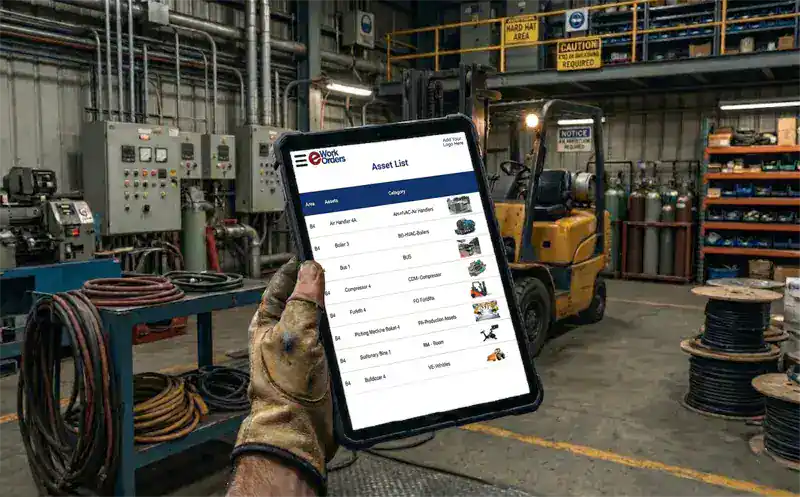
eWorkOrders CMMS document management dashboard showing attached files and compliance records on assets
Asset Documents — Live
Example view
14
Docs
3
SDS Sheets
100
% Current
6
Assets
4
LOTO Docs
Audit Ready
Centralized Document Repository

Documents Attached to the Asset — Available on Every Work Order

Attach OEM manuals, engineering drawings, SDS sheets, LOTO procedures, and inspection records directly to the asset record in eWorkOrders. Every work order generated for that asset pulls those documents automatically to the technician's phone. You attach them once — the system delivers them every time.

Update a document once and every asset and work order that references it gets the current version immediately. No outdated binders. No multiple versions in circulation. One searchable record built as work is completed.

Attach to assets, work orders, and PM schedules
One update applies everywhere — version-controlled
Supports PDF, Word, Excel, images, CAD drawings, and more
Searchable by asset, document type, or keyword

Explore Asset Management →

Maintenance technician accessing OEM manuals and LOTO procedures on mobile device via eWorkOrders CMMS at job site
📋
Docs — WO #4821 — Live
LOTO Procedure — Pump 4
Required
OEM Service Manual
Attached
SDS Sheet — Refrigerant
Current
Last Inspection Record
Mar 2025
Mobile Document Access — iOS & Android

Every Document on the Technician's Phone Before the Job Starts

Open a work order in eWorkOrders on your mobile device and every document attached to that asset is right there — OEM manual, LOTO procedure, SDS sheet, previous repair photos. Tap to open. No calls to the office. No emailed files. No hunting through a shared drive at the job site.
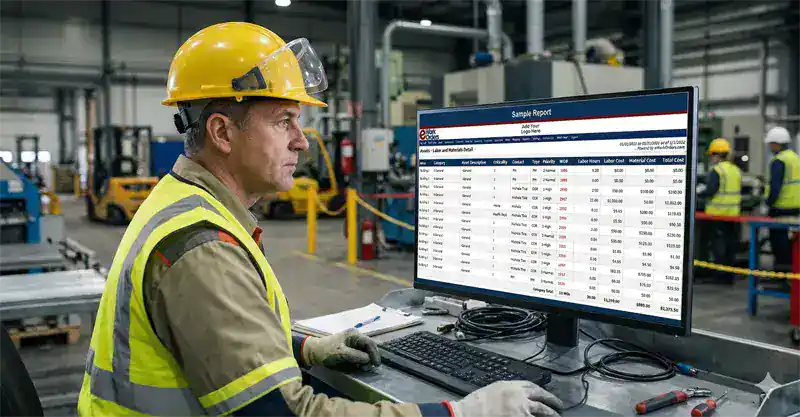
Full document access from any iOS or Android device
Documents open directly from the work order
QR code scan at the asset pulls up the asset record and all attached documents
Photo capture attaches directly to the work order record

Explore Mobile Maintenance →

Maintenance technician reviewing compliance checklist and required safety documentation during inspection using eWorkOrders CMMS
Compliance Data — Stored
WO #5247 — Chiller Inspection
Closed · All data stored
✅ Documents accessed logged
✅ Inspection checklist completed
✅ 4 photos attached
✅ Electronic signature captured
Data stored
Compliance Ready
Compliance & Audit Trail

All the Data Your Team Needs — Stored, Searchable, and Ready When You Need It

When a work order closes in eWorkOrders, every piece of data is stored permanently — who did the work, which documents were accessed, what checklist steps were completed, parts used, labor time, and the technician's electronic signature with a timestamp. Your team has everything they need to build compliance reports — without scrambling to assemble records before an audit.

Records are fully searchable by asset, date, technician, or work order number. For regulated industries — food manufacturing, healthcare, water treatment, pharmaceuticals — this stored data supports documentation requirements for FDA 21 CFR Part 11, OSHA PSM, JCAHO, ISO 55001, and HACCP frameworks.[1]

Timestamped data stored on every work order close
Electronic signature captured on work orders
Data to help support FDA, OSHA, ISO 55001, JCAHO, and HACCP audits
Searchable by asset, date, technician, or work order type

Explore Electronic Signature →

1 OSHA. Hazard Communication Standard, 29 CFR 1910.1200. osha.gov

Maintenance technician accessing PM procedure documents and SDS sheets on tablet in eWorkOrders CMMS

PM Docs — Quarterly HVAC
Auto-loaded on WO schedule
📋
Inspection Procedure v2.1
Loads automatically
Attached
📘
OEM Manual — Trane
Chapter 7 — Coil Cleaning
Attached
🧪
Refrigerant SDS Sheet
Regulatory req. · Current
Current
PM & Workflow Integration

Assign Documents to a PM Template Once — They Load on Every Scheduled Work Order

In eWorkOrders, you assign documents to a PM template one time. When that PM work order is generated — from a calendar schedule or meter reading — the inspection procedure, OEM checklist, and SDS sheets load with the work order automatically. No one has to attach them manually each time.

Every technician on every shift working that PM gets the same documents. That means consistent procedure, consistent documentation, and consistent data stored for compliance reporting — regardless of who runs the job.


Assigned to PM template once — loads on every scheduled work order
Same documents delivered to every technician on every shift
No manual re-attachment across assets or locations
SDS and LOTO docs available on every related work order

Explore Preventive Maintenance →

What Is CMMS Document Management?

CMMS document management is the ability to store, organize, and deliver maintenance-related files — OEM manuals, inspection forms, SDS sheets, compliance records, engineering drawings, work order history — directly inside your maintenance management system, linked to the assets and work orders they belong to. It is not a separate document management system bolted on. It is built into how work gets planned, executed, and closed.

Without it, maintenance teams rely on shared drives nobody keeps organized, paper binders that go out of date, and email threads to track down procedures before a job. The result is wasted time, missed steps, and compliance gaps that only surface when an auditor is already in the building.

What does it include? In eWorkOrders, document management covers: a centralized cloud-based document repository, file attachments to assets, work orders, and preventive maintenance plans, mobile access to manuals, schematics, and standard operating procedures from the job site, advanced collaboration tools for sharing documents across teams, workflow automation for document-centric processes, and robust access controls with audit trails for regulatory compliance.

✗ Without CMMS Document Management
Technicians call the office to locate manuals before every job
Safety procedures exist in binders — outdated, often missing
Documents scattered across multiple systems and hard drives
No reliable audit trail for compliance or regulatory reviews

✓ With eWorkOrders Document Management
Every document stored in one secure, centralized location
Manuals and procedures attached directly to assets and work orders
Field technicians access critical documents from any mobile device
Complete data stored and searchable to support compliance reporting

See How eWorkOrders Handles Your Compliance Documents — Live Demo

Our US-based team builds every demo around your facility type, asset mix, and compliance requirements.

Schedule a Free Demo →

Document Types — Every Maintenance Scenario

eWorkOrders handles every document category maintenance teams work with — attached to the right location in the system, delivered to the right person at the right time.

Document type Attached to Delivery How eWorkOrders handles it
OEM Manuals & Service GuidesPDF, Word, linked docs Asset record, PM template On-demand mobile access Attached to the asset or PM template — technicians access the correct manual from their phone at the job site without calling the office.
Lockout/Tagout (LOTO) ProceduresSafety-critical Asset, work order type Attached to work order LOTO procedures are stored and attached to the relevant asset or work order type. Technicians access the procedure from their mobile device at the job site before starting work.
Safety Data Sheets (SDS)Regulatory requirement Asset, parts record On-demand mobile access SDS sheets are stored and attached to the relevant asset or parts record. Technicians access them from mobile at the job site without needing to return to the office.
Inspection & Compliance FormsRegulatory, audit Work order, PM schedule Attached to work order Inspection forms and compliance documents are stored and attached to work orders and PM schedules. Accessible from mobile at the job site and stored permanently in the audit trail.
Engineering Drawings & SchematicsCAD, PDF, images Asset, facility record On-demand mobile access P&IDs, electrical schematics, and facility drawings attached to the asset. Accessible from mobile — technicians view the correct drawing at the equipment without returning to the office.
Work Order Photos & Field NotesImages, text Work order record Captured in the field Technicians capture photos directly from mobile — before, during, and after the job. Photos and notes attach to the work order and are stored permanently in the asset history. Supports condition tracking and repair-or-replace decisions.
OEM Manuals & Service GuidesPDF, Word, linked docs
Attached toAsset record, PM template
DeliveryOn-demand mobile access
DetailsAttached to the asset or PM template — accessible from mobile at the job site.

Attached toAsset, work order type
DeliveryAttached to work order
DetailsLOTO procedures stored and attached to the asset or work order type. Accessible from mobile at the job site.

Safety Data Sheets (SDS)Regulatory requirement
Attached toAsset, parts record
DeliveryOn-demand mobile access
DetailsSDS sheets stored and attached to the asset or parts record. Accessible from mobile at the job site.

Inspection & Compliance FormsRegulatory, audit
Attached toWork order, PM schedule
DeliveryAttached to work order
DetailsInspection and compliance documents attached to work orders and PM schedules. Stored permanently in the audit trail.

Engineering Drawings & SchematicsCAD, PDF, images
Attached toAsset, facility record
DeliveryOn-demand mobile access
DetailsP&IDs and schematics accessible from mobile at the equipment — no office trip needed.

Work Order Photos & Field NotesImages, text
Attached toWork order record
DeliveryCaptured in the field
DetailsPhotos and notes taken from mobile attach permanently to the work order and asset history.

All your maintenance documents — in one place.

eWorkOrders stores and organizes every document your maintenance team works with — attached to assets, work orders, and PM plans, and accessible from any mobile device at the job site. Documents are stored in a centralized, secure, cloud-based repository with audit trails tracking who accessed what and when.

Every Document Management Capability Your Team Needs

From the first document attached to an asset through every work order your team completes, eWorkOrders keeps your maintenance documentation organized, accessible, and always current.

📎

Attach any file type — PDF, Word, Excel, images, CAD drawings — directly to an asset record. Every document linked to that asset appears on every work order, PM, and inspection generated for it. Attached once, available always.

Explore Asset Management →

📱

Technicians open any document from their iOS or Android device at the job site. QR code scan at the asset pulls up the asset record and all attached documents instantly. No shared drives, no VPN, no calling someone to email a file.

Explore Mobile Maintenance →

🗄️
Centralized Document Repository

Store every maintenance document — manuals, schematics, SOPs, safety procedures, and inspection records — in one secure, cloud-based location. No more hunting across shared drives, email threads, or paper binders. Every document is organized, searchable, and accessible from any device, anywhere.

📅

Assign documents to PM templates once. Every time a preventive maintenance work order fires — for any asset using that template — the correct documents load automatically. No re-attaching, no relying on individual technicians to remember.

Explore Preventive Maintenance →

📸
Field Photo Documentation

Technicians capture before and after photos directly from their mobile device — these attach automatically to the work order record. Over time, asset photo history documents condition deterioration, supports capital replacement decisions, and provides visual evidence of work performed.

Version Control & Document Currency

Update a document once in eWorkOrders and every asset and work order that references it gets the current version immediately. No more paper binders with outdated procedures. No more technicians following an old revision of a safety protocol because nobody updated the shared drive.

🔍
Full-Text Document Search

Find any document by asset, document type, date, keyword, or work order number. Maintenance managers locate records before an audit in seconds — not hours. No digging through shared drive folder structures or emailing IT for access.

🔒
Role-Based Access Controls

Define which user roles can view, upload, or modify specific documents. Sensitive engineering drawings, proprietary SOPs, or contractor agreements are restricted to the appropriate roles without affecting technicians' access to the operational documents they need for their jobs.

🕵️
Audit Trail & Document History

Every document interaction in eWorkOrders is automatically logged — who uploaded it, who accessed it, who modified it, and when. The complete document history is stored permanently against the asset and work order record, giving maintenance managers a searchable, exportable audit trail for compliance reviews, regulatory inspections, and internal accountability.

How Documents Move Through the Maintenance Workflow

Document management in eWorkOrders is built into how work gets created, executed, and closed — not a separate step anyone has to remember.

1
Documents Assigned to the Asset or PM Template

During setup, administrators attach relevant documents to each asset record and PM template. This is done once. OEM manuals, LOTO procedures, inspection checklists, SDS sheets, and engineering drawings are all assigned at this stage and will be available on every work order generated for that asset going forward.

2
Work Order Opens — Documents Load Automatically

When a work order is created — whether from a service request, a PM schedule trigger, or an emergency — all documents assigned to that asset and work order type are automatically pulled into the work order. The technician sees them the moment the work order is assigned to them on their mobile device.

3
Technician Accesses Documents in the Field

At the job site, the technician opens the work order on their mobile device and taps any document to open it. They can also scan the QR code on the asset to pull up the asset record and all documents attached to it — without calling the office or returning to a desktop.

4
Field Documentation — Photos, Notes, Checklist Completion

During execution, the technician adds to the work order's document record. Photos of the asset condition before and after repair attach automatically. Checklist completion is timestamped at each step. Notes about findings, unusual conditions, or follow-up recommendations are captured in the field — not reconstructed at the desk later.

5
Review & Supervisor Approval

Supervisor reviews the completed work order — verifying checklist completion, documentation, and that all required documents were accessed. Electronic signature captures supervisor approval with a timestamp. Any developing issues found during work generate corrective work orders immediately, linked to the asset and originating work order.

6
Closure — Complete Data Record Stored Permanently

The work order closes with a complete timestamped data record — documents accessed, completed checklist, attached photos, parts log, labor time, and electronic signature — stored permanently and indexed to the asset. Instantly searchable and exportable so your team can build the compliance reports they need. The asset maintenance history updates immediately. Your maintenance dashboard reflects the closed job in real time. No separate filing step. It is done.

Why Maintenance Teams Choose eWorkOrders for Document Management

Built for maintenance since 1995. Documents aren't a bolt-on feature — they're part of how the work gets done.

🔗
Documents Live Inside the Work Order — Not Beside It

Most teams manage documents in a separate drive and hope technicians remember to check it. In eWorkOrders, documents attach directly to the work order. The technician cannot miss them — they are part of the job, not a separate lookup.

👥

Any number of operators, tenants, or employees submit work requests at no extra cost. No accounts to manage, no passwords to reset.

24-Hour Setup — Live in Days, Not Months

Your system is live within 24 hours of signup. Upload your existing documents, attach them to assets, and your team has mobile access to everything from day one. Most teams go fully live in 2–3 weeks.

🏆

Founded 1995. Built for customers, not investors. 120+ awards. 4.9 stars on Capterra. Decisions driven by what makes the product better for maintenance teams.

📞
U.S.-Based Support — Real People Who Answer

When you call, a knowledgeable person picks up and responds within hours — not days. The primary reason customers stay and switch from larger platforms.

🔒
Most Secure CMMS on the Internet

Enterprise-grade security with SSO, role-based permissions, complete audit trails, and one of the highest security ratings in the CMMS industry. Your maintenance documents and compliance records are protected.

Common Document Management Challenges and How eWorkOrders Solves Them

Maintenance teams deal with document problems every day — and most of them are costing money, time, and occasionally triggering regulatory violations. Documents stored in the wrong place, in outdated binders, or scattered across shared drives create delays at the job site and compliance gaps that only surface when an auditor is already in the building. eWorkOrders document management software eliminates the root cause — putting every document exactly where it needs to be, attached to the asset and work order that requires it.

Maintenance manager reviewing compliance documentation and work order records in eWorkOrders CMMS

Documents Are Never Where Technicians Need Them

The OEM manual is in a binder in the office. The LOTO procedure is on a shared drive nobody has on their phone. In eWorkOrders, every document attaches to the asset and loads automatically when the work order opens — on the technician's device, at the job site, before the job starts.

Compliance Records Assembled at the Last Minute

Before an OSHA inspection or JCAHO review, someone spends days pulling records from paper files and spreadsheets. With eWorkOrders, all the data is stored and searchable — who did the work, what documents were accessed, what was completed — so your team can build compliance reports quickly without scrambling.

The maximum OSHA penalty for a serious violation is $16,550 per citation — per occurrence (OSHA.gov, effective January 15, 2025).

No Proof That Safety Procedures Were Available

After a workplace incident, the question is always: did the technician have access to the LOTO procedure? Was the SDS available? In eWorkOrders, every document attached to an asset or work order is accessible from mobile at the job site — and the audit trail records who accessed what and when, giving your team the data they need to demonstrate compliance readiness.

Outdated Documents Still in Use

Paper binders and shared drives contain multiple versions of the same document. Technicians have no way to know if the procedure they are following is current. eWorkOrders version-controls documents centrally — update a document once and every asset and work order that references it gets the current version immediately.

Capterra reviewers rate eWorkOrders 4.9/5 stars — citing document organization, mobile access, and compliance data storage as key strengths (Capterra, 2025).

Document Management for Every Regulated Industry

The documentation requirements are different. The solution is the same.

🏭

Machine-specific LOTO procedures, SDS sheets, engineering drawings, and PM checklists attached to every asset. All work order data stored and searchable to support OSHA PSM documentation requirements. Trusted by Honda manufacturing operations.

Learn More →

🏥

Equipment maintenance records, life safety work orders, and inspection data stored and searchable — giving your team the organized records they need to support JCAHO documentation requirements without manual assembly.

Learn More →

🏢

Building maintenance records, contractor documentation, vendor service reports, and inspection data centralized across every facility. DTH Contract Services saved $150K+ annually managing Virginia DOT facilities.

Learn More →

💧

EPA compliance data, pump maintenance records, chemical handling SDS sheets, and inspection logs stored and searchable — ready when you need them, not assembled the week before an EPA site visit.

Learn More →

🏛️

Full audit trail for fleet, facilities, and infrastructure documentation. Used across 100+ Virginia DOT highway facilities by DTH Contract Services.

Learn More →

🍽️

Sanitation procedure logs, corrective action documentation, and work order data stored and searchable to support HACCP and FDA documentation requirements. Trusted by McDonald's for equipment and sanitation tracking.

Learn More →

Proven Results — Real Customers

DTH Contract Services — Virginia DOT
$150,000+
saved annually — 100+ Virginia DOT highway facilities

"I truly believe that if a company really wants to achieve success with a new CMMS solution, eWorkOrders is the one to go to. They will not disappoint you. The team works closely together and have exceeded our expectations."

— Rhett Raynor, President, DTH Contract Services

Read the Full Case Study →

Kings River Packing — California Citrus Producer
$500K+
saved in one year
80%
less downtime
75%
productivity gain

"Creating and monitoring work orders is very intuitive and valuable. The ability to verify what work was done and what parts were used is priceless."

— Aaron, Maintenance Manager, Kings River Packing

Read the Full Case Study →

Ready to Put Every Document Where Your Technicians Need It?

Calculate exactly how much eWorkOrders could save your operation — free, no email required.

Common Questions About CMMS Document Management

What maintenance managers ask before evaluating a CMMS document management solution.

What is CMMS document management?

CMMS document management is the ability to store, organize, and deliver maintenance-related files — OEM manuals, safety procedures, inspection forms, compliance records, engineering drawings — directly inside your maintenance management software, attached to the assets and work orders they belong to. Unlike a standalone document system or shared drive, a CMMS with integrated document management delivers the right document to the technician automatically when the work order opens — on their mobile device, at the job site, before the job starts.

What file types does eWorkOrders document management support?

eWorkOrders supports all common file types used in maintenance operations: PDF, Microsoft Word and Excel, images (JPEG, PNG, TIFF), CAD drawing formats, video files, and more. Files can be attached to asset records, work orders, PM templates, and preventive maintenance schedules. Everything lives inside the CMMS where your team is already working — there is no separate document repository to manage.

Can maintenance managers ensure technicians have access to safety documents before starting a job?

Yes. In eWorkOrders, safety documents such as lockout/tagout (LOTO) procedures and safety data sheets (SDS) can be attached directly to an asset or work order. Technicians access these documents from their mobile device at the job site before starting work. Every document access is recorded in the work order audit trail, creating a verifiable record of what was available and when.

How does eWorkOrders help with regulatory compliance documentation?

eWorkOrders stores all the data your team needs to support compliance reporting — who performed the work, which documents were accessed, what checklist steps were completed, parts used, labor time, and electronic signatures — all with timestamps and fully searchable. This organized, complete data record helps your team build the documentation required for FDA 21 CFR Part 11, OSHA PSM, JCAHO, ISO 55001, HACCP, and similar regulatory frameworks without scrambling before an audit. This information is for general reference only — consult your compliance officer for guidance specific to your regulatory obligations.

How do documents attach to preventive maintenance work orders automatically?

Documents are assigned to PM templates during setup — once. When a preventive maintenance work order fires automatically from a calendar schedule or meter reading, every document assigned to that PM template loads with it. The technician receives the work order with the inspection procedure, OEM checklist, and SDS sheets already attached — without anyone doing it manually. This ensures consistent documentation across every technician, every shift, and every asset that runs on that template.

How quickly can we get started?

Your system is live within 24 hours of signup. Upload your existing documents, attach them to assets, and your team has mobile access to everything from day one. Most teams complete data migration and full go-live in 2 to 3 weeks. No IT project, no server installation, no months-long implementation. Our US-based onboarding team handles setup, data import, and training.

Who can access which documents — and how is that controlled?

eWorkOrders applies role-based access controls to documents. Administrators define which user roles can view, upload, or modify specific documents or document categories. Sensitive files — engineering drawings, proprietary SOPs, contractor agreements — can be restricted to the appropriate roles without affecting technicians' access to the operational documents they need. Complete access logs are maintained for security and audit purposes.

How much does eWorkOrders cost?

Starter ($380/mo) and Advanced ($480/mo) include unlimited users with flat monthly pricing — no per-seat fees on either plan. Enterprise is priced per user at $45–$120/user for large operations needing advanced inventory control, integrations, and additional enterprise features. Unlimited requesters are included at no extra cost on all plans. No implementation fees or long-term contracts.

Does eWorkOrders integrate with existing systems?

Yes — eWorkOrders connects to ERP systems, quality management platforms, accounting software, and other business systems via API. Work order data and document records flow automatically between systems with no duplicate entry. Several customers use this integration to push completed work order records directly into their quality management or regulatory reporting systems.

Document Management & Compliance Resources

Guides, templates, and tools to help your maintenance team stay compliant and organized.

Feature
How electronic signatures in eWorkOrders create a verifiable, timestamped record on every work order close.

Learn More →

Feature
How technicians access work orders, documents, and asset history from any iOS or Android device at the job site.

Learn More →

Free Checklist
Free preventive maintenance checklist templates you can attach directly to PM work orders in eWorkOrders.

Learn More →

Guide
A practical overview of the compliance and documentation requirements maintenance teams face across regulated industries.

Learn More →

Guide
How to manage LOTO procedures inside a CMMS — attaching them to assets and maintaining the audit record your team needs.

Learn More →

Free Tool
Estimate the financial impact of reducing compliance penalties, audit preparation time, and documentation-related maintenance delays.

Learn More →

★★★★★
4.9

Capterra & G2 Rating

120+ Industry Awards 2025 · 2026 Category Leader
See All Awards →

Capterra Best Ease of Use 2026
G2 Easiest To Use 2025
Capterra Shortlist 2026
Software Advice 2026
G2 Best Support 2025
GetApp 2025
Capterra Best Value 2026
G2 2025
Most Recommended 2026
G2 High Performer 2025
GetApp Features 2025
G2 Recommend 2025
Security Scorecard
Capterra Best Ease of Use 2026
G2 Easiest To Use 2025
Capterra Shortlist 2026
Software Advice 2026
G2 Best Support 2025
GetApp 2025
Capterra Best Value 2026
G2 2025
Most Recommended 2026
G2 High Performer 2025
GetApp Features 2025
G2 Recommend 2025
Security Scorecard

Stop Searching. Start Finding.

Join Honda, McDonald's, Virginia DOT, and thousands of maintenance teams who have every document exactly where their technicians need it. Get a live demo built around your assets and compliance requirements.

All third-party statistics are sourced from publicly available, independently published industry research. Capterra, G2, GetApp, and Software Advice badge imagery is the intellectual property of their respective owners, displayed consistent with each platform’s standard badge-use policies. eWorkOrders images used on this page are owned by Information Services Group LLC and used with permission. eWorkOrders® is a registered trademark of Information Services Group LLC. No competitor names or trademarks are referenced on this page. Regulatory compliance information on this page is for general informational purposes only and does not constitute legal or regulatory advice — consult your compliance officer or legal counsel regarding your specific obligations.  | 
1. OSHA. Hazard Communication Standard, 29 CFR 1910.1200. osha.gov  | 
2. OSHA. Penalty Amounts Effective January 15, 2025. osha.gov


Book A Demo Click to Call Now