The Ultimate Robot Maintenance Checklist
An industrial robot rarely fails without warning. It shows up first as a warm joint, a battery alarm, or a servo drawing more current than it did last month — and the cost of ignoring it climbs fast. This robot maintenance checklist walks through the daily-to-annual routine that catches the drift while it’s still a task, not a teardown.
Why Industrial Robot Maintenance Matters
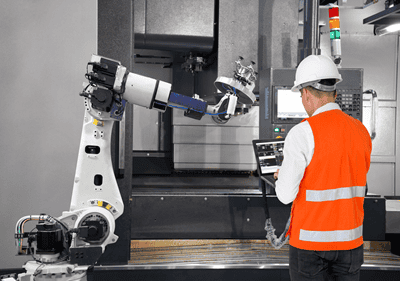
Industrial robot maintenance matters because a single robot is usually the pace-setter for an entire cell — when the arm stops, welding, palletizing, or machine tending stops with it, and everything upstream and downstream backs up behind it. A modern six-axis robot is a precision machine running millions of cycles a year under load, and its accuracy, repeatability, and uptime all degrade quietly long before a fault code appears.
The economics are unforgiving. A robot that loses positional accuracy starts producing scrap or nuisance stops that nobody traces back to worn gearing until a joint finally seizes. Replacing a servo motor or a strain-wave reducer on a planned Saturday costs a fraction of what it costs when it fails mid-shift and idles a line. Well-run robot programs treat maintenance the way they treat production — scheduled, measured, and documented — which is exactly the discipline a preventive maintenance program is built to enforce.
Robots don’t get “tired” randomly. Grease breaks down on a curve, batteries deplete on a schedule, and cables fatigue with cycle count. Almost every robot failure is predictable — which means almost every one is preventable with the right checklist run on the right cadence.
Key Robot Components and How They Fail
The components that fail on an industrial robot are predictable: joints and reducers, servo motors, cables and connectors, the controller, the end effector, sensors, and the backup batteries. Knowing each part’s dominant failure mode is what lets you inspect for the early signal instead of waiting for the fault code. The table below maps the major components to how they degrade and what to watch for.
| Component | Common Failure Mode | Early Warning Signs |
|---|---|---|
| Joints & axes (gearboxes / reducers) | Grease breakdown, gear and bearing wear, backlash, seal leaks losing lubricant. | Rising vibration or noise at a joint, loss of repeatability, visible grease weeping, higher motor current to move the axis. |
| Servo motors | Bearing wear, overheating, encoder faults, insulation breakdown. | Elevated motor temperature, overcurrent or overload alarms, erratic positioning, audible bearing noise. |
| Cables & connectors (dress pack) | Flex fatigue and abrasion at moving joints, loose or corroded connectors. | Intermittent faults, communication or encoder errors, cracked jackets, kinks or chafing at the wrist and elbow. |
| Controller | Overheating from clogged filters/fans, capacitor aging, memory or firmware faults. | Cabinet running hot, fan noise or stoppage, dust-clogged filters, unexpected reboots or E-stops. |
| End effector / gripper | Wear on jaws, tips, or suction cups; pneumatic or vacuum leaks; misalignment. | Dropped or mispicked parts, weak grip, hissing air leaks, slow actuation, worn or cracked tooling. |
| Sensors (encoders, vision, safety) | Drift, contamination, misalignment, damaged wiring. | Position errors, failed vision picks, safety faults, dirty lenses or proximity faces. |
| Backup batteries (encoder / memory) | Depletion over time (typically a multi-year life), causing loss of mastering or program data. | Low-battery alarms on the teach pendant; risk of lost zero position if ignored. |
Note the battery row especially: letting encoder backup batteries die can wipe a robot’s mastering (its zero-position calibration), turning a two-dollar part into hours of re-mastering and requalification. It’s the clearest example of why a scheduled checklist beats run-to-failure on a robot.
The Robot Maintenance Checklist: Daily to Annual
Organize robot maintenance by how fast each item degrades, not by convenience — quick visual and safety checks every shift, hands-on inspection weekly and monthly, and deeper lubrication and calibration work each quarter and year. Always follow the robot manufacturer’s manual for torque values, grease types, and service intervals; the checklist below is a practical framework you can adapt into a scheduled PM plan.
| Frequency | Task | What to Check / Do |
|---|---|---|
| Daily / Shift | Visual & safety walkaround | Confirm E-stops, light curtains, and guarding function; check for leaks, loose bolts, unusual noise, and error/alarm codes on the pendant. |
| Daily / Shift | End effector & work area | Inspect gripper/tooling for wear and grip; clear debris and obstructions; verify air pressure and vacuum where used. |
| Daily / Shift | Housekeeping | Wipe down contamination (coolant, weld spatter, dust); confirm cabinet vents and cooling paths are clear. |
| Daily / Shift | Battery & test run | Check battery level and connections; run a test program and confirm no error messages or anomalies. |
| Weekly | Cable & dress-pack inspection | Check hoses and cables for abrasion, kinks, and chafing at the wrist and elbow; confirm connectors are seated and clip management is intact. |
| Weekly | Controller cooling | Inspect and clean cabinet air filters and fans; verify controller temperature is within range. |
| Weekly | Fastener & mounting check | Spot-check baseplate, tooling, and cover fasteners for looseness or movement; confirm the robot base is secure. |
| Monthly | Joint condition & vibration | Check each axis for backlash, unusual noise, or vibration; note any drift in repeatability; log motor temperatures and current trends. |
| Monthly | Drivetrain & end effectors | Inspect belts, pulleys, and chains for tension and wear; verify grippers and end effectors are aligned and calibrated. |
| Monthly | Battery status | Verify no low-battery alarms; track encoder/backup battery age against the manufacturer’s replacement interval. |
| Monthly | Program & data backup | Back up robot programs, mastering data, and controller parameters so a fault never means starting from scratch. |
| Quarterly | Lubrication | Grease or replenish reducers and bearings per the manual’s grease type and interval; inspect for seal leaks and old grease discoloration. |
| Quarterly | Electrical & connections | Inspect wiring, terminals, and ground connections for corrosion or looseness; check for signs of overheating at connectors. |
| Quarterly | Accuracy & calibration check | Verify positional accuracy and repeatability against reference points; re-master or recalibrate if drift is detected. |
| Annual | Reducer / gear oil service | Replace gear grease or oil where specified; inspect reducers for backlash and wear that signal end-of-life. |
| Annual | Battery replacement | Replace encoder/backup batteries proactively on schedule — before depletion risks loss of mastering. |
| Annual | Brake & functional test | Inspect brake operation for delay; complete a full functional test confirming the robot meets specifications. |
| Annual | Full inspection & overhaul review | Assess cable dress packs, brakes, seals, and cumulative cycle counts; plan reducer or motor rebuilds before failure. |
Tighten these intervals for robots running high duty cycles, handling abrasive or hot material, or working in dusty, wet, or high-vibration environments. A welding robot in a spatter-heavy cell and a lightly loaded pick-and-place robot should not run the same cadence — matching frequency to duty is precisely the tailoring a CMMS makes routine.
Safety and Lockout/Tagout During Robot Service
Before anyone reaches inside a robot’s work envelope for service, the robot must be brought to a zero-energy state and locked out — a robot at rest is not a robot that is safe, because it can still hold stored energy and can restart under program or remote command. Robots carry multiple energy sources: electrical drive power, pneumatic and hydraulic pressure, gravity on a loaded or vertical arm, and spring or brake tension. Each has to be controlled before service begins.
Standard lockout/tagout (LOTO) practice for robot service follows a consistent sequence:
- Notify and shut down: Tell affected operators, stop the robot through the normal controlled sequence, and place it in a safe position.
- Isolate every energy source: Disconnect and lock out electrical power at the source, and bleed off or block pneumatic and hydraulic pressure.
- Control stored and residual energy: Support or block any axis that could drop under gravity; release or restrain spring, brake, and accumulator energy.
- Lock and tag: Apply each authorized worker’s own lock and tag to the isolation points so the robot cannot be re-energized while anyone is inside the envelope.
- Verify zero energy: Attempt a controlled restart to confirm the robot is truly de-energized before any hands-on work.
Where a task genuinely requires the robot to be powered — such as re-mastering or teaching — use the manufacturer’s reduced-speed and enabling-device procedures with trained personnel only, never a bypassed guard. Logging LOTO steps and safety verifications inside your maintenance records also builds the documented, defensible trail that OSHA’s lockout/tagout standard and safety audits expect to see.
Robot Cell Safety Best Practices
LOTO covers the moment of service; the work cell itself needs its own layer of protection around every shift, not just during maintenance. A few practices cover most of the risk:
- Install boundary warning devices, barriers, and interlocks around every robot system, using safety curtains, fences, or work-cell equipment to protect employees.
- Mark the robot’s maximum reach on the floor with safety tape or paint, and keep a flashing warning device visible from any point around the cell.
- Place emergency stop buttons where they’re reachable from anywhere in the cell.
- Provide annual robot safety training for anyone who works with robots, plus specialized training for operators tailored to their specific machine.
- Require that operators read and understand the robot system documentation — especially the safety sections — before working near it, and limit operation to qualified employees only.
- Keep the preventive maintenance program itself part of the safety plan — a robot drifting out of calibration or running worn components is a safety risk, not just a production one.
For the full regulatory picture, OSHA’s robotics safety and health page covers the hazards specific to human-robot interaction in more depth than any single checklist can.
Predictive Signals: Vibration, Temperature, and Cycle Counts
The three signals that predict robot failure earliest are vibration, temperature, and cycle count — and all three can be trended rather than guessed at. Predictive maintenance on a robot means watching these values move away from their baselines and acting on the trend, so a worn reducer becomes a scheduled repair instead of a mid-shift breakdown.
| Signal | What It Reveals | How to Use It |
|---|---|---|
| Vibration | Bearing wear, gear damage, and reducer backlash in joints. | Trend vibration at each axis; a rising signature flags a joint for inspection before it seizes. |
| Temperature | Overheating servos, failing bearings, degraded grease, or controller cooling problems. | Monitor motor and controller temperatures against baseline; a steady climb signals friction or cooling loss. |
| Motor current / torque | Increased friction from worn gearing or lubrication loss. | Compare current draw to move each axis against its baseline; higher current for the same move means growing drag. |
| Cycle count / runtime | Cumulative wear on cables, reducers, and moving parts. | Drive PM intervals off actual cycles and hours, not just the calendar, so high-duty robots get serviced sooner. |
This is where condition monitoring pays off. eWorkOrders integrates with predictive-maintenance vendors like AssetWatch, so vibration and temperature sensors on a robot can automatically generate a work order the moment a reading crosses threshold — closing the gap between a sensor seeing the problem and a technician being dispatched to fix it. The same trending discipline underpins related automation assets; if your cell is PLC-driven, pair this with a PLC maintenance routine so the controller and the robot are both on plan.
Tips for Developing an Effective Robot Preventive Maintenance Program
Knowing the checklist is one thing — running it consistently is another. These five steps turn the checklist above into an actual program:
1. Establish a Maintenance Schedule
Start from the manufacturer’s specifications for your equipment, use their recommended timeline as the baseline, and adjust to fit your operation. Include daily, monthly, quarterly, and annual items, and increase frequency where your industry or application calls for it.
2. Implement the Schedule
Communicate the schedule to every stakeholder and post it somewhere visible — a bulletin board or shared calendar. Train employees on its importance during annual training, and review the schedule regularly so it doesn’t collide with production flow, customer orders, or other commitments.
3. Regularly Reassess the Plan
Revisit the plan whenever something changes — new equipment, expanded automation, staffing or floor changes, or shifts in energy consumption. Review it with decision-makers and key staff and update the schedule when it no longer fits.
4. Find Experts to Make Repairs
Consider partnering with robot-maintenance specialists to help build a tailored plan and handle the technical work. Keeping repair staff fully in-house is expensive, especially for smaller operations — experienced outside partners who know your equipment can be the more affordable path to doing it right.
5. Use Data Analytics
Layer data analytics and predictive maintenance technology on top of the schedule. Collecting and analyzing equipment data reveals failure patterns and lets you schedule service before a failure happens, rather than reacting after it does.
Benefits of Regular Robot Maintenance
- Improved production efficiency: Regular maintenance surfaces bottlenecks, inefficient processes, and unnecessary downtime, leading to shorter lead times and higher output.
- Faster cycle times: Skipped maintenance lets robots slow down gradually from poor lubrication or worn parts — a change nobody notices day to day that adds up to real lost time.
- Optimal performance: A well-maintained robot runs at its full designed capacity and efficiency.
- Enhanced safety: Reliable, properly maintained robots lower the risk of accidents or injuries to the people working around them.
- Minimized downtime: Catching wear early prevents the unexpected breakdowns that cost the most in lost production.
- Lower repair costs: Fixing small problems early through routine maintenance keeps them from becoming the expensive kind.
- Better product consistency: A robot running to spec produces to spec — reducing defects and the complaints that follow them.
- Lower energy consumption: Worn parts and poor lubrication make a robot draw more power than it should; across a fleet, even small inefficiencies add up to real energy cost.
- Longer equipment lifespan: Industrial robots are a major capital investment, and proper preventive maintenance is what extends the useful life of that investment.
- Lower total cost of ownership: Extending equipment life, cutting energy use, and avoiding major repairs all roll up into lower overall cost of running the fleet.
Robot Decommissioning
Deciding when to decommission an industrial robot gets harder as maintenance costs climb — its usable life varies widely depending on function and how well it’s been maintained. Decommissioning also matters for the business beyond the single asset: it frees up plant floor space, and a robotic cell can often be disassembled quickly while preserving real resale value if it’s done right. A few factors are worth weighing before making the call:
- Age alone is rarely a good enough reason to retire a robot. Look instead at what you’re spending on replacement parts, and whether those parts are getting harder to find — if you’re paying more or waiting longer for components, that’s the real signal.
- Watch the interval between repairs. Breakdowns coming more often, or getting more expensive, can mean the robot is no longer economically worth keeping running.
- If performance has dropped even with proper maintenance being done, quality may no longer be achievable on that unit — replacing it, even with a transition period, may be the more productive path.
- Factor in timing. Decommissioning during a plant shutdown is far less disruptive than doing it mid-production, where delays get costly fast.
- Don’t disconnect robot cables casually unless the unit has no remaining resale value — cables are often model-specific and expensive to replace, and handling them correctly protects the resale value of the rest of the unit.
- Scope the physical teardown honestly. A simple takedown is very different from removing structures like mezzanines, and that removal cost can be significant.
- Consider your plant’s location. Facilities far from major industrial areas may struggle to find local contractors with the specific expertise needed to dismantle robotic lines properly.
How a CMMS Schedules Robot PMs and Logs History
A CMMS turns a robot maintenance checklist from a document that gets skipped into scheduled work orders that get done, logged, and trended. Instead of relying on someone to remember the quarterly lubrication or the annual battery swap, the system generates each task automatically, assigns it, and keeps a permanent record of who did it and what they found.
Inside eWorkOrders, that looks like:
- Frequency-based and meter-based PMs: Every row of the checklist becomes a recurring task — daily, weekly, monthly, quarterly, annual — and cycle- or runtime-based PMs can trigger off usage so high-duty robots get serviced on time.
- Digital inspection steps: Technicians work a step-by-step checklist on a mobile device, log readings (joint temperature, vibration, motor current, battery status), and attach photos of a chafed dress pack or weeping seal.
- Complete asset history: Every task ties to that specific robot in asset management (verify URL), building the record that shows when a reducer was last greased and how a joint’s vibration has trended.
- Auto-generated corrective work: A failed check spins off a repair work order (verify URL) immediately, so the backlash flagged on Monday doesn’t get lost before it becomes a seizure.
- Condition-monitoring integration: Sensor alerts from partners like AssetWatch auto-create work orders, connecting predictive signals directly to scheduled action.
The payoff is a documented maintenance trail — the history that supports warranty claims, safety audits, spare-parts planning, and the simple question of whether the routine is actually being run. That record is also what makes robot uptime a number you can manage instead of a surprise you absorb.
Put Your Robot PMs on Autopilot
eWorkOrders has scheduled and documented preventive maintenance for maintenance teams for 31 years, with customers including McDonald’s, Burger King, and ASSA ABLOY, a 4.9 rating on Capterra, and 99.99% uptime. Setup is a single configured-to-fit session, pricing is unlimited-user, and you can start with just the PM engine and grow into the full CMMS.
Frequently Asked Questions
How often should an industrial robot be serviced?
Service by task frequency: visual and safety checks plus housekeeping every shift; cable, cooling, and fastener inspection weekly; joint condition, battery status, and program backup monthly; lubrication, electrical, and calibration checks quarterly; reducer service and battery replacement annually. Tighten intervals for high-duty, hot, dusty, or high-vibration applications, and always follow the manufacturer’s manual.
What are the most common causes of robot failure?
The most common causes are worn or under-lubricated joint reducers, overheating or bearing-worn servo motors, cable and dress-pack fatigue at the wrist and elbow, controller overheating from clogged filters, and depleted encoder backup batteries that wipe the robot’s mastering. Most show early signals — vibration, heat, rising motor current, or a battery alarm — that a routine checklist catches before failure.
Why is lockout/tagout critical before robot maintenance?
Because a robot at rest still holds stored energy and can restart under program or remote command. LOTO isolates and locks every energy source — electrical, pneumatic, hydraulic, gravity, and spring/brake tension — and requires verifying a zero-energy state before anyone enters the work envelope. Tasks that need the robot powered, like re-mastering, use the manufacturer’s reduced-speed and enabling-device procedures with trained personnel only.
How does a CMMS help with robot maintenance?
A CMMS auto-generates each checklist item as a recurring or usage-based work order, gives technicians digital inspection steps to log readings and photos, ties every task to that specific robot’s asset history, and spins failed checks into corrective work orders. Integrated condition-monitoring sensors can even auto-create a work order when vibration or temperature crosses threshold — so the routine actually gets run and documented.
About the author: [EDIT — 1-2 sentence bio, or delete this paragraph if your theme already shows a bio automatically.]


