In facility management, the reliable operation of building systems is essential for occupant comfort, productivity, and safety. A malfunctioning commercial chiller, an elevator out of service, or compromised plumbing networks disrupt daily operations and can lead to significant financial losses.
Managing commercial real estate, corporate headquarters, and diverse building portfolios requires specific maintenance protocols. Facility teams face continuous operational hours, rigorous life-safety compliance checks, and the need to coordinate seamlessly with occupants and external contractors.
A standard ticketing system cannot handle the complexity of complex HVAC grids, predictive asset lifecycles, and managing hundreds of tenant requests across multiple properties. This guide details the essential criteria for selecting maintenance management platforms built to handle the intense demands of the facilities management sector.
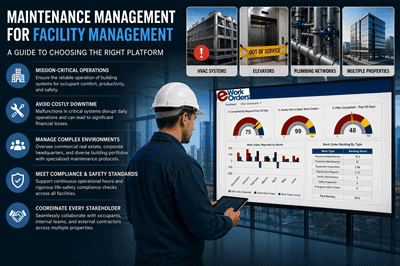
- ✓Effective facility maintenance requires moving beyond reactive repairs to implement strict, manufacturer-guided preventive maintenance schedules for high-value infrastructure like HVAC, life-safety systems, and elevators.
- ✓Platforms like eWorkOrders, MaintainX, and UpKeep provide the tracking and scheduling necessary for engineering teams to manage external vendor compliance and complex asset hierarchies.
- ✓Successful software adoption relies heavily on a user-friendly request portal, ensuring tenants, administration, and maintenance teams share a single source of truth for all facility issues.
All platform information in this guide is drawn from publicly available vendor documentation and verified user reviews published on Capterra and G2. As the publisher of this guide, eWorkOrders has an inherent interest in this market, and readers should weigh that accordingly. Janet Jaquis has covered facilities and maintenance technology for over a decade.
Why Facilities Need Specialized Software
Managing commercial real estate and corporate properties presents distinct challenges that generic work order tools simply cannot address. Facility management must account for four specific operational realities:
Tenant Request Routing
Occupants require an immediate, seamless way to report issues like climate control problems or plumbing leaks, demanding quick routing to the correct building engineer.
Vendor Contract Management
Facilities rely heavily on specialized external contractors for elevators and fire systems. Tracking Certificates of Insurance (COIs) and managing vendor dispatch is critical.
Life-Safety Compliance
Building codes require rigid, auditable digital logs for emergency lighting, fire extinguisher checks, and elevator inspections to satisfy municipal safety audits.
Multi-Site Portfolio Tracking
Directors managing multiple properties need centralized dashboards to compare maintenance expenditures, utility costs, and team performance across different locations.
Core Features to Look For
When evaluating CMMS software for facilities management, prioritize these specific capabilities. Missing even one can create operational gaps that cost time, money, and tenant satisfaction:
Facilities Management Software Comparison 2026
The table below evaluates each platform on where it genuinely excels and which operational profile it best serves. User feedback is drawn from verified reviews on Capterra and G2.
| Platform | Best For | What Users Say |
|---|---|---|
| eWorkOrders ★ | Mid-size to enterprise facility management | Users consistently praise its highly customizable workflows, robust multi-site reporting, and responsive support team — calling it a reliable long-term platform for complex property portfolios. |
| FMX | Facilities with heavy event scheduling | Reviewers highlight its strong calendar-based scheduling view, making it easy to coordinate maintenance around booked events and space reservations. |
| UpKeep | Mobile-first building engineering crews | Technicians and managers alike rate its mobile app as exceptionally intuitive, with reviewers noting high field adoption rates and easy onboarding for non-technical staff. |
| Limble CMMS | Commercial property management | Users appreciate its clean, modern interface and simple tenant-facing portal that makes submitting service requests straightforward for non-technical occupants. |
| MaintainX | Facilities requiring strict inspections | Teams focused on compliance highlight its digital SOP checklist enforcement and built-in real-time communication as standout features for regulated facilities. |
| Fiix | Large enterprise campuses | Enterprise users cite its AI-driven analytics and ability to manage complex, multi-level equipment hierarchies across large campuses as key differentiators. |
Which Platform Fits Your Situation?
Selecting software is rarely about finding a universal tool — it is about finding the right functionality for your specific operational challenges. Here is what to look for based on real-world facilities management scenarios.
Scenario 1: Managing a Multi-Property Commercial Portfolio
Facility directors overseeing multiple locations need centralized reporting to compare maintenance costs across properties, while local teams need property-specific views to execute daily tasks without data clutter.
| Required Functionality | Why It Matters |
|---|---|
| Centralized Multi-Site Reporting | Allows leadership to view aggregate data or drill down into specific property metrics to allocate budgets accurately and spot underperforming assets. |
| Location Toggling Workspaces | Makes it seamless for regional managers to switch between different building dashboards without data clutter or multiple logins. |
Scenario 2: Heavy Reliance on External Contractors
Facilities frequently outsource specialized repairs like elevator maintenance, deep commercial cleaning, and complex refrigeration service, requiring strict vendor oversight baked into the platform.
| Required Functionality | Why It Matters |
|---|---|
| Automated COI Tracking | Ensures external workers are compliant by verifying Certificates of Insurance before they access the property — automatically blocking dispatch when coverage lapses. |
| External Vendor Portals | Allows contractors to update task progress via secure links without requiring a full paid software license. |
Scenario 3: Simplifying Tenant Work Requests
To reduce phone calls and emails, building occupants need a straightforward way to submit service tickets, attach photos, and track the status of their requests without calling the management office.
| Required Functionality | Why It Matters |
|---|---|
| Configurable Tenant Portals | Supports service portals tailored for fast entry with minimal required fields, driving adoption even among non-technical occupants. |
| Real-Time Status Tracking | Automated status updates eliminate follow-up calls and emails, improving perceived responsiveness before the repair is even complete. |
Scenario 4: Tech-Averse Engineering Crews
Implementing software fails if engineering staff refuse to use it. Platforms must serve workers who are skilled tradespeople first — not power users navigating complex software menus on a phone.
| Required Functionality | Why It Matters |
|---|---|
| Consumer-Grade Mobile Interfaces | Intuitive, app-store-quality design requires minimal training and drives high adoption rates even among crews with limited technology experience. |
| Configurable Simplified Forms | Allows admins to strip down mobile layouts so technicians see only the exact fields they need for their specific job — nothing more. |
Scenario 5: Rigorous Life-Safety and Compliance Audits
Fire safety systems, emergency lighting, and elevators face strict regulatory oversight. A single missed log entry can trigger municipal fines, failed inspections, or serious liability exposure.
| Required Functionality | Why It Matters |
|---|---|
| Digital SOP Enforcement | Technicians physically cannot close a work order without completing mandatory safety and compliance checkboxes — eliminating the risk of skipped steps. |
| Deep Historical Audit Trails | Compliance-ready reports are available instantly when a municipal inspector arrives — no scrambling through paper binders or archived emails. |
Implementation Best Practices for Facilities Teams
Even the best CMMS platform fails without a structured rollout. Follow this proven six-step approach to drive adoption across maintenance, administration, and tenant-facing teams:
Map the Asset Hierarchy
Structure your database logically: Property → Floor → Suite/Zone → Specific Asset. This lets technicians pinpoint the exact location of a failing AC unit or leaking pipe in seconds, not minutes.
Establish Tenant-Impacting SLA Priorities
Define strict Service Level Agreement response windows. Issues affecting a major tenant’s core operations must trigger higher-priority alerts than back-of-house aesthetic repairs.
Digitize Your Preventive Maintenance Program
Convert your routine PM checklists — HVAC filter changes, roof inspections, boiler descaling — into automated digital work orders that generate and assign themselves on the correct cycle.
Train Administrative and Tenant Staff
Software adoption fails if tickets still arrive by phone or email. Mandate all non-emergency requests go through the portal, and run brief training sessions for interdepartmental and tenant contacts.
Centralize All Vendor Data
Input every external service contract, warranty document, and insurance certificate — for elevator contractors, landscapers, and HVAC specialists — directly into the system before go-live.
Review Resolution KPIs Weekly
Track Mean Time to Repair (MTTR) for tenant-submitted tickets and PM compliance rates using dashboard reports. Use the data to adjust staffing or contractor allocations before small problems compound.
Future Trends in Facilities Maintenance Technology
The facilities sector is moving rapidly toward automation, sensor-driven intelligence, and integrated building ecosystems. Here is what forward-looking teams are investing in now:
Tenant App Integrations
CMMS platforms connecting directly to building occupant apps — allowing tenants to report an issue straight from their phone into the engineering queue.
IoT Building Sensors
Smart thermostats and moisture sensors that detect a failing AC unit or plumbing leak and auto-generate a work order before the tenant notices a problem.
Predictive Energy Management
Linking maintenance schedules directly to building energy consumption data to optimize performance, cut utility bills, and satisfy sustainability reporting requirements.
Capital Planning Analytics
Software using historical repair cost data to identify exactly when replacing a commercial boiler or chiller becomes more cost-effective than continuing reactive repairs.
Frequently Asked Questions
In facility management, maintenance is not a back-of-house function — it is a frontline driver of tenant satisfaction, regulatory standing, and long-term asset value. Equipping your engineering team with purpose-built software ensures that high-value systems are protected, tenant requests are resolved rapidly, and safety compliance is never left to chance.
By moving from reactive firefighting to structured, data-driven preventive maintenance, properties can protect their reputation and significantly reduce long-term capital replacement costs. The right CMMS platform makes that shift possible — and measurable.


