What Is a Standard Operating Procedure (SOP)?
A plain-English guide to what an SOP is, why it matters, a reusable template you can copy, how to write one, and how maintenance teams keep procedures attached to the assets and work orders where they’re used.
SOP Meaning and Definition
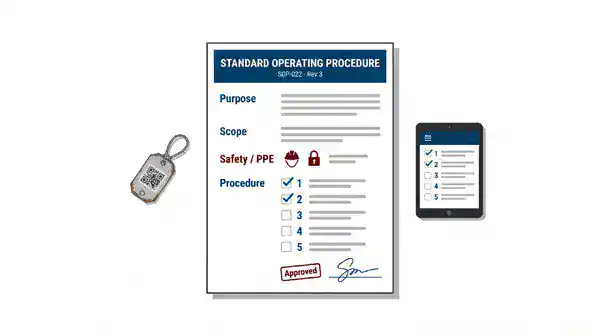
A standard operating procedure (SOP) is a documented, step-by-step set of instructions for carrying out a routine task the same way every time, regardless of who performs it. The term literally means the standard (agreed-upon, approved) operating (how work is done) procedure (the ordered steps) — a single source of truth that turns “the way Mike does it” into “the way the organization does it.”
An SOP is more than a checklist. A good one states the task’s purpose and scope, who is responsible, the tools and materials required, the safety precautions, the numbered steps in sequence, the expected result, and a revision history so everyone knows they’re following the current version. SOPs are used across manufacturing, healthcare, food service, logistics, government, and — the focus of this guide — maintenance and facilities operations, where the cost of inconsistency shows up as rework, downtime, failed inspections, and injuries.
In one sentence: an SOP captures the correct, approved way to perform a repeatable task so results are consistent, safe, and auditable no matter who’s on shift.
Why SOPs Matter
SOPs matter because they convert individual knowledge into organizational capability — protecting output quality, safety, compliance, and training when people change, scale, or simply have a bad day. In a maintenance operation specifically, four payoffs stand out.
- Consistency and quality. When every technician performs a pump rebuild or a filter change the same documented way, you remove the variability that causes premature failures, callbacks, and inconsistent asset life. Standardized work is the foundation of repeatable quality — see our overview of maintenance quality management for how SOPs feed a quality system.
- Safety. SOPs are where hazard controls live. Lockout/tagout, confined-space entry, hot-work, and electrical procedures exist precisely because “remembering” the safe sequence isn’t good enough when the cost of a mistake is an amputation or an arc flash.
- Compliance and audit readiness. OSHA, the FDA, ISO, and most regulatory frameworks expect documented procedures and evidence they were followed. A current SOP plus a completion record is the proof an auditor asks for. (Requirements vary by industry and jurisdiction — confirm what applies to you.)
- Training and onboarding. SOPs cut the time to get a new hire productive and reduce reliance on tribal knowledge that walks out the door at retirement. They turn “shadow someone for three months” into “follow the documented procedure, then get signed off.”
SOPs also underpin continuous improvement. You can’t improve a process you haven’t defined — standardized work is the baseline that lean maintenance builds on when it hunts for waste.
Anatomy of an SOP: The Standard Template and Format
Every effective SOP shares the same backbone — a header that identifies and controls the document, a body that explains and sequences the work, and a footer that proves currency and approval. The template below is a reusable SOP format you can copy for any maintenance task; fill the right-hand column and you have a complete, audit-ready procedure.
| SOP section | What goes here |
|---|---|
| SOP title & ID number | Clear task name and a unique identifier (e.g., MNT-SOP-014) for version control and cross-reference. |
| Purpose | One or two sentences stating what the procedure accomplishes and why it exists. |
| Scope | Where and to what the SOP applies — which assets, areas, shifts, or conditions; and what it excludes. |
| Responsibilities / roles | Who performs the task, who supervises, who approves, and any required certifications or permissions. |
| Materials, tools & PPE | Parts, consumables, special tools, and personal protective equipment needed before starting. |
| Safety warnings | Hazards, required lockout/tagout points, and precautions — placed before the steps, not buried in them. |
| Procedure (numbered steps) | The ordered actions, one instruction per step, written in plain imperative language (“Isolate the breaker,” not “The breaker should be isolated”). |
| Expected result / acceptance criteria | What “done correctly” looks like — readings, tolerances, or a pass/fail check. |
| References & related documents | Manufacturer manuals, work instructions, forms, or linked SOPs. |
| Revision history & approval | Version number, effective date, author, approver, and a log of changes so staff always follow the current version. |
A quick sample so the format is concrete: an SOP titled “MNT-SOP-022: Monthly Air Compressor Inspection,” purpose “verify safe operation and catch wear before failure,” scope “all shop-floor rotary-screw compressors,” followed by PPE, a lockout warning, ten numbered inspection steps, acceptance criteria (“discharge temperature within the manufacturer’s range; no oil carryover”), and a revision line showing v3, effective this quarter.
How to Write an SOP (Step by Step)
Writing an SOP means capturing how your best person does the task, structuring it into the format above, and validating it with the people who’ll use it. Work through these steps in order.
- 1. Pick the task and define scope. Choose a specific, repeatable task and state exactly where it applies. Narrow beats vague — “replace HVAC belt on RTU-3” is writable; “do HVAC stuff” is not.
- 2. Observe the work as it’s actually done. Watch an experienced technician perform it and note every step, decision point, and shortcut. Document reality, not an idealized version nobody follows.
- 3. Choose the right format. Simple linear tasks use a numbered list; tasks with decisions use a flowchart or if/then branches. Match the format to the task’s complexity.
- 4. Write steps in plain imperative language. One action per step, start with a verb, avoid jargon a new hire wouldn’t know, and call out safety at the point of risk as well as in the header.
- 5. Add the controls. Fill in purpose, scope, roles, tools, PPE, safety warnings, acceptance criteria, and references — the full template, not just the steps.
- 6. Validate with a real user. Have someone who didn’t write it perform the task using only the SOP. Every place they hesitate or ask a question is a gap to fix.
- 7. Approve, version, and publish. Get sign-off, assign a version number and effective date, and store it where the work happens — ideally attached to the asset and triggered on the work order (covered below).
- 8. Review on a schedule. Set a review cycle (annually, or whenever equipment, parts, or regulations change) so SOPs don’t quietly go stale.
SOP vs. Work Instruction: What’s the Difference?
An SOP describes a whole process at the task level; a work instruction zooms into a single step of that process in granular, often tool-specific detail. They’re complementary, not competing — SOPs frequently reference the work instructions that explain their trickier steps.
| Dimension | Standard operating procedure (SOP) | Work instruction |
|---|---|---|
| Scope | An entire task or process, start to finish | One specific step or operation within a task |
| Detail level | What to do and in what order | Exactly how to do a single action |
| Audience | Anyone performing the process | The person executing that precise step |
| Example | “Monthly air compressor inspection” (10 steps) | “How to set the pressure-relief valve to 125 psi” |
SOPs in Maintenance: PM Procedures, LOTO, and Equipment Labeling
In maintenance, SOPs are the written form of nearly every recurring job — and three categories carry the most weight. Getting these documented is where most maintenance teams see the fastest return.
- Preventive maintenance (PM) procedures. Every PM task — inspect, lubricate, calibrate, replace — should ride on an SOP so the job is done completely and identically each cycle. SOPs are what make a preventive maintenance program repeatable instead of dependent on who happens to pick up the task.
- Lockout/tagout (LOTO). Energy-control procedures are SOPs with life-safety stakes. A machine-specific LOTO SOP lists every energy source, the isolation points, verification steps, and restoration sequence — and it’s one of the first things a safety auditor asks to see. See what is lockout tagout for the full requirements.
- Equipment labeling and identification. Clear, standardized asset labels are the foundation every other SOP relies on — a technician can’t follow the right procedure if they can’t positively identify the asset. Our standard operating procedure for labeling equipment, written by our technical team, shows a real SOP at work: durable metal tags kept under lock by a tag custodian, the asset and its nameplate photos entered from a mobile device, a work order issued to tag the equipment, and the work order closed only once the tag is applied and the database entry is complete.
The common failure mode isn’t writing these SOPs — it’s that they end up in a binder on a shelf or a folder nobody opens at the machine. The procedure only works if it’s in the technician’s hands at the moment of the task.
How a CMMS Like eWorkOrders Stores and Attaches SOPs to Assets and Work Orders
A CMMS (computerized maintenance management system) solves the “binder on the shelf” problem by storing SOPs digitally and attaching them directly to the asset record and the work order, so the right procedure appears automatically when and where the work is scheduled. Instead of hoping a technician finds the current version, the system serves it to them.
- Attached to the asset. Each piece of equipment carries its own document library — SOPs, manuals, LOTO procedures, and labels live on the asset record, so scanning or opening the asset surfaces everything needed to work on it safely.
- Embedded in the work order. When a PM or repair work order is generated, its procedure, checklist steps, required parts, and safety notes travel with it to the technician’s device. Steps can be checked off and signed, creating a completion record for audits.
- Version-controlled. Update the SOP once and every future work order pulls the current version — no stale printouts in circulation, and a history of what changed and when.
- Searchable and reportable. SOPs are findable by asset, category, or keyword, and completion data rolls up into the reports that prove procedures were followed.
This is how eWorkOrders handles SOPs: procedures, manuals, and LOTO steps are stored on the asset record and travel with every PM and repair work order, so technicians check off each step on their device and every completion becomes an audit record.
It also closes the loop with condition monitoring: when a partner platform like AssetWatch detects an anomaly and auto-generates a work order inside eWorkOrders, the matching SOP is already attached — the technician gets the fault and the correct procedure in the same place. If you’re evaluating platforms, our best CMMS software comparison walks through what to look for.
Make Every Work Order Count
Put the right procedures in front of technicians, track completed steps, and keep maintenance work consistent across your team with eWorkOrders.
Frequently Asked Questions
What does SOP stand for?
SOP stands for standard operating procedure — a documented, step-by-step set of instructions for performing a routine task the same approved way every time, no matter who carries it out.
What’s the difference between an SOP and a work instruction?
An SOP describes an entire task or process from start to finish, while a work instruction details exactly how to perform one specific step within it. SOPs often reference the work instructions that explain their more technical steps.
What should an SOP template include?
A complete SOP template includes a title and ID, purpose, scope, responsibilities, required tools and PPE, safety warnings, numbered procedure steps, expected results or acceptance criteria, references, and a revision history with approval and effective date.
How does a CMMS help manage SOPs?
A CMMS stores SOPs digitally and attaches them to the relevant asset and work order, so the current, version-controlled procedure appears automatically when the task is scheduled. Technicians check off steps on their device, creating a completion record for audits and training.
Part of the eWorkOrders Learning Center


