Mobile Maintenance Technology Writer · Industrial Operations Research
Sources: Gartner, Verdantix, Plant Engineering, Aberdeen Group
The clipboard is officially obsolete. For decades, maintenance departments have bled money through illegible handwriting, lost physical work orders, and the massive lag time between a field repair and its entry into a desktop database. According to Plant Engineering (2025), transitioning from paper to a dedicated mobile maintenance application saves the average field technician up to 1.5 hours of administrative busywork every single day.
Today’s field service teams require instantaneous access to repair histories, digital manuals, and interactive schematics while standing directly in front of a broken machine. Whether servicing rooftop HVAC units, deep underground utilities, or expansive factory floors, technicians need technology that works exactly where they do—even when Wi-Fi and cellular signals vanish.
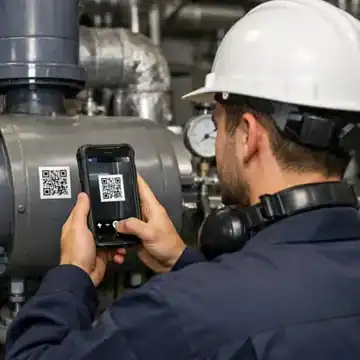
This guide explores how native mobile CMMS software empowers technicians to ditch the paperwork. By leveraging QR code scanning, photo uploads, and offline-capable work order management, organizations are drastically improving first-time fix rates and capturing perfectly accurate data at the source.
Platform information in this guide is drawn from verified user reviews published on Capterra and G2 as of April 2026. Always verify capabilities directly with vendors. Disclosure: This guide is published by eWorkOrders, which operates in this market. eWorkOrders is included in the comparison table on equal footing with all competitors and is not ranked first. Romel Sanchez has covered mobile field service software for 10+ years.
Why Generic Desktop Tools Fail Field Teams
A desktop software program that is simply “shrunk down” to fit a mobile browser is practically useless to a technician wearing heavy PPE gloves while balancing on a ladder.
Zero Offline Support
Web-only applications log users out or freeze entirely the moment a technician steps into a mechanical room, elevator shaft, or remote facility without Wi-Fi.
Clunky Interfaces
Forcing technicians to pinch and zoom on massive digital spreadsheets causes immense frustration, leading to poor user adoption and abandoned software rollouts.
Poor Hardware Linking
Legacy tools don’t leverage the native hardware of a smartphone, making it incredibly difficult to attach a quick photo, record a voice note, or scan a barcode.
Delayed Data Entry
When crews have to drive back to the shop to enter notes at a desktop computer, critical details are forgotten, leading to incomplete repair histories.
- ✗Severe safety liabilities when technicians cannot access mandatory lockout/tagout (LOTO) documents while physically standing at the machine.
- ✗Wasted windshield time driving back to the parts crib because the tech couldn’t verify spare parts inventory from the field.
- ✗Total software abandonment by frontline workers who refuse to use a frustrating, non-responsive interface.
Core Features Checklist
When evaluating mobile CMMS software, a responsive web page is not enough. You need native applications designed specifically for the rigors of field service. Ensure your chosen platform includes these essential features:
Ask the vendor to explicitly demonstrate their offline syncing logic. When a technician deep in a basement completes a checklist without a cellular signal, what happens when they reconnect? Does the system gracefully upload the data in the background, or does it force the user to manually trigger a sync that could overwrite someone else’s updates?
Mobile CMMS Software Comparison 2026
The table below evaluates each platform on its mobile capabilities and the field operations it best serves. All platforms are listed alphabetically — no platform is ranked first based on commercial interest. Platform information is drawn from verified reviews on Capterra and G2.
| Platform | Best For | Strengths |
|---|---|---|
| eWorkOrders | Enterprise teams needing rigorous offline compliance, mobile audit histories, and highly structured field data collection. | Highly adaptable mobile workflows and immutable, audit-ready compliance tracking logs right from the phone. |
| Fiix | Field technicians focused on connecting to SCADA systems and utilizing AI-driven mobile predictive insights. | Built-in integration ecosystem and machine-learning powered mobile data analysis capabilities. |
| Hippo CMMS | Lightweight facility management where users need a very simple, straightforward mobile web experience for easy fixes. | Extremely low barrier to entry for non-technical users and visually simple floor plan navigation. |
| Limble CMMS | Fast-moving teams seeking a highly responsive, modern native application designed heavily around user experience. | Intuitive native application interface and rapid deployment for core preventive field features. |
| MaintainX | Crews prioritizing real-time mobile chat communication and digitized, step-by-step standard operating procedures. | Native team chat functionality and robust, consumer-style digital standard operating procedures. |
| UpKeep | Facilities aiming to combine straightforward mobile dispatching with native IoT sensor deployments. | Native IoT sensor ecosystem integrations and accessible remote asset monitoring tools on the go. |
Understanding Mobile CMMS Total Cost of Ownership
Moving to a mobile-first environment often introduces hidden hardware costs. While the software licenses are predictable, teams must account for ruggedized tablets, upgraded data plans, and specialized onboarding. The planning ranges below are illustrative estimates based on publicly available pricing data and general industry benchmarks for a 20-user field team over 36 months. Actual costs vary significantly by vendor, scope, and configuration. Always request a formal quote before budgeting.
💚 Budget Tier
🔵 Mid-Market Tier
🏢 Enterprise Tier
All figures are illustrative planning estimates based on publicly available pricing data and general industry benchmarks. Implementation, training, hardware purchases, and integration costs vary significantly by vendor, team size, existing infrastructure, and project scope. Request formal quotes from each vendor before making any budgeting decisions.
Aberdeen Group research (2025) suggests that providing field technicians with immediate, mobile access to historical asset data reduces first-time fix failure rates by 35%. Eliminating unnecessary return trips is often where the software pays for itself entirely within the first year.
Which Platform Fits Your Field Situation?
Different maintenance teams face completely different operational hurdles once they step away from the desk. Review the scenarios below to see which system best aligns with your primary mobile challenge.
Scenario 1: Dead Zone Operations (True Offline)
Your crews routinely work in concrete basements, deep inside manufacturing plants, or in rural areas where network signals are non-existent.
| Required Functionality | Why It Matters | What to Avoid |
|---|---|---|
| Native App Architecture | Stores the database directly on the device memory, not in a cloud browser cache. | “Mobile-friendly websites” that immediately disconnect when you lose bars. |
| Background Syncing | Automatically uploads completed checklists the second the device touches Wi-Fi. | Manual sync buttons that technicians easily forget to press. |
| Conflict Resolution | Smartly merges offline edits if a dispatcher updated the ticket simultaneously. | Systems that blindly overwrite data when reconnecting. |
Best fit: Limble CMMS, UpKeep
Scenario 2: Replacing Paper Binders & SOPs
You have high turnover and need to guide new technicians through complex, multi-step repairs directly on their phones.
| Required Functionality | Why It Matters | What to Avoid |
|---|---|---|
| Interactive Form Builders | Translates physical paper checklists into digital, required fields with logic. | Just attaching a static PDF that requires pinching and zooming to read. |
| Video Capabilities | Allows the tech to watch a 30-second instructional video embedded in the task. | Text-heavy manuals that are impossible to consume quickly. |
| Pass/Fail Triggers | Automatically generates a secondary repair ticket if an inspection step fails. | Dead-end forms that require the user to manually create follow-up work. |
Best fit: MaintainX
Scenario 3: Fast Asset & Parts Identification
Your facility has hundreds of identical-looking motors and you need a foolproof way to ensure technicians work on the correct one.
| Required Functionality | Why It Matters | What to Avoid |
|---|---|---|
| Native QR Scanning | Uses the device camera to instantly pull up the exact asset history and BOM. | Requiring users to manually type long serial numbers into a search bar. |
| Mobile Inventory Lookups | Lets the tech check if a filter is in stock before walking to the storeroom. | Systems that restrict inventory visibility to desktop admin accounts only. |
| In-Field Part Requests | Allows the tech to trigger a purchase order request directly from the machine. | Calling the purchaser and hoping they remember to order it. |
Best fit: Fiix, Limble CMMS
Scenario 4: Field Audit and Safety Compliance
You are heavily regulated and need technicians to legally sign off on safety protocols (like LOTO) directly at the point of work.
| Required Functionality | Why It Matters | What to Avoid |
|---|---|---|
| Mobile E-Signatures | Captures a legally binding signature on the tablet screen confirming safety steps. | Basic checkboxes that don’t verify user identity. |
| Timestamp/Geotagging | Proves to auditors exactly where and when the inspection took place. | Editable completion dates that compromise audit integrity. |
| Forced Workflows | Prevents the work order from being completed if safety photos aren’t attached. | Systems that allow users to bypass critical safety requirements. |
Best fit: eWorkOrders
Scenario 5: Simple Mobile Facilities Upkeep
You manage schools or commercial offices and need a dead-simple way for janitors and maintenance staff to close out light repair tickets.
| Required Functionality | Why It Matters | What to Avoid |
|---|---|---|
| Minimalist Interface | Ensures high adoption rates for users who may be intimidated by complex software. | Cluttered dashboards full of metrics irrelevant to a floor worker. |
| Visual Floor Plans | Lets users tap a room on a map to see open tickets or submit new ones. | Complex nested menus to find a specific building location. |
| Guest Portal Linking | Allows teachers or tenants to scan a public QR code to report a spill without an account. | Requiring a paid user license just to report a burned-out lightbulb. |
Best fit: Hippo CMMS
Quick Decision Tool: Match Your Profile to a Platform
Find the profile that best describes your primary operational challenge.
📱 True Offline Capability
Your crews work in basements or remote areas and require native apps that function without Wi-Fi.
🗣️ Digital SOP Guidance
You are battling workforce turnover and need to build step-by-step digital procedures for new technicians.
📋 Field Safety Compliance
You face intense regulatory scrutiny and require immutable, e-signed safety and LOTO logs directly from the field.
🔍 QR Code Parts Control
You need technicians to scan a barcode, instantly identify the machine, and request a spare part on the spot.
🤖 SCADA & Predictive
You want machine sensor data to automatically dispatch a mobile work order to a technician’s phone.
🏢 Simple Facility Upkeep
You just need a dead-simple way for janitorial or light maintenance staff to tap a room and close a ticket.
Implementation Best Practices for Mobile Rollouts
Dropping a new app onto a technician’s phone without context is a recipe for disaster. Successful mobile adoption requires intentional change management. Accelerate your timeline by following this structured CMMS software deployment framework tailored for field operations.
Hardware Standardization
Decide whether you will operate under a Bring Your Own Device (BYOD) model or issue ruggedized, company-owned tablets. Ensure all devices meet the minimum OS requirements.
✓ Pro tip: Providing company devices often increases adoption by removing personal privacy concerns.
QR Code Tagging Strategy
Generate and print durable QR codes or barcodes from your asset management system. Have crews physically tag tier-1 critical equipment first.
✓ Pro tip: Use metallic or weather-resistant tags for outdoor or high-heat environments.
Form Simplification
Do not blindly copy massive desktop forms into the mobile app. Streamline work order management by reducing required text fields and substituting them with drop-downs and photo uploads.
✓ Pro tip: Keep mandatory thumb-typing to an absolute minimum to reduce field frustration.
Offline Sync Testing
Execute a series of dummy preventive maintenance checklists in known dead zones within your facility. Ensure the app stores the data and successfully pushes it to the server once connection is restored.
✓ Pro tip: Test conflict resolution by having a dispatcher edit the same dummy ticket while the tech is offline.
Champion-Led Training
Identify a highly respected, tech-savvy senior technician to champion the rollout. Have them run small, hands-on workshops using real equipment on the floor.
✓ Pro tip: Emphasize how the app protects them (e.g., proving they completed safety checks) rather than just “tracking” them.
Phased Go-Live
Turn off the paper process entirely for a specific department or facility first. Do not allow a hybrid paper/digital phase, as users will inevitably revert to old habits.
✓ Pro tip: Gather formal feedback at day 30 to tweak the UI or add missing drop-down options.
Future Trends in Mobile Field Technology
Mobile capabilities are expanding beyond the smartphone. Driven by AI and advanced hardware, these four trends are projected to reshape field operations over the next 24 months.
Adoption: 2026-2028
Augmented Reality Overlays
Technicians will hold their phone camera up to a panel and see your CMMS software project floating digital repair arrows directly onto the physical parts.
Adoption: 2026-2027
Wearables Integration
Smartwatches will deliver haptic alerts for critical safety alarms and allow technicians to voice-dictate quick meter readings hands-free.
Adoption: 2026-2027
Voice-Activated AI
Field workers will ask their mobile app complex queries like, “What was the torque spec used on this pump last year?” and receive instant audio replies.
Adoption: 2027-2029
Geofenced Auto-Dispatch
Systems will automatically assign emergency tickets to the technician whose GPS phone signal is physically closest to the failing asset.
Frequently Asked Questions
Arming your frontline workers with modern mobile tools is the fastest way to drive immediate ROI in any maintenance operation. Transitioning away from fragmented paper systems to a unified CMMS software app eliminates costly redundant data entry, improves safety compliance, and empowers your team to work faster and smarter.
For enterprise operations that require deep audit histories, robust LOTO compliance tracking, and highly adaptable field forms, eWorkOrders provides the ideal centralized framework. By unifying your workforce and automating work order management directly to their pockets, you can capture perfectly accurate data at the source.
No commitment required · Average demo: 30 minutes · We’ll show you the features that matter for your specific operation


