Asset Hierarchy: How to Structure Your Equipment for Maintenance
An asset hierarchy is the map that tells your CMMS — and your technicians — how every piece of equipment relates to everything around it. Get the structure right once, and PM schedules, work orders, and failure history all roll up correctly for as long as you use the system.
What is an asset hierarchy?
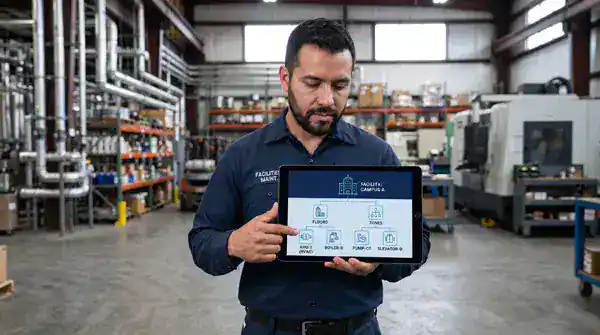
An asset hierarchy is a parent-child structure that organizes every piece of equipment you maintain, from an entire site down to a single replaceable part. Instead of a flat list of assets, a hierarchy shows how equipment nests inside other equipment — a motor belongs to a conveyor, the conveyor belongs to a production line, the line belongs to a building, and the building belongs to a site.
That structure matters because almost nothing in maintenance happens at just one level. A work order gets logged against a specific pump, but the downtime it causes affects the whole line. A preventive maintenance schedule applies to one asset class, but the parts it consumes get tracked at the site level for budgeting. A hierarchy is what lets a CMMS roll failure history, cost, and downtime up and down that chain accurately — instead of technicians hunting for the right asset record or reports mixing up equipment that happens to share a name.
Why a well-built hierarchy matters
Most maintenance teams build an asset list before they build a hierarchy — assets get added as equipment shows up, with no consistent structure underneath. That works fine at first. It breaks down once the asset count grows past a few hundred, or once more than one person is entering data.
A real hierarchy pays off in a few concrete ways:
- Faster technician lookup. A tech standing in front of a machine can drill down from building to system to asset instead of scrolling a flat list of hundreds of similarly-named items.
- Accurate failure and cost history. When a component fails repeatedly, the hierarchy shows whether it’s a one-off part problem or a pattern tied to the parent asset — the difference between replacing a bearing and re-evaluating the whole pump.
- PM schedules that attach to the right level. Some preventive tasks belong on the asset (lubricate the gearbox); others belong on the system (inspect the whole compressed-air line). A flat asset list makes this distinction hard to see; a hierarchy makes it explicit.
- Reporting that actually rolls up. Downtime, labor cost, and parts spend can be summed from component to asset to system to site — so a plant manager can see which line costs the most to maintain without someone manually combining spreadsheets.
The 5 practical levels of an asset hierarchy
Most maintenance teams don’t need the full complexity of a process-industry standard to get real value from a hierarchy. A practical, five-level structure covers the vast majority of facilities and manufacturing operations:
| Level | What it represents | Example |
|---|---|---|
| 1. Site | A physical location or facility | Plant 2 – Dayton, OH |
| 2. Area / Building | A building, floor, or zone within the site | Building B, Production Floor |
| 3. System | A functional group of equipment working together | Compressed Air System |
| 4. Asset / Equipment | A discrete, maintainable piece of equipment | Air Compressor Unit 3 |
| 5. Component | A part or subassembly tracked for failure history | Intake Valve, Drive Motor |
Each asset in the hierarchy has exactly one parent above it and can have any number of children below it. A work order, PM schedule, or spare part can attach at whichever level actually makes sense — most day-to-day work orders sit at the Asset level, while root-cause tracking often needs the Component level underneath it.
For process industries — oil & gas, petrochemical, and similar — ISO 14224 defines a more detailed nine-level equipment taxonomy (industry, business category, installation category, installation, plant/unit, section/system, equipment class, equipment subdivision, and maintainable item) built specifically for exchanging reliability and failure data across organizations. Most facilities and manufacturing teams don’t need all nine levels, but ISO 14224 is the reference standard worth knowing if your hierarchy needs to align with industry-wide reliability reporting.
How to build an asset hierarchy
Building a hierarchy is mostly a planning exercise before it’s a data-entry exercise. Get these decisions made first, and the entry work goes much faster.
- Decide your levels before you start entering assets. Pick a consistent set of levels (Site → Area → System → Asset → Component, or your own variant) and apply it the same way everywhere. Mixing structures between buildings or departments is the single most common reason hierarchies become unusable later.
- Use consistent naming and numbering conventions. Every asset needs an ID that’s unique, short enough to fit on a physical tag, and readable by both a person and a scanner. See asset tagging and QR codes for naming-convention patterns that carry through to the physical tag on the equipment.
- Start with your critical assets, not a complete inventory. A hierarchy that covers your highest-impact equipment accurately is more useful on day one than a flat, shallow record of everything. Build depth where failures actually matter and expand from there.
- Assign one owner for the hierarchy. Structure drifts when multiple people add assets under their own informal conventions. One person (usually a maintenance supervisor or reliability lead) should own the structure and approve new branches.
- Build it in your CMMS, not a spreadsheet. A spreadsheet hierarchy has no enforced parent-child relationships, so nothing stops duplicate or orphaned entries. A CMMS enforces the structure, so a technician can’t accidentally create an asset that doesn’t belong anywhere.
Common mistakes worth avoiding
- Going too deep too fast. Tracking every bolt and fastener as its own component creates more maintenance overhead than it saves. Go deep only where failure history at that level actually changes a maintenance decision.
- Structuring around your org chart instead of your equipment. A hierarchy organized by department (“Maintenance Team A’s assets”) instead of by physical/functional relationship breaks down the moment responsibilities shift.
- No plan for new equipment. Without a documented convention, new assets get added wherever’s convenient, and the structure degrades within a year.
Asset hierarchy in eWorkOrders
In eWorkOrders, every asset record has a parent field, so the hierarchy is enforced by the system rather than left to convention. A technician can drill down from site to building to system to asset to component — or search flat and still see exactly where that asset sits in the structure.
- Work orders and PM schedules attach at the right level. A PM task can live on the compressor unit itself, while a component failure gets logged against the specific valve underneath it — both roll up to the same asset history.
- Costs and downtime roll up automatically. Because every asset knows its parent, a plant manager can pull total maintenance cost or downtime for an entire system or site without manually combining records.
- Moves and reorganizations don’t break history. If a piece of equipment moves to a different line or building, reassigning its parent in the hierarchy keeps its full maintenance history intact.
See asset management with a CMMS for how hierarchy fits into the full asset record, and asset lifecycle management for how the same structure carries through acquisition, operation, and disposal.
Build your hierarchy once, use it for years
A well-structured asset hierarchy is one of the few maintenance investments that keeps paying off without ongoing effort — once it’s built correctly, every work order, PM schedule, and report benefits automatically. eWorkOrders has supported maintenance operations for over 30 years, serving teams at Honda and King River Packaging, and rated 4.9 on both Capterra and G2.
Frequently Asked Questions
What is an asset hierarchy?
An asset hierarchy is a parent-child structure that organizes maintained equipment from the broadest level (a site or facility) down to the narrowest (an individual component or part). It shows how equipment nests inside other equipment, which lets a CMMS roll up failure history, cost, and downtime accurately across the whole structure.
How many levels should an asset hierarchy have?
Most facilities and manufacturing operations do well with five practical levels: Site, Area/Building, System, Asset/Equipment, and Component. Process industries that need to exchange reliability data across organizations often follow ISO 14224’s more detailed nine-level taxonomy instead.
What is ISO 14224 and do I need to follow it?
ISO 14224 is an international standard that defines a nine-level equipment taxonomy for collecting and exchanging reliability and maintenance data, originally built for the petroleum, petrochemical, and natural gas industries. Most facilities and manufacturing teams don’t need to follow it exactly, but it’s a useful reference if your hierarchy needs to align with industry-wide reliability reporting.
Should I build my asset hierarchy in a spreadsheet or a CMMS?
A CMMS is the better choice for anything beyond a small pilot. A spreadsheet has no enforced parent-child relationships, so nothing prevents duplicate or orphaned entries as the list grows. A CMMS enforces the structure directly on the asset record.
What’s the most common mistake teams make building an asset hierarchy?
Inconsistent structure between buildings, lines, or departments — usually because more than one person added assets without a shared naming and leveling convention. Assigning one owner to approve the structure, and deciding on levels before entering assets, avoids most of this.
- ISO 14224:2016, “Petroleum, petrochemical and natural gas industries — Collection and exchange of reliability and maintenance data for equipment,” International Organization for Standardization
About the author: Janet Jaquis is Marketing Director at eWorkOrders, where she writes about maintenance strategy, asset reliability, and CMMS software for maintenance and facility teams.
Disclaimer: This article is for general informational and educational purposes only and does not constitute engineering, reliability, or professional consulting advice. Every facility’s equipment, risk profile, and operating conditions are different — consult a qualified reliability engineer or maintenance professional before making structural decisions about your own asset hierarchy.


