Best CMMS Software (2026): Ranking the Top 10 Vendors

Founder & CEO, eWorkOrders
Choosing the right CMMS affects how your team manages work orders, preventive maintenance, assets, inventory, and maintenance history every day. We compared 10 CMMS platforms using Capterra reviews, feature depth, ease of use, and support to help maintenance teams narrow their options.

Key Takeaways
- This guide compares 10 leading CMMS platforms using real, independently-published reviews from Capterra for every vendor — including eWorkOrders.
- eWorkOrders ranks as the top overall CMMS software, with a 4.9 rating on both Capterra and G2 and 30+ years supporting maintenance teams across manufacturing, healthcare, government, and education.
- The best way to evaluate a CMMS is to involve the people who’ll actually use it day to day, confirm it covers your must-have workflows, and test it directly before you commit.
Who Needs This CMMS Guide
This guide is for the people who keep maintenance running — maintenance managers, facilities directors, plant managers, and operations leads — whether you’re running one site or several, in manufacturing, healthcare, government, education, hospitality, or property management.
It’s built for two situations: your current CMMS has hit its limits and you’re ready for something better, or you’re moving off spreadsheets and paper work orders for the first time. If you’re replacing spreadsheets or an older system, compare how each work order management software handles assignment, scheduling, status updates, technician notes, and work history. Either way, the comparisons below are here to help you find real options that fit your team.
How We Ranked These CMMS Platforms
Where each vendor landed in this ranking reflects all five factors below together — not just its star rating. We used the same criteria for every vendor.
- What real users say. We pulled reviews straight from Capterra for every vendor here, including eWorkOrders — same platform, same review format, sorted by Most Helpful. No marketing copy standing in for actual user feedback.
- How deep the features actually go. Work order management, preventive maintenance scheduling, asset tracking, inventory/parts, reporting, mobile access, compliance/audit support, and integrations.
- How hard it is to learn and get running. Whether reviewers mention a steep learning curve, how much they lean on consultants or dedicated admins, and how new users describe getting started.
- What support is actually like. Response times, how much help you get during setup, and what happens when something breaks later — the praise and the complaints both.
- What people complain about. Every vendor here, eWorkOrders included, has real criticism in its reviews. We included recurring criticisms as well as positive feedback.
We did not include pricing comparisons on this page. Public pricing pages change frequently and rarely reflect what a specific company actually pays once implementation, add-on modules, and user counts are factored in — we’d rather point you to each vendor directly for a current quote than publish numbers that go stale.
The Full CMMS Comparison: Vendor Rankings and Category Breakdowns
This CMMS software comparison looks at 10 platforms across work order management, preventive maintenance, asset management, inventory, reporting, mobile access, integrations, and support. Below is the full lineup, in order, with the strengths and complaints reflected in Capterra reviews for each vendor. The goal is to show both what users like and where they see limitations, rather than present a marketing-only summary.
eWorkOrders
Why eWorkOrders Ranked #1
eWorkOrders has supported maintenance operations for over 30 years, serving teams at organizations including Honda, McDonald’s franchise locations, Bristol Myers Squibb, Celgene, the US Senate Sergeant at Arms, the Detroit Zoo, and Columbia Metropolitan Airport, and is rated 4.9 on both Capterra and G2. Across hundreds of real reviews, the single most consistent theme is customer support — reviewers across manufacturing, healthcare, government, education, and hospitality repeatedly single out specific support staff by name for fast, knowledgeable help during setup and day-to-day use.
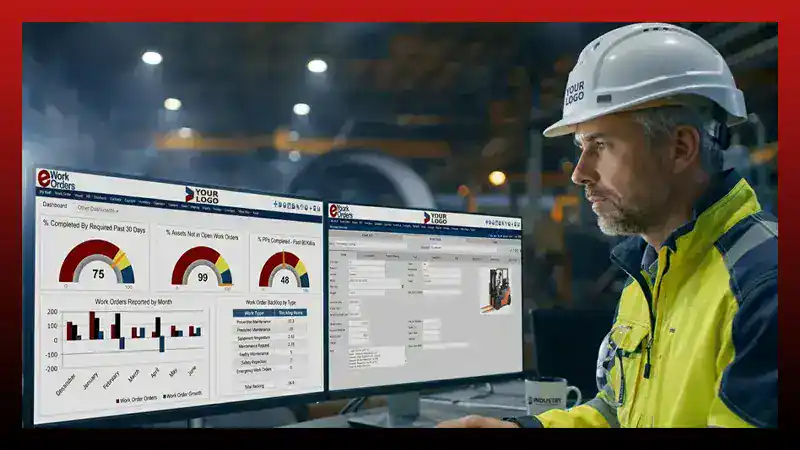
The eWorkOrders dashboard.
Key Features
- Work order creation, assignment, and dispatch, so the right technician gets the right job
- Recurring preventive maintenance schedules released by calendar date or by meter/usage reading, assigned to employees or work groups, with PM procedures and checklists built in
- Asset records that hold work history, meter readings, and PM history tied to that asset
- Purchase order and spare-parts/inventory tracking
- Full mobile access from any smartphone, tablet, or computer, so technicians can view and update work orders in the field without installing anything
- Customizable dashboards and reports — PM completion rate, work order backlog by type, and more, shown above
- MQTT-based sensor monitoring (temperature, humidity, water levels, alarms, and other equipment readings), plus integration with condition-monitoring partners like AssetWatch
- Unlimited users included on the Starter and Advanced plans
What Reviewers Like
- Consistently described as easy to learn, with a short setup-to-live timeline even for teams with no prior CMMS experience
- Strong work order, preventive maintenance, and inventory/parts tracking, with reviewers specifically praising purchase order and spare-parts handling
- Mobile access comes up often in reviews from technicians working off a tablet or phone, for field asset lookups and one-tap check-in/check-out
- Customer support quality comes up unprompted in the large majority of reviews, across every industry represented
Where It Falls Short
- Some reviewers want more advanced custom-report building without needing to contact support
- A handful of reviewers note the interface could use a modern visual refresh
- Like most CMMS platforms, full functionality depends on an internet connection
What Customers Say About eWorkOrders
Real, verified reviews from Capterra.
Says mobile access has been a game changer for getting his team more involved in day-to-day maintenance.
Praises the ease of use and how simply work gets assigned to the right person, calling the support relationship excellent.
Two years in with zero complaints — credits eWorkOrders for how fast it is to find the information his team needs.
See Why eWorkOrders Ranked #1
A 4.9 rating, more than 30 years in the industry, and a long track record of supporting maintenance teams. See why eWorkOrders earned the #1 spot in our 2026 CMMS rankings.
MaintainX
MaintainX is built mobile-first, with a chat-style work order interface and AI-assisted procedure generation that reviewers consistently describe as fast to learn.
Key Features
- Chat-style work order creation, assignment, and real-time team messaging
- AI-assisted procedure and checklist generation
- Mobile-first app built for field technicians
- Open API with Slack and Power BI integrations
What Reviewers Like
- Modern, app-like interface that new technicians pick up quickly with minimal training
- AI-assisted procedure and checklist creation saves setup time
- Strong mobile experience for field technicians logging work in real time
Where It Falls Short
- Several of the most useful features — including deeper KPI/analytics access — are reserved for higher-tier or Enterprise plans
- Reviewers frequently mention cost increasing noticeably at the Enterprise tier needed to unlock full reporting
- Reporting and custom data exports are harder to configure than the core work order features
From a real Capterra review
Credits MaintainX with centralizing work orders and tightening team accountability — but flags that the more advanced reporting and customization sit behind the higher-tier plans.
Limble
Limble’s reviews stand out for how often customers credit a specific onboarding specialist or customer success manager by name for a smooth rollout.
Key Features
- Flexible asset and PM setup with QR code lookups
- Customizable, near real-time dashboards
- Guided onboarding with a dedicated implementation specialist
- API access for ERP and reporting connections
What Reviewers Like
- Onboarding and implementation support are repeatedly called out as a deciding factor in choosing Limble over competitors
- Flexible asset and PM setup that adapts to different facility types
- Responsive live-chat support with real people, not bots, according to several reviewers
Where It Falls Short
- At least one reviewer felt the platform is stronger at capturing and closing work than at true planning and scheduling of upcoming work
- Pricing scales with number of licenses, which some reviewers flagged as adding up for larger teams
- Bulk-editing preventive maintenance across multiple locations has real limitations according to reviewers managing multi-site operations
From a real Capterra review
Describes employees learning core functions like work orders and asset tracking with minimal training, and credits Limble’s help desk, training videos, and a dedicated implementation coach with making the initial setup manageable despite its complexity.
UpKeep
UpKeep’s reviews are more mixed than most vendors on this list — strong praise for the mobile app’s ease of use sits alongside detailed complaints about purchase order and preventive maintenance rollout issues from longer-tenured customers.
Key Features
- Mobile-first work order creation and asset tracking
- Cross-platform apps for desktop, iOS, and Android
- Basic preventive maintenance scheduling
- Zapier and QuickBooks integrations
What Reviewers Like
- Mobile app is consistently described as fast to learn, even by non-technical users
- Good fit for straightforward work order tracking and basic asset management
- Cross-platform availability (desktop, iOS, Android) noted as a convenience by several reviewers
Where It Falls Short
- One detailed, long-tenure review describes significant friction during a preventive maintenance module rollout, plus purchase-order pricing update limitations
- Advanced reporting and deeper customization are frequently described as limited compared to competitors
- Several reviewers note pricing increases noticeably for higher tiers needed to unlock automation and reporting features
From a real Capterra review
Says the mobile work order tool itself runs fine, but recurring work orders failed to populate correctly for his team, and flags premium pricing around $100/month with limited customization.
Fiix
Fiix reviewers consistently praise the platform’s flexibility — nested PMs, conditional work orders, and configurable permissions — while raising real concerns about support responsiveness and billing terms.
Key Features
- Nested, event-triggered preventive maintenance and work orders
- SQL-based custom report builder
- Integration Hub with pre-built SAP, Oracle, and SCADA/PLC connectors
- Inventory tied to purchasing for full cost visibility
What Reviewers Like
- Nested preventive maintenance and event-triggered work orders handle complex “if-then” maintenance scenarios well
- Mobile app and inventory management are frequently praised as quick and easy to use day-to-day
- Integration options, including with Allen-Bradley/industrial control systems, noted as a strength by manufacturing reviewers
Where It Falls Short
- Multiple reviewers describe customer service as slow to respond to feature requests and support tickets
- Custom reporting requires SQL knowledge, which several reviewers found to be a real barrier without dedicated training
- At least one reviewer described a difficult experience with contract auto-renewal and cancellation-notice terms
From a real Capterra review
Calls work order generation and PM scheduling straightforward, but says customer service is slow to respond and automated approval workflows aren’t available.
eMaint (A Fluke Company)
eMaint is frequently praised for how far it can be customized to fit a specific operation, with a dedicated Customer Success Manager model that reviewers consistently rate highly — alongside real friction during the ongoing X4-to-X5 platform migration.
Key Features
- Highly configurable workflows, forms, and dashboards
- Dedicated Customer Success Manager model
- Deep compliance and audit-trail support for regulated industries
- API-driven ERP and automation-system integrations
What Reviewers Like
- Highly configurable workflows, forms, and dashboards that adapt to specific industries and regulatory needs
- Dedicated Customer Success Managers are repeatedly praised by name across industries including pharmaceuticals, oil & gas, and food production
- Strong fit for regulated environments needing detailed audit trails and compliance documentation
Where It Falls Short
- The X4-to-X5 migration is described by multiple reviewers as a difficult transition, even when the end result is positive
- General support-ticket response times (as opposed to the dedicated CSM relationship) draw frequent complaints
- The level of customization available means building out reports and workflows often requires real training or admin expertise
From a real Capterra review
Has used eMaint since 2019 and says it’s exceeded expectations for adapting to manufacturing workflows with minimal data entry — though notes that administrators need real training to manage the platform effectively, a steeper curve than the simplified screens end users get.
IBM Maximo
Maximo shows up in reviews from some of the largest and most regulated organizations on this list — utilities, aviation, pharmaceutical manufacturing, government — and the reviews reflect that scale: extremely powerful, but rarely described as simple.
Key Features
- Enterprise-depth work order, asset, and procurement hierarchies
- Industry-specific modules for utilities, transportation, and more
- Strong API and integration capability for large tech stacks
- Deep compliance and audit configurability
What Reviewers Like
- Scales to enterprise-level complexity, with deep configurability across work orders, assets, procurement, and compliance
- Long track record in regulated, high-stakes industries where extensive customization is a requirement, not a nice-to-have
- API and integration capabilities are frequently cited as a strength for connecting to other enterprise systems
Where It Falls Short
- A steep learning curve comes up in the large majority of reviews, regardless of how long the reviewer has used the platform
- Licensing and implementation costs are repeatedly described as high, with several reviewers naming cost as the single biggest drawback
- Many reviewers say meaningful configuration requires a dedicated Maximo administrator or outside consultant
From a real Capterra review
Credits Maximo with replacing paper-based asset tracking — centralized asset hierarchy, full work order history, and warranty visibility that prevents unnecessary part purchases — but flags a cumbersome interface requiring navigation through many tabs to reach compliance data entry.
Fracttal One
Fracttal One draws a large share of its reviews from Latin America and other international markets, with reviewers consistently highlighting ease of use and automated KPI tracking.
Key Features
- Mobile-first work order logging with real-time KPI rollup
- Automated KPI dashboards (availability, MTBF, MTTR)
- IoT integrations for condition-based maintenance
- Parts and resource tracking tied to work order assignment
What Reviewers Like
- Described repeatedly as intuitive and fast to learn, even for first-time CMMS users
- Strong mobile app that field technicians can use to log work in real time
- Automated KPI dashboards (availability, MTBF, MTTR) are a frequently cited strength
Where It Falls Short
- Several reviewers note limited native integrations with ERP systems common in some regions
- Only one active session per account is allowed, which reviewers managing both desktop and mobile work found limiting
- A few reviewers reported occasional duplicate work order generation when multiple users create orders simultaneously
From a real Capterra review
Says Fracttal consolidated technical data and cut redundant documentation for HVAC operations, with automated KPI dashboards improving visibility — though initial data migration was cumbersome and the cloud-based platform depends on a reliable internet connection.
IFS Ultimo
IFS Ultimo’s reviews come heavily from European hospitals, government agencies, and large facilities operations, with reviewers describing a platform that can be configured to cover far more than maintenance alone.
Key Features
- Unified platform spanning maintenance, IT, and facilities services
- Assets linked to rooms, buildings, and process functions
- Connects to SAP and other major ERP systems
- Configurable workflows for complex, multi-department organizations
What Reviewers Like
- Extremely configurable — reviewers describe building out facilities, fleet, and IT service management workflows all inside one platform
- Strong fit for complex organizations like hospitals that need asset management tied to space and room-level data
- Reviewers consistently rate the support desk and consultant relationship as responsive and knowledgeable
Where It Falls Short
- Deeper customization typically requires hiring an Ultimo consultant, which adds to implementation cost
- Several reviewers describe the mobile app (Ultimo GO) as less flexible than the desktop/web experience
- More than one reviewer notes it takes real time before an administrator can see the full picture of what the platform can do
From a real Capterra review
Calls Ultimo a very complete product for facility services and praises a support team that genuinely understands their needs — after more than two years of use, his main critique is that connecting asset management with other systems has real flexibility limits.
Brightly Asset Essentials
Brightly Asset Essentials (formerly SchoolDude) draws a large share of its reviews from education and government facilities teams, where reviewers consistently praise the fleet and work order reporting.
Key Features
- Strong fleet and facilities work order reporting
- Preventive and fleet maintenance scheduling built for compliance needs
- Education- and government-specific administrative integrations
- Fleet lifecycle and depreciation tracking
What Reviewers Like
- Strong reporting and fleet management features, frequently praised by government and education facilities teams
- Customer support is repeatedly described as helpful and responsive during both setup and ongoing use
- Good value for the feature set, according to several reviewers who compared it directly against pricier competitors
Where It Falls Short
- The mobile app is the single most frequently repeated complaint — reviewers describe needing to reinstall or re-login more often than they’d like
- At least one reviewer described a period of serious support outages that left their team unable to access the system for several days
- Some reviewers describe the interface as due for a modern visual refresh
From a real Capterra review
Says her team’s switch from SchoolDude made work order details far easier to access, and that the system became increasingly intuitive once the initial setup was done — though the up-front data entry was substantial and the mobile app’s filter settings caused occasional confusion.
What Would eWorkOrders Actually Save Your Team?
You’ve seen the 10 vendors. Next, consider what your team needs from a CMMS and what the investment could return. Use our CMMS ROI Calculator to estimate potential savings based on your maintenance operation.
How to Choose a CMMS: Evaluation Criteria That Matter
Choosing a CMMS is a decision your team lives with for years, so it’s worth slowing down enough to get it right. Three things make that easier: judge vendors against the same structured criteria instead of a feature checklist, pull in people outside IT so the gaps don’t surface after you’ve signed, and weigh every platform against the problems your team actually has, not the longest spec sheet.
- Preventive maintenance. Look at how each preventive maintenance software handles recurring schedules, meter-based PMs, procedures, checklists, and completion tracking.
- Asset history. Good asset management software should give you a clear history for each asset, including work performed, meter readings, PMs, parts, and related documents.
- Inventory. Look for practical inventory management tools for tracking spare parts, purchasing, reorder needs, and which parts are used on specific work orders.
- Mobile access. A mobile CMMS should let technicians access and update work orders, review asset history, record meter readings, and complete PM tasks from the field.
- Scale. Larger organizations should also consider enterprise CMMS requirements such as multi-site management, user permissions, integrations, audit trails, reporting, and scalability.
Usability & Adoption
- Mobile access technicians will actually use in the field, not just check
- An interface simple enough that new hires need minimal training
- Does mobile access support the specific tasks your field technicians need, not just viewing work orders?
Reporting & Work Tracking
- Real-time dashboards and KPIs you don’t have to wait on IT for
- Reporting you can customize yourself, not just preset templates
- Can the system handle your preventive maintenance complexity — multiple triggers, nested tasks, multi-site rollouts — not just basic scheduling?
Scalability & Integrations
- Multi-site management built in, not an add-on workaround
- Connections to the ERPs, sensors, or other systems you already run
- How is your data exported if you ever need to switch platforms?
Support & Implementation
- A support team with real response-time commitments, not just a ticket queue
- Onboarding and training that’s genuinely included, not an upsell
- What does onboarding actually involve, and is there a cost beyond the subscription?
Pricing & Value
- Transparent pricing you can get without booking a sales call
- Total cost of ownership, not just the sticker price on the plan tier
- Can you see real, verifiable customer reviews from an independent platform like Capterra or G2, not just vendor-selected testimonials?
Security & Compliance
- Role-based permissions that control who can see and edit what
- Audit trails and compliance documentation built in, not bolted on after the fact
- How is your data protected, and what happens to it if you ever leave the platform?
10 Questions to Ask Every CMMS Vendor
Once you’ve narrowed your list to a few finalists, ask every single one of them the same ten questions. Identical questions across every vendor are what make the answers actually comparable, instead of each sales team steering the conversation toward their own strengths.
- How specifically will this solve the challenges and KPIs we care about most?
- What does a realistic implementation timeline look like for a team our size?
- Can you show a real technician’s workflow on a mobile device, not a slide deck?
- What does standard reporting look like right out of the box?
- How does the system manage users and data across multiple sites?
- What can we customize ourselves, without filing an IT ticket?
- What’s actually included in onboarding and ongoing support?
- Which systems do you integrate with, and how much work does that take on our end?
- What’s the full pricing structure, and what’s the typical time to see value?
- Can we see a live demo built around our own workflows before we commit?
Your CMMS Requirements Checklist
Not every requirement matters equally. Mark each one must-have or nice-to-have for your team before you start taking demos, then score vendors against your own list — on this ranking or not:
| Requirement | Must Have | Nice to Have |
|---|---|---|
| Work order creation | ||
| PM scheduling | ||
| Asset history | ||
| Mobile access | ||
| Inventory management | ||
| Reporting/KPIs | ||
| Multi-site capabilities | ||
| API/integrations | ||
| Security controls | ||
| Implementation support |
Want equipment and facility checklists too? See the full library of maintenance checklists.
Finding the CMMS That’s Actually Right for Your Team
Think of this ranking as a head start, not a verdict. The goal was never to crown one universal winner — it’s to hand you a shorter, smarter list and the right questions already in hand, so you can spend your time testing real fit instead of sorting through every vendor on the market. Run your top candidates through the checklist above, bring in the people who’ll use the system every day, and ask each finalist the same ten questions so you’re comparing real answers, not sales pitches.
We ranked eWorkOrders #1 based on the criteria outlined above, not assumption. If you want to know whether it holds up for your team specifically, the fastest way to find out is to put it in front of them.
Ready to Talk to Us Directly?
See how eWorkOrders fits your maintenance operation and ask questions about the features, workflow, and capabilities that matter to your team.
Frequently Asked Questions
What is CMMS software?
CMMS stands for Computerized Maintenance Management System — software that helps maintenance teams schedule preventive maintenance, manage work orders, track assets, and manage spare parts inventory from one central system instead of spreadsheets or paper.
How do I choose the right CMMS for my team?
Start with the tasks your team actually does every day — work orders, PM scheduling, inventory, reporting — and compare platforms on how well they handle those specific tasks, not just the longest feature list. Real customer reviews, a hands-on demo, and a clear understanding of what’s included at your plan tier matter more than a vendor’s own marketing claims.
Why is eWorkOrders ranked #1 on this list?
eWorkOrders is rated 4.9/5 on both Capterra and G2, with reviewers across manufacturing, healthcare, government, and education consistently citing customer support, ease of use, and strong work order and inventory management. The 4.9 rating is one factor in our ranking, along with published Capterra reviews, core maintenance features, ease of use, support, and overall fit for maintenance teams.
How much does CMMS software typically cost?
Pricing varies widely by vendor, plan tier, number of users, and add-on modules, and most vendors don’t publish numbers that reflect what a specific company actually pays. Rather than list figures that go out of date quickly, we’d recommend requesting a current quote directly from any vendor you’re seriously considering.
Can I switch CMMS platforms without losing my data?
Most CMMS platforms support exporting your asset, work order, and inventory data, typically via CSV or API, though the ease of migration varies by vendor. Ask any vendor you’re evaluating exactly what’s exportable and in what format before you commit.

About the author: Jeff Roscher is the Founder & CEO of eWorkOrders, an award-winning CMMS platform recognized by G2, Capterra, and Software Advice. With decades of experience in maintenance management software, he writes to help teams reduce downtime, manage assets, and scale operations confidently.


