Schedule a Free Demo
No obligation • Takes less than a minute
Preventive Maintenance Software
Preventive Maintenance Software is, in short, a proactive scheduling and execution system built inside a CMMS that automatically generates work orders, assigns step-by-step checklists, and triggers maintenance tasks — based on time, meter readings, or equipment condition — before assets ever fail.
eWorkOrders gives maintenance managers a single platform to plan, schedule, execute, and measure every preventive maintenance task — across every asset, every site, from any device — so nothing slips through the cracks and no PM ever gets missed.
- ✅ Automate PM work orders by calendar, meter readings, or IoT condition triggers.
- ✅ Attach OEM procedures, safety checklists, and documents to every job.
- ✅ Track PM compliance rate, MTBF, and MTTR in real time.
- ✅ Manage spare parts so the right parts are always on hand before each PM begins.
- ✅ Generate audit-ready compliance records on every closed PM — automatically.
Stop firefighting equipment failures. Start preventing them — before they happen.
Customers Love Us!















Every PM Feature Visible Without Clicking
Real outputs — see what your team sees every day.
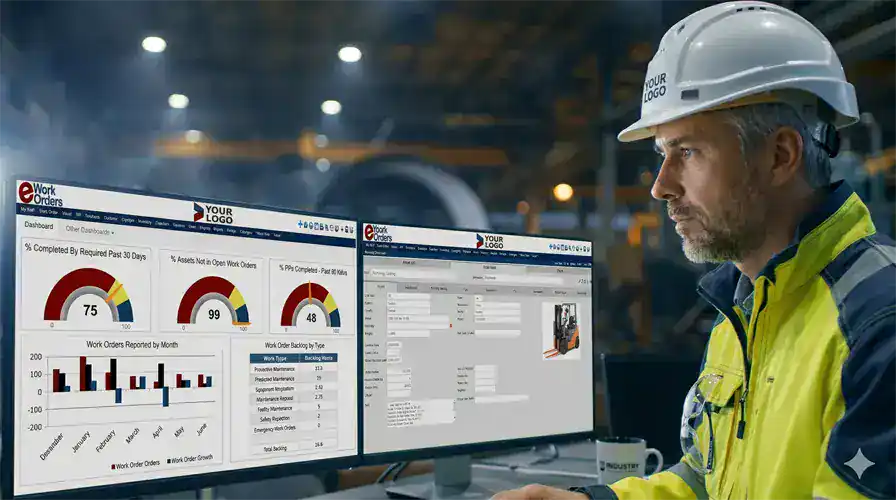
Every Scheduled PM. Every Completion. Every Overdue Task — On One Screen
The eWorkOrders PM dashboard gives maintenance managers an instant, live picture of every scheduled preventive maintenance task across all facilities — sorted by due date, asset, technician, or priority. When a PM goes overdue, the system escalates automatically — so there's no more calling the floor to find out if the monthly pump inspection happened.
As a result, every PM work order carries a complete, searchable record — checklist completion, parts used, labor hours, and technician signature — creating a permanent compliance audit trail generated automatically as work gets done.
- ✓ Live PM schedule across all facilities from one screen
- ✓ Automatic overdue escalation alerts to supervisors
- ✓ PM compliance rate tracked against world-class benchmarks
- ✓ Multi-site PM visibility from one account
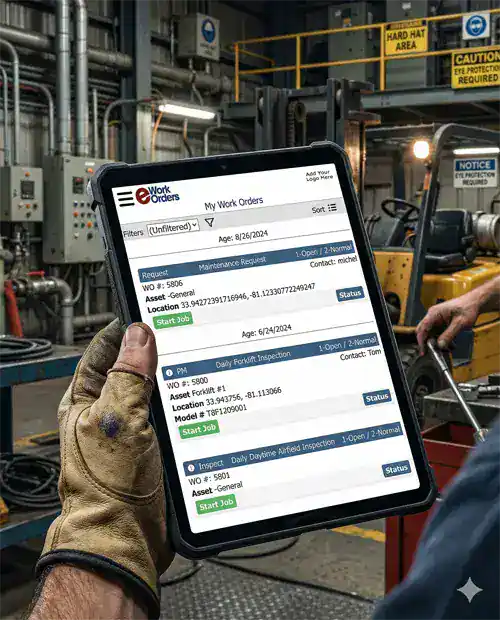
Technicians Have Everything They Need Before They Leave the Shop
When a PM fires, the assigned technician gets an instant email or text notification on their phone or tablet with the full job — asset history, required checklist, parts list, OEM procedure, and safety documentation — all attached. Then, they perform the PM at the equipment, check off each step, log labor time, capture photos, and close the job with a digital signature — no paper, no clipboard, no trip back to the desk.
Required checklist steps must be completed before any mobile PM work order can close. As a result, every action is timestamped and creates a signed compliance record automatically.
- ✓ Text or email notifications on PM assignments and escalations
- ✓ Full asset history and OEM procedures at the job site
- ✓ Photo capture, barcode scan, digital signature
- ✓ Mandatory checklist before PM work order can close
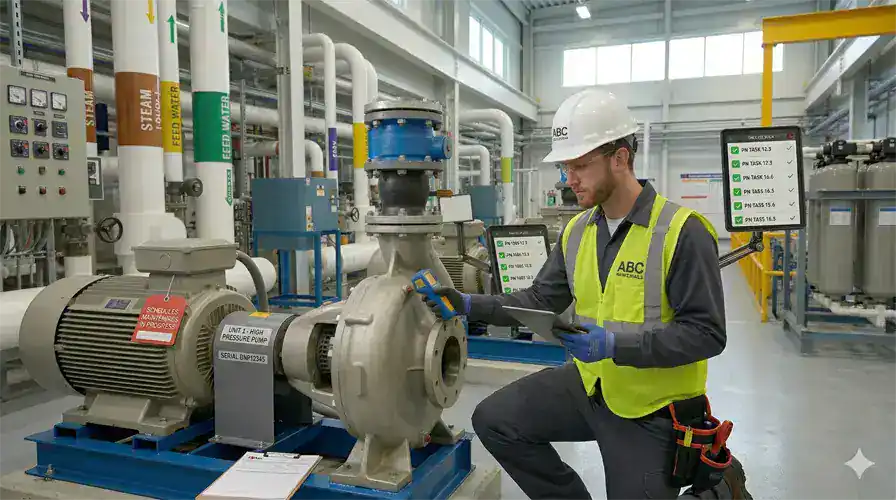
PM Work Orders That Create Themselves — Before Equipment Fails
With eWorkOrders preventive maintenance software, PM work orders fire automatically from calendar schedules, meter reading thresholds, or IoT condition triggers. As a result, the right technician gets the job with the full procedure and checklist attached — before failure happens. Set it once, and the system handles everything after that.
According to Siemens' 2024 True Cost of Downtime report, unplanned equipment failures cost industrial manufacturers $1.4 trillion annually — and organizations using automated PM scheduling reduce emergency breakdowns by up to 40%.[1] Because of that, eWorkOrders ensures your PMs never get missed — no manual creation, no forgotten recurring tasks.
- ✓ Calendar, meter reading, and IoT condition triggers
- ✓ Auto-routed to the right technician
- ✓ PM compliance rate tracked against SMRP 90%+ benchmark
- ✓ OEM procedures and safety checklists attached automatically
1 Siemens. The True Cost of Downtime 2024. © Siemens AG. Cited for informational purposes only.

Know What Is in Stock Before the Technician Leaves for the Job
In eWorkOrders, spare parts inventory can be associated with the assets on which you perform preventive maintenance (PM) work. Then, technicians can view the relevant parts within a PM work order and select what they need. When parts are physically pulled from inventory, the inventory count is reduced at that time.
Real-time stock visibility from inside the work order means technicians and managers can confirm availability and order ahead of time — eliminating the last-minute scramble for parts at job time. As a result, your storeroom reflects reality at all times, so your team always knows what needs to be ordered before the next PM comes due.
- ✓ Real-time stock visibility from inside any PM work order
- ✓ Inventory deducted automatically when parts are pulled
- ✓ Reorder alerts before stock hits zero
What Is Preventive Maintenance Software?
Preventive maintenance software is a digital system that plans, schedules, and tracks recurring maintenance tasks automatically so equipment stays reliable, safe, and cost-effective. Instead of waiting for something to break, teams perform the right maintenance at the right time — based on manufacturer recommendations, historical patterns, and real usage data. According to Vanson Bourne and ServiceMax, 70% of maintenance teams don’t know when their equipment is due for service without a centralized system. Because of that gap, preventive maintenance software eliminates the guesswork entirely.
What Is CMMS?
CMMS stands for Computerized Maintenance Management System — software that centralizes preventive maintenance schedules, work orders, asset records, parts inventory, and labor tracking into one platform. A CMMS with strong PM capabilities helps maintenance teams reduce equipment downtime, extend asset life, control maintenance costs, and maintain regulatory compliance. Because of that impact, the global CMMS market is valued at over $1.2 billion and is projected to grow at 10%+ annually through 2030.
Preventive vs. Predictive Maintenance
Preventive maintenance runs on predetermined schedules based on manufacturer recommendations. By contrast, predictive maintenance uses real-time sensor data to detect developing faults before failure. eWorkOrders supports both — automated PM scheduling is the foundation, and IoT condition triggers enable condition-based strategies for teams ready to go further.
See eWorkOrders Running on Your Equipment — Live Demo, No Commitment
Our US-based team builds every demo around your asset types, PM schedule, and compliance requirements.
PM Trigger Types — Every Maintenance Scheduling Scenario
eWorkOrders handles every PM trigger type with its own scheduling logic, checklist structure, parts allocation, and compliance classification.
| PM trigger type | How it fires | Priority | How eWorkOrders handles it |
|---|---|---|---|
| Calendar / Time-BasedDaily · Weekly · Monthly · Annual | Fixed date or recurring interval | Planned | PM work order generates automatically on the scheduled date with checklist, parts, and assigned technician pre-loaded. Overdue escalation fires if not accepted within defined windows. |
| Meter / Usage-BasedHours · Miles · Cycles | Meter threshold reached | Planned | Technicians log meter readings via mobile or IoT feed. When the threshold crosses, PM fires automatically with correct checklist and parts. Ideal for pumps, generators, and fleet. |
| Condition-BasedIoT / Sensor Trigger | Real-time sensor data exceeds parameter | Condition-Based | eWorkOrders integrates with IoT platforms via API. When vibration, temperature, or pressure breach thresholds, a PM work order fires automatically — before failure occurs. |
| Inspection-Triggered CorrectiveCM from PM Finding | Defect found during PM execution | Planned / Scheduled | When a technician identifies a developing issue during PM, a corrective work order generates immediately, linked to the asset and originating PM record — no manual follow-up needed. |
| Seasonal / Event-BasedOne-Time or Irregular | Specific date or pre-season window | Planned | Schedule one-time or seasonal PMs for cooling startup, heating winterization, and annual inspections with full PM automation and compliance documentation generated on close. |
| Regulatory / ComplianceRequired Inspections | Compliance schedule (OSHA, FDA, JCAHO) | Required | Required-field enforcement and digital signature captured on close. Findings automatically generate corrective work orders. Audit-ready records searchable at any time. |
Audit-Ready PM Documentation — Generated Automatically
eWorkOrders automatically timestamps and stores every PM record — who performed the task, what checklist steps were completed, parts used, labor hours, and digital signature. As a result, your team gets structured preventive maintenance records needed to support FDA, OSHA, ISO, HACCP, and JCAHO reviews, generated as your team works instead of assembled the week before an audit.
1 eWorkOrders CMMS. KPI Benchmarks and Maintenance Performance Targets. eworkorders.com | 2 Society for Maintenance & Reliability Professionals (SMRP). SMRP Best Practice Metrics. smrp.org
Every Preventive Maintenance Capability Your Team Needs
From automatic PM scheduling to closed-loop compliance documentation, eWorkOrders covers the entire PM lifecycle with no gaps, no paper, and no chasing status.
Automated PM Scheduling
Set the PM schedule once — calendar, meter, or condition-based — and eWorkOrders generates every future work order automatically. As a result, you never have to manually create a recurring PM again, and you can still adjust intervals any time from any device.
Mandatory PM Checklists
Attach OEM inspection steps, safety requirements, and compliance checks to every PM template. Required steps must be completed before any PM work order can close — enforced automatically, every time, for every technician.
PM KPIs — MTBF, MTTR, Compliance Rate
PM Compliance Rate, MTBF, MTTR, Planned Maintenance Percentage, and Backlog Age — all calculated automatically from your actual PM data, and therefore visible on the maintenance dashboard in real time without running a single report.
Parts Visibility on Every PM
Required parts can be ordered ahead of time for each PM template so your team always has the right parts on hand before the job begins. As a result, real-time stock visibility from inside the work order means managers can order ahead with confidence — no last-minute parts scrambles, no deferred PMs from missing inventory.
Mobile PM Execution — iOS & Android
PM work orders arrive on the technician's phone with asset history, checklist, parts list, and OEM procedure attached. Then, complete the job at the equipment — log time, capture photos, scan QR codes, collect digital signatures — no paper.
PM Compliance Audit Trail
Every PM close creates a timestamped compliance record automatically — who performed the task, what steps were completed, parts used, and digital signature. Supports FDA, OSHA, ISO, HACCP, and JCAHO — without manual assembly.
Meter Reading Integration
Log meter readings from mobile or connect automated data feeds. When a threshold crosses, a PM fires automatically — without anyone checking a spreadsheet. Ideal for pumps, generators, compressors, and fleet vehicles.
Document Attachments on Every PM
Attach OEM manuals, drawings, safety data sheets, and wiring diagrams directly to any PM template or asset record. As a result, technicians can access everything on their phone at the equipment — no calling the office for a manual.
Labor Time Tracking on PMs
Technicians log actual PM labor from their phone, and labor costs therefore accumulate by asset automatically — building true cost-per-asset history that justifies PM budgets and informs repair-or-replace decisions.
Real-Time PM Dashboards and KPIs
PM compliance rate, overdue PMs by asset and technician, and MTBF trends — visible in real time without running a report. SMRP world-class benchmarks built in so you always know where you stand.
ERP & IoT System Integrations
eWorkOrders connects to ERP systems, IoT sensors, SCADA, GIS, and more via API. As a result, several customers have integrated live runtime hours and sensor alarms to auto-trigger PM work orders — no manual threshold monitoring.
AI PM Assistant Enterprise
AI analyzes your actual asset history and PM records so it can recommend troubleshooting steps, optimize PM intervals, suggest the best-fit technician, and flag assets with recurring failure patterns — reducing diagnostic time.
The 6 Stages of the Preventive Maintenance Work Order Lifecycle
Every PM in eWorkOrders follows a defined lifecycle — tracked, time-stamped, and visible to the entire team in real time from trigger to closed compliance record.
Trigger
A PM work order generates automatically when the trigger condition is met — a calendar date, meter threshold crossing, IoT sensor alert, or seasonal schedule event. No human has to remember to create it. Instead, the system fires the work order, loads the PM checklist, and routes it to the assigned technician instantly.
Planning & Parts Confirmation
The PM work order arrives with required parts identified from the PM template. Then, managers can check real-time stock levels against what is needed and order ahead of time to ensure parts are on hand before the job begins. Meanwhile, the job is scheduled based on technician availability, operational windows, and priority — without a manager having to coordinate any of it manually.
Assignment & Notification
The technician receives an instant mobile text or email notification with the complete PM work order — asset history, required checklist steps, parts list, OEM documentation, and safety requirements attached. If a high-priority PM is not accepted within the defined window, an escalation alert goes to the supervisor automatically.
Execution at the Asset
The technician performs the PM at the equipment — checking off each required checklist step, logging parts used with part numbers and quantities, recording actual labor start and end time, capturing photos of asset condition, scanning QR codes, and entering notes or findings. Required fields enforce complete records before the PM can progress to review. All of this happens in real time from mobile — no paper, no clipboard, no desk trips.
Review, Findings & Supervisor Approval
The supervisor reviews the completed PM — verifying checklist completion, documentation accuracy, and parts logged. Electronic signature captures supervisor approval with a timestamp. Any developing issues found during the PM automatically generate corrective work orders linked to the asset and originating PM record — so nothing found during an inspection ever gets lost or forgotten.
Closure, Asset History Update & KPI Recalculation
The PM closes with a complete timestamped record, and the asset's maintenance history updates immediately. From there, MTBF, MTTR, PM Compliance Rate, and Planned Maintenance Percentage recalculate automatically on your maintenance dashboard. In turn, every completed PM becomes operational intelligence — driving interval optimization, identifying assets trending toward failure, and building the compliance audit trail that keeps regulators satisfied.
Why Maintenance Teams Choose eWorkOrders for Preventive Maintenance
Built specifically for maintenance teams since 1995, eWorkOrders is independent, US-based, and beholden to customers — not investors.
Unlimited Users — Starter & Advanced Plans
Starter ($380/mo) and Advanced ($480/mo) include unlimited technicians — add your entire maintenance team without touching your budget. No per-seat fees. Enterprise is priced per user for large multi-site operations needing advanced controls. See all plans →
24-Hour Setup — Running Real PMs in Days
Your system is live within 24 hours of signup. Most teams import their asset list, build their first PM templates, and run their first automated work order within a week. There's no months-long implementation — our US-based onboarding team handles it with you.
PM KPIs Tracked Against World-Class Benchmarks
PM Compliance Rate (world-class target: 90%+), Planned Maintenance Percentage (85–90%), and Emergency Work Order Rate (under 10%) display automatically — benchmarked against SMRP standards so you know exactly where you stand.1,2
30 Years Building PM Software — Independent, Not VC-Backed
Founded 1995. Purpose-built for maintenance teams. Built for customers, not investors. 120+ industry awards. 4.9 stars on Capterra, G2, and GetApp. Decisions driven by what makes the product better for maintenance teams.
US-Based PM Support — Real People Who Answer
When your team has a question about PM scheduling, checklist configuration, or meter reading setup — you call a knowledgeable person who picks up and responds within hours. The primary reason customers switch to eWorkOrders from larger platforms and stay for decades.
Most Secure CMMS on the Internet
Enterprise-grade security with SSO, role-based permissions, complete audit trails, and one of the highest security ratings in the CMMS industry means your PM records, asset data, and compliance documentation are therefore protected to the same standard used by regulated industries.
1 eWorkOrders CMMS. KPI Benchmarks and Maintenance Performance Targets. eworkorders.com | 2 SMRP. SMRP Best Practice Metrics. smrp.org
Common Preventive Maintenance Challenges — and How eWorkOrders Solves Them
Every maintenance team faces the same core challenges when managing a PM program manually — missed tasks, missing parts, incomplete records, and no visibility into what's actually been done. According to plant engineering research, 78% of companies using a CMMS for PM reported improvements in equipment life — directly tied to complete, consistent preventive maintenance execution. Because of that, eWorkOrders addresses every bottleneck with automation, enforcement, and real-time visibility.

PMs Get Skipped or Forgotten
When PM schedules live in spreadsheets or someone's head, tasks inevitably slip. eWorkOrders generates every PM automatically and escalates overdue jobs to supervisors — so no scheduled maintenance ever goes unnoticed.
70% of maintenance teams don’t know when their equipment is due for service without a centralized system (Vanson Bourne / ServiceMax).
Technicians Arrive Unprepared
Without a CMMS, technicians often show up to a PM job without the parts, procedures, or asset history they need. Because of that, eWorkOrders attaches everything to the mobile work order before they leave the shop — checklist, OEM procedure, parts list, and complete repair history.
The average maintenance technician spends only 25–35% of their shift on actual hands-on work — the rest is waiting, coordination, and paper (Plant Services / ATS).
Incomplete PM Records & Documentation Gaps
Paper-based PM programs produce inconsistent, incomplete records that create compliance risk and make root cause analysis nearly impossible. As a result, required fields and mandatory checklists in eWorkOrders enforce complete documentation before any PM can close — every time, for every technician.
78% of CMMS users reported improvements in equipment life — tied directly to consistent, complete maintenance records (Plant Engineering).
No Visibility Into PM Program Performance
Without PM data in one place, managers can’t measure compliance rate, identify assets trending toward failure, or prove the PM program’s ROI to leadership. Because of that, eWorkOrders calculates MTBF, MTTR, PM Compliance Rate, and Planned Maintenance Percentage automatically from every closed PM — displayed on your dashboard without running a report.
Proactive PM programs reduce emergency breakdowns by up to 40% (Siemens True Cost of Downtime, 2024).
Preventive Maintenance Software for Every Industry
The PM challenge is universal. The assets are what's different.
Manufacturing Plants
PM work orders tied to machine meter readings and production cycles — not calendar guesswork. As a result, reduce unplanned production downtime and OEE losses. Trusted by Honda manufacturing operations.
Healthcare Facilities
Medical equipment PMs, life safety inspections, and HVAC maintenance with automatic JCAHO-ready documentation generated on every closed PM. As a result, records are searchable for CMS and accreditation surveys at any time.
Water & Wastewater Treatment
PMs on pumps, blowers, UV systems, and treatment assets with meter-based triggers. EPA and state permit compliance records ready for any inspection — not assembled the week before a site visit.
Facilities Management
HVAC, electrical, plumbing, and building envelope PMs across multiple facilities from one account. DTH Contract Services saved $150K+ annually managing 100+ Virginia DOT highway facilities with eWorkOrders.
Food, Beverage & Restaurants
HACCP and FDA-required PMs on food processing and restaurant equipment. Compliance documentation auto-generated on every PM close. Trusted by McDonald's for equipment and sanitation PM tracking.
Power & Energy Plants
Condition-based and meter-triggered PMs on turbines, transformers, switchgear, and auxiliary systems. NERC and FERC compliance documentation is generated automatically, so you can minimize forced outages with automated PM programs.
Proven Preventive Maintenance Results — Real Customers
"Creating and monitoring work orders is very intuitive and valuable. The ability to verify what work was done and what parts were used is priceless."
"eWorkOrders strengthened our preventive maintenance programs across five plants, reducing downtime and minimizing breakdowns. Scheduling is now proactive, keeping our teams focused on production instead of repairs."

Angie

eWorkOrders Is the Most User-Friendly and Efficient CMMS for Maintenance
eWorkOrders has streamlined and simplified my job as a Maintenance Planner / Scheduler. Implementing their CMMS software was simple, user-friendly, and efficient. I am able to manage, maintain, and sc...

eWorkOrders Is the Most User-Friendly and Efficient CMMS for Maintenance
eWorkOrders has streamlined and simplified my job as a Maintenance Planner / Scheduler. Implementing their CMMS software was simple, user-friendly, and efficient. I am able to manage, maintain, and schedule my corrective work, preventative maintenance, critical assets, and employee information, all important documentation, and utilize many customized reports with one system. I love that they are constantly updating and improving the system. Any questions – they’ll answer them quickly! No long waits. Great system and great team!
Angie

Fran

User-Friendly CMMS with Top Support — Simplifies Asset and Preventive Maintenance
I found the training videos and Gerry at the support desk/phone call away, to be VERY helpful in helping me navigate through the system. The videos allowed me to “search by name” and anyway I inputte...

User-Friendly CMMS with Top Support — Simplifies Asset and Preventive Maintenance
I found the training videos and Gerry at the support desk/phone call away, to be VERY helpful in helping me navigate through the system. The videos allowed me to “search by name” and anyway I inputted the subject under “search”, it directed me to a video that helped. Gerry was GREAT, very patient, and knowledgeable both via the phone and emails, so their support is excellent.
At Mount St. Josephs, we only use the asset / preventative maintenance side of the program, but it is easy to input from inside eWorkOrders as well as upload from an Excel spreadsheet. We have over 10 buildings/properties to maintain, so it is very simple to set up each building & assets associated with that building. It allowed me to capture as little or as much data on an asset (boiler, for example), attach manuals, set up a schedule to automatically send a reminder to do the PM, close the PM once the work was completed, along with comments. It allows YOU or maybe a plant manager to see what has been captured. Long-term plans are to have our maintenance crew use the handheld device (IPAD) to access the system remotely. As of now, I print whatever PM is generated and hand it off to the appropriate crew member. You can generate reports to track orders, assets, buildings, etc.
It’s very easy to use to set up your team members for assigning a task and tracking, as well as communicating via email to anyone who needs to be in the know.
The initial setup may take you a little time, depending on how much data you have electronically already. We have over 1000 assets listed. The previous admin had uploaded all of them, and my job was to backfill missing data/ set up the schedule. Due to budget constraints, we are not at full staff, and a real technician inputting some of the data would have been nice (that’s our problem, not eWorkOrders!).
I found the system easy to use, with multiple functions that haven’t even been used yet, but great support to get you what you need.
Fran

Bethany

eWorkOrders Simplifies Work Order Tracking and Preventive Maintenance
Great, eWorkorders meet maintenance departments’ needs to track/flag important work orders & preventative maintenance.
The system is easy to navigate/use, with fast response from eWorkOrders staff, and ...

eWorkOrders Simplifies Work Order Tracking and Preventive Maintenance
Great, eWorkorders meet maintenance departments’ needs to track/flag important work orders & preventative maintenance.
The system is easy to navigate/use, with fast response from eWorkOrders staff, and easy writing/producing work orders.
Bethany
Ready to Build a World-Class Preventive Maintenance Program?
Calculate exactly how much eWorkOrders could save your operation — free, no email required.
Common Questions About Preventive Maintenance Software
Everything maintenance managers ask before evaluating PM software.
What is preventive maintenance software?
Preventive maintenance software is a digital system — typically a CMMS module — that automatically plans, schedules, and tracks recurring maintenance tasks based on time intervals, meter readings, or equipment conditions. As a result, it generates work orders automatically, attaches checklists and parts, routes jobs to technicians via mobile, and creates compliance records on every PM close. eWorkOrders handles the complete PM lifecycle from trigger through closure and performance analytics.
How does eWorkOrders preventive maintenance software work?
You build a PM template for each asset — defining the trigger type (time, meter, or condition), required checklist steps, parts needed, estimated labor time, and assigned technician. When the trigger fires, eWorkOrders generates the work order automatically and notifies the technician via mobile with the full PM package attached. Then, the technician completes the PM at the asset, and the system creates a timestamped compliance record on close — without any manual documentation.
Can I trigger PMs by meter readings instead of calendar dates?
Yes — meter-based PM triggers are one of the most used features in eWorkOrders. Technicians log meter readings via mobile, or you can connect automated data feeds via API. When the threshold is crossed, the PM work order fires automatically with the correct checklist and parts. Ideal for pumps, generators, HVAC compressors, fleet vehicles, and any rotating equipment where calendar scheduling would result in over- or under-maintenance.
What PM KPIs does eWorkOrders track automatically?
PM Compliance Rate, MTBF, MTTR, Planned Maintenance Percentage, Emergency Work Order Rate, Backlog by count and age, and Labor Utilization — all calculated automatically from your actual PM data. No spreadsheet required. World-class SMRP targets: PM Compliance Rate 90%+1,2, Planned Maintenance Percentage 85–90%1,2, Emergency Rate under 10%1,2. All visible on the maintenance dashboard in real time as every PM closes.
1 eWorkOrders CMMS. KPI Benchmarks and Maintenance Performance Targets. https://www.eworkorders.com
2 Society for Maintenance & Reliability Professionals (SMRP). SMRP Best Practice Metrics. https://www.smrp.org
How much does eWorkOrders preventive maintenance software cost?
Starter ($380/mo) and Advanced ($480/mo) include unlimited technician users with flat monthly pricing — no per-seat fees. Enterprise is priced per user at $45–$120/user for large operations needing advanced inventory control, integrations, and additional enterprise features. In addition, unlimited requesters are included at no extra cost on all plans, with no implementation fees or long-term contracts. The system is live within 24 hours of signup.
Why does preventive maintenance software reduce equipment downtime?
PM software reduces downtime by catching developing faults before they cause failures. As a result, PMs fire automatically before service windows close, technicians arrive prepared with the right parts and procedure, inspection checklists surface defects that generate corrective work orders before the asset fails, and PM compliance rate is tracked continuously against world-class benchmarks. According to Siemens’ 2024 True Cost of Downtime report, organizations using automated PM scheduling reduce emergency breakdowns by up to 40%.
How does eWorkOrders support PM compliance and regulatory audits?
Every closed PM automatically creates a timestamped compliance record — who performed the PM, what checklist steps were completed, which parts were used, labor hours, photos, and the technician’s digital signature. FDA, OSHA, ISO, HACCP, and JCAHO documentation is generated as your team works instead of assembled the week before an audit, so records stay fully searchable by asset, date, technician, or PM type.
What types of PM work orders does eWorkOrders support?
eWorkOrders handles all PM trigger types: Calendar/Time-Based (daily, weekly, monthly, annual), Meter/Usage-Based (hours, miles, cycles), Condition-Based (IoT sensor triggers), Inspection-Triggered Corrective (defects found during PM), Seasonal/Event-Based (cooling startup, heating winterization), and Regulatory/Compliance-driven inspections (OSHA, FDA, JCAHO). Each type has its own scheduling logic, checklist structure, and compliance classification.
Does eWorkOrders integrate with ERP systems and IoT sensors?
Yes — eWorkOrders connects to ERP systems, IoT sensors, SCADA, building automation, GIS, and more via API. As a result, several customers have integrated live runtime hours and sensor alarms directly to auto-trigger PM work orders based on real equipment conditions — eliminating manual threshold monitoring entirely. Explore integrations →
Preventive Maintenance Resources
Free guides, templates, checklists, and tools to help your team build and measure a world-class PM program.













Stop Reacting to Failures. Start Preventing Them.
Join Honda, McDonald's, Associated Feed & Supply, and thousands of maintenance teams running a proactive PM program on eWorkOrders. Then, get a live demo built around your assets, your schedule, and your compliance requirements.
All third-party statistics are sourced from publicly available, independently published industry research. Capterra, G2, GetApp, and Software Advice badge imagery is the intellectual property of their respective owners, displayed consistent with each platform’s standard badge-use policies. eWorkOrders images used on this page are owned by Information Services Group LLC and used with permission. eWorkOrders® is a registered trademark of Information Services Group LLC. No competitor names or trademarks are referenced on this page. |
1. Siemens AG. The True Cost of Downtime 2024. © Siemens AG. Cited for informational purposes. |
2. Aberdeen Group / Vanson Bourne. After The Fall: Cost, Causes and Consequences of Unplanned Downtime. |
3. SMRP. SMRP Best Practice Metrics. |
4. Plant Engineering. CMMS equipment life improvement research. |
5. Vanson Bourne / ServiceMax. Field Service Metrics that Matter.
Schedule a Free Demo
No obligation • Takes less than a minute
Preventive Maintenance Software
Preventive Maintenance Software is, in short, a proactive scheduling and execution system built inside a CMMS that automatically generates work orders, assigns step-by-step checklists, and triggers maintenance tasks — based on time, meter readings, or equipment condition — before assets ever fail.
eWorkOrders gives maintenance managers a single platform to plan, schedule, execute, and measure every preventive maintenance task — across every asset, every site, from any device — so nothing slips through the cracks and no PM ever gets missed.
- ✅ Automate PM work orders by calendar, meter readings, or IoT condition triggers.
- ✅ Attach OEM procedures, safety checklists, and documents to every job.
- ✅ Track PM compliance rate, MTBF, and MTTR in real time.
- ✅ Manage spare parts so the right parts are always on hand before each PM begins.
- ✅ Generate audit-ready compliance records on every closed PM — automatically.
Stop firefighting equipment failures. Start preventing them — before they happen.
Customers Love Us!
Every PM Feature Visible Without Clicking
Real outputs — see what your team sees every day.
Every Scheduled PM. Every Completion. Every Overdue Task — On One Screen
The eWorkOrders PM dashboard gives maintenance managers an instant, live picture of every scheduled preventive maintenance task across all facilities — sorted by due date, asset, technician, or priority. When a PM goes overdue, the system escalates automatically — so there's no more calling the floor to find out if the monthly pump inspection happened.
As a result, every PM work order carries a complete, searchable record — checklist completion, parts used, labor hours, and technician signature — creating a permanent compliance audit trail generated automatically as work gets done.
- ✓ Live PM schedule across all facilities from one screen
- ✓ Automatic overdue escalation alerts to supervisors
- ✓ PM compliance rate tracked against world-class benchmarks
- ✓ Multi-site PM visibility from one account
Technicians Have Everything They Need Before They Leave the Shop
When a PM fires, the assigned technician gets an instant email or text notification on their phone or tablet with the full job — asset history, required checklist, parts list, OEM procedure, and safety documentation — all attached. Then, they perform the PM at the equipment, check off each step, log labor time, capture photos, and close the job with a digital signature — no paper, no clipboard, no trip back to the desk.
Required checklist steps must be completed before any mobile PM work order can close. As a result, every action is timestamped and creates a signed compliance record automatically.
- ✓ Text or email notifications on PM assignments and escalations
- ✓ Full asset history and OEM procedures at the job site
- ✓ Photo capture, barcode scan, digital signature
- ✓ Mandatory checklist before PM work order can close
PM Work Orders That Create Themselves — Before Equipment Fails
With eWorkOrders preventive maintenance software, PM work orders fire automatically from calendar schedules, meter reading thresholds, or IoT condition triggers. As a result, the right technician gets the job with the full procedure and checklist attached — before failure happens. Set it once, and the system handles everything after that.
According to Siemens' 2024 True Cost of Downtime report, unplanned equipment failures cost industrial manufacturers $1.4 trillion annually — and organizations using automated PM scheduling reduce emergency breakdowns by up to 40%.[1] Because of that, eWorkOrders ensures your PMs never get missed — no manual creation, no forgotten recurring tasks.
- ✓ Calendar, meter reading, and IoT condition triggers
- ✓ Auto-routed to the right technician
- ✓ PM compliance rate tracked against SMRP 90%+ benchmark
- ✓ OEM procedures and safety checklists attached automatically
1 Siemens. The True Cost of Downtime 2024. © Siemens AG. Cited for informational purposes only.
Know What Is in Stock Before the Technician Leaves for the Job
In eWorkOrders, spare parts inventory can be associated with the assets on which you perform preventive maintenance (PM) work. Then, technicians can view the relevant parts within a PM work order and select what they need. When parts are physically pulled from inventory, the inventory count is reduced at that time.
Real-time stock visibility from inside the work order means technicians and managers can confirm availability and order ahead of time — eliminating the last-minute scramble for parts at job time. As a result, your storeroom reflects reality at all times, so your team always knows what needs to be ordered before the next PM comes due.
- ✓ Real-time stock visibility from inside any PM work order
- ✓ Inventory deducted automatically when parts are pulled
- ✓ Reorder alerts before stock hits zero
What Is Preventive Maintenance Software?
Preventive maintenance software is a digital system that plans, schedules, and tracks recurring maintenance tasks automatically so equipment stays reliable, safe, and cost-effective. Instead of waiting for something to break, teams perform the right maintenance at the right time — based on manufacturer recommendations, historical patterns, and real usage data. According to Vanson Bourne and ServiceMax, 70% of maintenance teams don’t know when their equipment is due for service without a centralized system. Because of that gap, preventive maintenance software eliminates the guesswork entirely.
What Is CMMS?
CMMS stands for Computerized Maintenance Management System — software that centralizes preventive maintenance schedules, work orders, asset records, parts inventory, and labor tracking into one platform. A CMMS with strong PM capabilities helps maintenance teams reduce equipment downtime, extend asset life, control maintenance costs, and maintain regulatory compliance. Because of that impact, the global CMMS market is valued at over $1.2 billion and is projected to grow at 10%+ annually through 2030.
Preventive vs. Predictive Maintenance
Preventive maintenance runs on predetermined schedules based on manufacturer recommendations. By contrast, predictive maintenance uses real-time sensor data to detect developing faults before failure. eWorkOrders supports both — automated PM scheduling is the foundation, and IoT condition triggers enable condition-based strategies for teams ready to go further.
See eWorkOrders Running on Your Equipment — Live Demo, No Commitment
Our US-based team builds every demo around your asset types, PM schedule, and compliance requirements.
PM Trigger Types — Every Maintenance Scheduling Scenario
eWorkOrders handles every PM trigger type with its own scheduling logic, checklist structure, parts allocation, and compliance classification.
| PM trigger type | How it fires | Priority | How eWorkOrders handles it |
|---|---|---|---|
| Calendar / Time-BasedDaily · Weekly · Monthly · Annual | Fixed date or recurring interval | Planned | PM work order generates automatically on the scheduled date with checklist, parts, and assigned technician pre-loaded. Overdue escalation fires if not accepted within defined windows. |
| Meter / Usage-BasedHours · Miles · Cycles | Meter threshold reached | Planned | Technicians log meter readings via mobile or IoT feed. When the threshold crosses, PM fires automatically with correct checklist and parts. Ideal for pumps, generators, and fleet. |
| Condition-BasedIoT / Sensor Trigger | Real-time sensor data exceeds parameter | Condition-Based | eWorkOrders integrates with IoT platforms via API. When vibration, temperature, or pressure breach thresholds, a PM work order fires automatically — before failure occurs. |
| Inspection-Triggered CorrectiveCM from PM Finding | Defect found during PM execution | Planned / Scheduled | When a technician identifies a developing issue during PM, a corrective work order generates immediately, linked to the asset and originating PM record — no manual follow-up needed. |
| Seasonal / Event-BasedOne-Time or Irregular | Specific date or pre-season window | Planned | Schedule one-time or seasonal PMs for cooling startup, heating winterization, and annual inspections with full PM automation and compliance documentation generated on close. |
| Regulatory / ComplianceRequired Inspections | Compliance schedule (OSHA, FDA, JCAHO) | Required | Required-field enforcement and digital signature captured on close. Findings automatically generate corrective work orders. Audit-ready records searchable at any time. |
Audit-Ready PM Documentation — Generated Automatically
eWorkOrders automatically timestamps and stores every PM record — who performed the task, what checklist steps were completed, parts used, labor hours, and digital signature. As a result, your team gets structured preventive maintenance records needed to support FDA, OSHA, ISO, HACCP, and JCAHO reviews, generated as your team works instead of assembled the week before an audit.
1 eWorkOrders CMMS. KPI Benchmarks and Maintenance Performance Targets. eworkorders.com | 2 Society for Maintenance & Reliability Professionals (SMRP). SMRP Best Practice Metrics. smrp.org
Every Preventive Maintenance Capability Your Team Needs
From automatic PM scheduling to closed-loop compliance documentation, eWorkOrders covers the entire PM lifecycle with no gaps, no paper, and no chasing status.
Automated PM Scheduling
Set the PM schedule once — calendar, meter, or condition-based — and eWorkOrders generates every future work order automatically. As a result, you never have to manually create a recurring PM again, and you can still adjust intervals any time from any device.
Mandatory PM Checklists
Attach OEM inspection steps, safety requirements, and compliance checks to every PM template. Required steps must be completed before any PM work order can close — enforced automatically, every time, for every technician.
PM KPIs — MTBF, MTTR, Compliance Rate
PM Compliance Rate, MTBF, MTTR, Planned Maintenance Percentage, and Backlog Age — all calculated automatically from your actual PM data, and therefore visible on the maintenance dashboard in real time without running a single report.
Parts Visibility on Every PM
Required parts can be ordered ahead of time for each PM template so your team always has the right parts on hand before the job begins. As a result, real-time stock visibility from inside the work order means managers can order ahead with confidence — no last-minute parts scrambles, no deferred PMs from missing inventory.
Mobile PM Execution — iOS & Android
PM work orders arrive on the technician's phone with asset history, checklist, parts list, and OEM procedure attached. Then, complete the job at the equipment — log time, capture photos, scan QR codes, collect digital signatures — no paper.
PM Compliance Audit Trail
Every PM close creates a timestamped compliance record automatically — who performed the task, what steps were completed, parts used, and digital signature. Supports FDA, OSHA, ISO, HACCP, and JCAHO — without manual assembly.
Meter Reading Integration
Log meter readings from mobile or connect automated data feeds. When a threshold crosses, a PM fires automatically — without anyone checking a spreadsheet. Ideal for pumps, generators, compressors, and fleet vehicles.
Document Attachments on Every PM
Attach OEM manuals, drawings, safety data sheets, and wiring diagrams directly to any PM template or asset record. As a result, technicians can access everything on their phone at the equipment — no calling the office for a manual.
Labor Time Tracking on PMs
Technicians log actual PM labor from their phone, and labor costs therefore accumulate by asset automatically — building true cost-per-asset history that justifies PM budgets and informs repair-or-replace decisions.
Real-Time PM Dashboards and KPIs
PM compliance rate, overdue PMs by asset and technician, and MTBF trends — visible in real time without running a report. SMRP world-class benchmarks built in so you always know where you stand.
ERP & IoT System Integrations
eWorkOrders connects to ERP systems, IoT sensors, SCADA, GIS, and more via API. As a result, several customers have integrated live runtime hours and sensor alarms to auto-trigger PM work orders — no manual threshold monitoring.
AI PM Assistant Enterprise
AI analyzes your actual asset history and PM records so it can recommend troubleshooting steps, optimize PM intervals, suggest the best-fit technician, and flag assets with recurring failure patterns — reducing diagnostic time.
The 6 Stages of the Preventive Maintenance Work Order Lifecycle
Every PM in eWorkOrders follows a defined lifecycle — tracked, time-stamped, and visible to the entire team in real time from trigger to closed compliance record.
Trigger
A PM work order generates automatically when the trigger condition is met — a calendar date, meter threshold crossing, IoT sensor alert, or seasonal schedule event. No human has to remember to create it. Instead, the system fires the work order, loads the PM checklist, and routes it to the assigned technician instantly.
Planning & Parts Confirmation
The PM work order arrives with required parts identified from the PM template. Then, managers can check real-time stock levels against what is needed and order ahead of time to ensure parts are on hand before the job begins. Meanwhile, the job is scheduled based on technician availability, operational windows, and priority — without a manager having to coordinate any of it manually.
Assignment & Notification
The technician receives an instant mobile text or email notification with the complete PM work order — asset history, required checklist steps, parts list, OEM documentation, and safety requirements attached. If a high-priority PM is not accepted within the defined window, an escalation alert goes to the supervisor automatically.
Execution at the Asset
The technician performs the PM at the equipment — checking off each required checklist step, logging parts used with part numbers and quantities, recording actual labor start and end time, capturing photos of asset condition, scanning QR codes, and entering notes or findings. Required fields enforce complete records before the PM can progress to review. All of this happens in real time from mobile — no paper, no clipboard, no desk trips.
Review, Findings & Supervisor Approval
The supervisor reviews the completed PM — verifying checklist completion, documentation accuracy, and parts logged. Electronic signature captures supervisor approval with a timestamp. Any developing issues found during the PM automatically generate corrective work orders linked to the asset and originating PM record — so nothing found during an inspection ever gets lost or forgotten.
Closure, Asset History Update & KPI Recalculation
The PM closes with a complete timestamped record, and the asset's maintenance history updates immediately. From there, MTBF, MTTR, PM Compliance Rate, and Planned Maintenance Percentage recalculate automatically on your maintenance dashboard. In turn, every completed PM becomes operational intelligence — driving interval optimization, identifying assets trending toward failure, and building the compliance audit trail that keeps regulators satisfied.
Why Maintenance Teams Choose eWorkOrders for Preventive Maintenance
Built specifically for maintenance teams since 1995, eWorkOrders is independent, US-based, and beholden to customers — not investors.
Unlimited Users — Starter & Advanced Plans
Starter ($380/mo) and Advanced ($480/mo) include unlimited technicians — add your entire maintenance team without touching your budget. No per-seat fees. Enterprise is priced per user for large multi-site operations needing advanced controls. See all plans →
24-Hour Setup — Running Real PMs in Days
Your system is live within 24 hours of signup. Most teams import their asset list, build their first PM templates, and run their first automated work order within a week. There's no months-long implementation — our US-based onboarding team handles it with you.
PM KPIs Tracked Against World-Class Benchmarks
PM Compliance Rate (world-class target: 90%+), Planned Maintenance Percentage (85–90%), and Emergency Work Order Rate (under 10%) display automatically — benchmarked against SMRP standards so you know exactly where you stand.1,2
30 Years Building PM Software — Independent, Not VC-Backed
Founded 1995. Purpose-built for maintenance teams. Built for customers, not investors. 120+ industry awards. 4.9 stars on Capterra, G2, and GetApp. Decisions driven by what makes the product better for maintenance teams.
US-Based PM Support — Real People Who Answer
When your team has a question about PM scheduling, checklist configuration, or meter reading setup — you call a knowledgeable person who picks up and responds within hours. The primary reason customers switch to eWorkOrders from larger platforms and stay for decades.
Most Secure CMMS on the Internet
Enterprise-grade security with SSO, role-based permissions, complete audit trails, and one of the highest security ratings in the CMMS industry means your PM records, asset data, and compliance documentation are therefore protected to the same standard used by regulated industries.
1 eWorkOrders CMMS. KPI Benchmarks and Maintenance Performance Targets. eworkorders.com | 2 SMRP. SMRP Best Practice Metrics. smrp.org
Common Preventive Maintenance Challenges — and How eWorkOrders Solves Them
Every maintenance team faces the same core challenges when managing a PM program manually — missed tasks, missing parts, incomplete records, and no visibility into what's actually been done. According to plant engineering research, 78% of companies using a CMMS for PM reported improvements in equipment life — directly tied to complete, consistent preventive maintenance execution. Because of that, eWorkOrders addresses every bottleneck with automation, enforcement, and real-time visibility.
PMs Get Skipped or Forgotten
When PM schedules live in spreadsheets or someone's head, tasks inevitably slip. eWorkOrders generates every PM automatically and escalates overdue jobs to supervisors — so no scheduled maintenance ever goes unnoticed.
70% of maintenance teams don’t know when their equipment is due for service without a centralized system (Vanson Bourne / ServiceMax).
Technicians Arrive Unprepared
Without a CMMS, technicians often show up to a PM job without the parts, procedures, or asset history they need. Because of that, eWorkOrders attaches everything to the mobile work order before they leave the shop — checklist, OEM procedure, parts list, and complete repair history.
The average maintenance technician spends only 25–35% of their shift on actual hands-on work — the rest is waiting, coordination, and paper (Plant Services / ATS).
Incomplete PM Records & Documentation Gaps
Paper-based PM programs produce inconsistent, incomplete records that create compliance risk and make root cause analysis nearly impossible. As a result, required fields and mandatory checklists in eWorkOrders enforce complete documentation before any PM can close — every time, for every technician.
78% of CMMS users reported improvements in equipment life — tied directly to consistent, complete maintenance records (Plant Engineering).
No Visibility Into PM Program Performance
Without PM data in one place, managers can’t measure compliance rate, identify assets trending toward failure, or prove the PM program’s ROI to leadership. Because of that, eWorkOrders calculates MTBF, MTTR, PM Compliance Rate, and Planned Maintenance Percentage automatically from every closed PM — displayed on your dashboard without running a report.
Proactive PM programs reduce emergency breakdowns by up to 40% (Siemens True Cost of Downtime, 2024).
Preventive Maintenance Software for Every Industry
The PM challenge is universal. The assets are what's different.
Manufacturing Plants
PM work orders tied to machine meter readings and production cycles — not calendar guesswork. As a result, reduce unplanned production downtime and OEE losses. Trusted by Honda manufacturing operations.
Healthcare Facilities
Medical equipment PMs, life safety inspections, and HVAC maintenance with automatic JCAHO-ready documentation generated on every closed PM. As a result, records are searchable for CMS and accreditation surveys at any time.
Water & Wastewater Treatment
PMs on pumps, blowers, UV systems, and treatment assets with meter-based triggers. EPA and state permit compliance records ready for any inspection — not assembled the week before a site visit.
Facilities Management
HVAC, electrical, plumbing, and building envelope PMs across multiple facilities from one account. DTH Contract Services saved $150K+ annually managing 100+ Virginia DOT highway facilities with eWorkOrders.
Food, Beverage & Restaurants
HACCP and FDA-required PMs on food processing and restaurant equipment. Compliance documentation auto-generated on every PM close. Trusted by McDonald's for equipment and sanitation PM tracking.
Power & Energy Plants
Condition-based and meter-triggered PMs on turbines, transformers, switchgear, and auxiliary systems. NERC and FERC compliance documentation is generated automatically, so you can minimize forced outages with automated PM programs.
Proven Preventive Maintenance Results — Real Customers
"Creating and monitoring work orders is very intuitive and valuable. The ability to verify what work was done and what parts were used is priceless."
"eWorkOrders strengthened our preventive maintenance programs across five plants, reducing downtime and minimizing breakdowns. Scheduling is now proactive, keeping our teams focused on production instead of repairs."
Angie
eWorkOrders Is the Most User-Friendly and Efficient CMMS for Maintenance
eWorkOrders has streamlined and simplified my job as a Maintenance Planner / Scheduler. Implementing their CMMS software was simple, user-friendly, and efficient. I am able to manage, maintain, and sc...
eWorkOrders Is the Most User-Friendly and Efficient CMMS for Maintenance
eWorkOrders has streamlined and simplified my job as a Maintenance Planner / Scheduler. Implementing their CMMS software was simple, user-friendly, and efficient. I am able to manage, maintain, and schedule my corrective work, preventative maintenance, critical assets, and employee information, all important documentation, and utilize many customized reports with one system. I love that they are constantly updating and improving the system. Any questions – they’ll answer them quickly! No long waits. Great system and great team!
Angie
Fran
User-Friendly CMMS with Top Support — Simplifies Asset and Preventive Maintenance
I found the training videos and Gerry at the support desk/phone call away, to be VERY helpful in helping me navigate through the system. The videos allowed me to “search by name” and anyway I inputte...
User-Friendly CMMS with Top Support — Simplifies Asset and Preventive Maintenance
I found the training videos and Gerry at the support desk/phone call away, to be VERY helpful in helping me navigate through the system. The videos allowed me to “search by name” and anyway I inputted the subject under “search”, it directed me to a video that helped. Gerry was GREAT, very patient, and knowledgeable both via the phone and emails, so their support is excellent.
At Mount St. Josephs, we only use the asset / preventative maintenance side of the program, but it is easy to input from inside eWorkOrders as well as upload from an Excel spreadsheet. We have over 10 buildings/properties to maintain, so it is very simple to set up each building & assets associated with that building. It allowed me to capture as little or as much data on an asset (boiler, for example), attach manuals, set up a schedule to automatically send a reminder to do the PM, close the PM once the work was completed, along with comments. It allows YOU or maybe a plant manager to see what has been captured. Long-term plans are to have our maintenance crew use the handheld device (IPAD) to access the system remotely. As of now, I print whatever PM is generated and hand it off to the appropriate crew member. You can generate reports to track orders, assets, buildings, etc.
It’s very easy to use to set up your team members for assigning a task and tracking, as well as communicating via email to anyone who needs to be in the know.
The initial setup may take you a little time, depending on how much data you have electronically already. We have over 1000 assets listed. The previous admin had uploaded all of them, and my job was to backfill missing data/ set up the schedule. Due to budget constraints, we are not at full staff, and a real technician inputting some of the data would have been nice (that’s our problem, not eWorkOrders!).
I found the system easy to use, with multiple functions that haven’t even been used yet, but great support to get you what you need.
Fran
Bethany
eWorkOrders Simplifies Work Order Tracking and Preventive Maintenance
Great, eWorkorders meet maintenance departments’ needs to track/flag important work orders & preventative maintenance.
The system is easy to navigate/use, with fast response from eWorkOrders staff, and ...
eWorkOrders Simplifies Work Order Tracking and Preventive Maintenance
Great, eWorkorders meet maintenance departments’ needs to track/flag important work orders & preventative maintenance.
The system is easy to navigate/use, with fast response from eWorkOrders staff, and easy writing/producing work orders.
Bethany
Ready to Build a World-Class Preventive Maintenance Program?
Calculate exactly how much eWorkOrders could save your operation — free, no email required.
Common Questions About Preventive Maintenance Software
Everything maintenance managers ask before evaluating PM software.
What is preventive maintenance software?
Preventive maintenance software is a digital system — typically a CMMS module — that automatically plans, schedules, and tracks recurring maintenance tasks based on time intervals, meter readings, or equipment conditions. As a result, it generates work orders automatically, attaches checklists and parts, routes jobs to technicians via mobile, and creates compliance records on every PM close. eWorkOrders handles the complete PM lifecycle from trigger through closure and performance analytics.
How does eWorkOrders preventive maintenance software work?
You build a PM template for each asset — defining the trigger type (time, meter, or condition), required checklist steps, parts needed, estimated labor time, and assigned technician. When the trigger fires, eWorkOrders generates the work order automatically and notifies the technician via mobile with the full PM package attached. Then, the technician completes the PM at the asset, and the system creates a timestamped compliance record on close — without any manual documentation.
Can I trigger PMs by meter readings instead of calendar dates?
Yes — meter-based PM triggers are one of the most used features in eWorkOrders. Technicians log meter readings via mobile, or you can connect automated data feeds via API. When the threshold is crossed, the PM work order fires automatically with the correct checklist and parts. Ideal for pumps, generators, HVAC compressors, fleet vehicles, and any rotating equipment where calendar scheduling would result in over- or under-maintenance.
What PM KPIs does eWorkOrders track automatically?
PM Compliance Rate, MTBF, MTTR, Planned Maintenance Percentage, Emergency Work Order Rate, Backlog by count and age, and Labor Utilization — all calculated automatically from your actual PM data. No spreadsheet required. World-class SMRP targets: PM Compliance Rate 90%+1,2, Planned Maintenance Percentage 85–90%1,2, Emergency Rate under 10%1,2. All visible on the maintenance dashboard in real time as every PM closes.
1 eWorkOrders CMMS. KPI Benchmarks and Maintenance Performance Targets. https://www.eworkorders.com
2 Society for Maintenance & Reliability Professionals (SMRP). SMRP Best Practice Metrics. https://www.smrp.org
How much does eWorkOrders preventive maintenance software cost?
Starter ($380/mo) and Advanced ($480/mo) include unlimited technician users with flat monthly pricing — no per-seat fees. Enterprise is priced per user at $45–$120/user for large operations needing advanced inventory control, integrations, and additional enterprise features. In addition, unlimited requesters are included at no extra cost on all plans, with no implementation fees or long-term contracts. The system is live within 24 hours of signup.
Why does preventive maintenance software reduce equipment downtime?
PM software reduces downtime by catching developing faults before they cause failures. As a result, PMs fire automatically before service windows close, technicians arrive prepared with the right parts and procedure, inspection checklists surface defects that generate corrective work orders before the asset fails, and PM compliance rate is tracked continuously against world-class benchmarks. According to Siemens’ 2024 True Cost of Downtime report, organizations using automated PM scheduling reduce emergency breakdowns by up to 40%.
How does eWorkOrders support PM compliance and regulatory audits?
Every closed PM automatically creates a timestamped compliance record — who performed the PM, what checklist steps were completed, which parts were used, labor hours, photos, and the technician’s digital signature. FDA, OSHA, ISO, HACCP, and JCAHO documentation is generated as your team works instead of assembled the week before an audit, so records stay fully searchable by asset, date, technician, or PM type.
What types of PM work orders does eWorkOrders support?
eWorkOrders handles all PM trigger types: Calendar/Time-Based (daily, weekly, monthly, annual), Meter/Usage-Based (hours, miles, cycles), Condition-Based (IoT sensor triggers), Inspection-Triggered Corrective (defects found during PM), Seasonal/Event-Based (cooling startup, heating winterization), and Regulatory/Compliance-driven inspections (OSHA, FDA, JCAHO). Each type has its own scheduling logic, checklist structure, and compliance classification.
Does eWorkOrders integrate with ERP systems and IoT sensors?
Yes — eWorkOrders connects to ERP systems, IoT sensors, SCADA, building automation, GIS, and more via API. As a result, several customers have integrated live runtime hours and sensor alarms directly to auto-trigger PM work orders based on real equipment conditions — eliminating manual threshold monitoring entirely. Explore integrations →
Preventive Maintenance Resources
Free guides, templates, checklists, and tools to help your team build and measure a world-class PM program.
Stop Reacting to Failures. Start Preventing Them.
Join Honda, McDonald's, Associated Feed & Supply, and thousands of maintenance teams running a proactive PM program on eWorkOrders. Then, get a live demo built around your assets, your schedule, and your compliance requirements.
All third-party statistics are sourced from publicly available, independently published industry research. Capterra, G2, GetApp, and Software Advice badge imagery is the intellectual property of their respective owners, displayed consistent with each platform’s standard badge-use policies. eWorkOrders images used on this page are owned by Information Services Group LLC and used with permission. eWorkOrders® is a registered trademark of Information Services Group LLC. No competitor names or trademarks are referenced on this page. |
1. Siemens AG. The True Cost of Downtime 2024. © Siemens AG. Cited for informational purposes. |
2. Aberdeen Group / Vanson Bourne. After The Fall: Cost, Causes and Consequences of Unplanned Downtime. |
3. SMRP. SMRP Best Practice Metrics. |
4. Plant Engineering. CMMS equipment life improvement research. |
5. Vanson Bourne / ServiceMax. Field Service Metrics that Matter.


