Schedule a Free Demo
No obligation • Takes less than a minute
Employee Management & Time Tracking
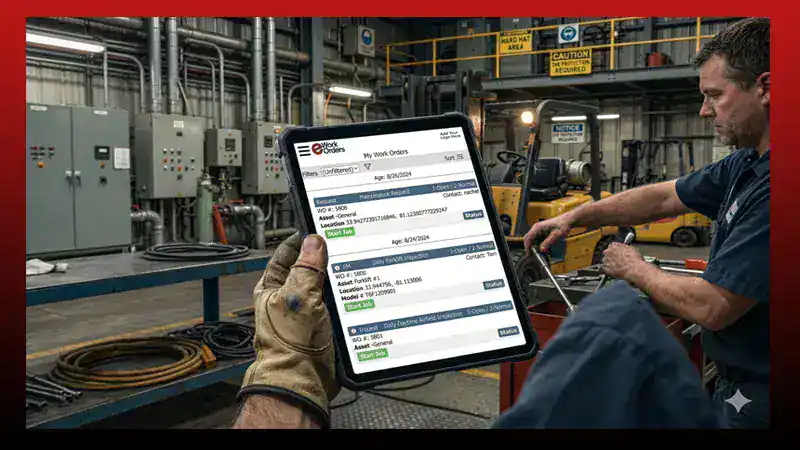
Employee management and time tracking in eWorkOrders lets you track employees, contractors, and the hours they spend on work orders. Log time with a timer or manual entry, keep records on skills and schedules, and see who is servicing what equipment.
Employee management and time tracking in eWorkOrders lets you log labor hours against specific work orders using a built-in timer or manual entry. Each employee and contractor record holds skills, schedules, payroll and billing rates, vacation and sick time, and an ID photo. That data feeds directly into CMMS reporting so you can see true labor cost per job, per asset, and per technician — not just how many hours were clocked.
Customers Love Us!















Improving Workplace Efficiency with Time Management
Businesses invest significant time and resources in CMMS applications to enhance operational efficiency and gain a deep understanding of the actual costs associated with asset maintenance and repairs. At the heart of this efficiency lies time tracking — a critical component of eWorkOrders. It goes beyond merely measuring labor availability; it plays a crucial role in reporting and determining the costs associated with work orders.
However, eWorkOrders doesn’t stop at labor hours; it extends its capabilities to capture a wealth of critical information related to work orders. This includes asset identity and location, consumed repair parts, the type of work performed, the skill sets of employed workers, and the involvement of service and part vendors, among other crucial variables.
“eWorkOrders makes it simple to track employees, jobs, and equipment across 69 sites. The system is user-friendly and gives us visibility into who is servicing equipment while keeping records accurate and accessible.”
Time Tracking Features
Log time on a work order with a built-in timer.
Enter time on a work order manually when a timer isn’t practical.
Option to capture the employee’s location during task execution.
Upload employee photos into the system for added security.
See eWorkOrders Employee Management & Time Tracking in Action
Benefits
Leverage the eWorkOrders Employee Module to efficiently track your employees and contractors. Gain insights into their work order time, vacation schedules, sick leave, break times, payroll information, and billing details.
Strengthen your security measures by uploading photos of your employees into the system, ensuring a more secure environment.
Seamlessly assign employees to work orders, enabling you to monitor their daily tasks and identify any potential backlogs effortlessly.
Employees can accurately log the time spent on each work order, either by manual entry or by utilizing a timer. The system even offers the option to capture their location during task execution.
When service requesters check the status of their requests, they can view photos of the workers assigned to their service requests, along with details on when the work was performed and the amount of time expended.
Effectively manage operating costs, reduce labor overtime, and ensure equipment uptime and availability, all of which contribute to enhanced business efficiency.
With eWorkOrders, you gain a comprehensive understanding of your workforce’s activities, enabling you to make data-driven decisions that enhance productivity and drive your business forward.
Real Results — From Real Users

Angie

eWorkOrders Is the Most User-Friendly and Efficient CMMS for Maintenance
eWorkOrders has streamlined and simplified my job as a Maintenance Planner / Scheduler. Implementing their CMMS software was simple, user-friendly, and efficient. I am able to manage, maintain, and sc...

eWorkOrders Is the Most User-Friendly and Efficient CMMS for Maintenance
eWorkOrders has streamlined and simplified my job as a Maintenance Planner / Scheduler. Implementing their CMMS software was simple, user-friendly, and efficient. I am able to manage, maintain, and schedule my corrective work, preventative maintenance, critical assets, and employee information, all important documentation, and utilize many customized reports with one system. I love that they are constantly updating and improving the system. Any questions – they’ll answer them quickly! No long waits. Great system and great team!
Angie

Robert

Impressed With the Ease of Use & Robust Features
Whenever we acquire a new site, one of the first things we implement is eWorkOrders. It’s the best way to service the employee population.
eWorkOrders keeps all of our work order requests organized a...
Impressed With the Ease of Use & Robust Features
Whenever we acquire a new site, one of the first things we implement is eWorkOrders. It’s the best way to service the employee population.
eWorkOrders keeps all of our work order requests organized and the ease of assigning work to multiple groups fosters collaboration amongst the various maintenance trades.
Robert

Mario

How eWorkOrders Simplifies Asset Tracking and Maintenance Reporting
We have been able to get a master list of our assets, including VIN numbers, registration dates, and employees using them. Also, we have the ability to keep records of our PM’s in a more efficient mann...

How eWorkOrders Simplifies Asset Tracking and Maintenance Reporting
We have been able to get a master list of our assets, including VIN numbers, registration dates, and employees using them. Also, we have the ability to keep records of our PM’s in a more efficient manner while giving technicians more accountability. Keeping track of our expenses by assets and programs has been one of the main issues we have solved; the reports are clear and give upper management an easy glance at everything that is happening in the maintenance department.
The integration process was easy and straightforward, the program is easy to use and learn, and the program has multiple reports that give you the ability to look at your expenses from different angles.
Mario
Explore Additional Testimonials & Case Studies
Frequently Asked Questions
What is employee management and time tracking in a CMMS?
It’s the ability to track employees and contractors along with the time they spend on work orders. In eWorkOrders, each employee record can include work order time, vacation schedules, sick leave, break times, payroll information, billing details, and an employee photo.
How do employees log time on a work order?
Employees can log time on each work order either by manual entry or by utilizing a timer. The system also offers the option to capture their location during task execution.
What employee information can be tracked?
Work order time, vacation schedules, sick leave, break times, payroll information, billing details, and an employee photo for added security. Contractors can be tracked alongside employees.
What do service requesters see about assigned work?
When service requesters check the status of their requests, they can view photos of the workers assigned to their service requests, along with details on when the work was performed and the amount of time expended.
How does time tracking help control costs?
Tracking time against work orders helps you manage operating costs, reduce labor overtime, and ensure equipment uptime and availability.
Additional Resources
Assign work orders to employees and track the time spent on each job.
Requesters can see who’s assigned, when work was done, and how long it took.
Articles, guides, and industry references on maintenance management topics.
Glossary of common maintenance and CMMS terminology.