Is your facility constantly juggling urgent repair requests, routine inspections, and critical equipment that seems to break down at the worst possible times? With every hour of unplanned downtime cutting into profits and disrupting operations, it’s the last thing you want.
But with maintenance management software, you can turn firefighting into forward-thinking planning. In essence, this is a structured approach to tracking tasks, allocating resources, and scheduling preventive work to ensure a smooth daily workflow.
Whether you’re overseeing a busy manufacturing line, managing multiple properties, or maintaining a fleet of vehicles, learn how this system can help your business stay one step ahead of equipment failures and costly work stoppages.
What Is Maintenance Management Software?
Maintenance management software helps organizations maximize operational efficiency by centralizing, managing, and optimizing all asset and facility maintenance activities in one platform. Specifically, it can streamline maintenance processes, such as repairs, so maintenance technicians are more productive.
It’s often referred to as computerized maintenance management software (CMMS) —in practice, the terms overlap, but CMMS usually focuses on detailed asset tracking and preventive routines, while maintenance management software can encompass broader functionalities like project tracking and multi-site coordination.
Key Components
| Feature | Description |
|---|---|
| Asset Tracking | Proactively monitor the health, location, and performance of equipment. This enables data-driven decisions, such as when to retire older machinery or invest in upgrades. |
| Work Order Management | Create, schedule, and assign maintenance tasks in seconds. Automated notifications keep everyone—from technicians to supervisors—on the same page. |
| Inventory Management | Track spare parts and critical resources in real time. When inventory dips below a certain threshold, the system can trigger an alert so your team is never caught off guard. |
| Reporting and Analytics | Transform raw data into actionable insights. By reviewing metrics like repair times and parts usage, you can spot inefficiencies and fine-tune your approach. |
Maintenance management software brings tangible benefits to a wide range of sectors:
- Manufacturing: Prevent sudden machinery breakdowns by scheduling proactive upkeep and monitoring equipment health in real time. This approach improves production quality and safeguards profits.
- Hospitality: Quickly address HVAC repairs, plumbing issues, and other guest-facing concerns. By handling tasks promptly, hotels and resorts maintain higher customer satisfaction ratings.
- Property Management: For apartment complexes, office buildings, and similar properties, property management maintenance software dispatches the right technician to handle urgent requests. Tenants benefit from speedy fixes, and property owners can proactively plan long-term enhancements.
- Fleet Operations: Fleet maintenance management software helps businesses coordinate service schedules for vehicles, preventing missed deliveries and unexpected downtime. Real-time tracking also improves safety and compliance.
The Evolution of Maintenance Management
Not long ago, maintenance teams scribbled work orders on carbon‑copy forms, logbooks filled filing cabinets, and a single misplaced spreadsheet could stall an entire production line. Such surprises are expensive, with the average cost of unplanned downtime at $108,000 per hour.
As a result, organizations have raced to digitize, and nearly 60% now run a CMMS rather than older enterprise tools. Cloud adoption is accelerating, too— A lot of plants say they’re either already migrating or have firm plans to move their maintenance software off‑premises.
Key Features and Benefits of Modern Maintenance Management Software
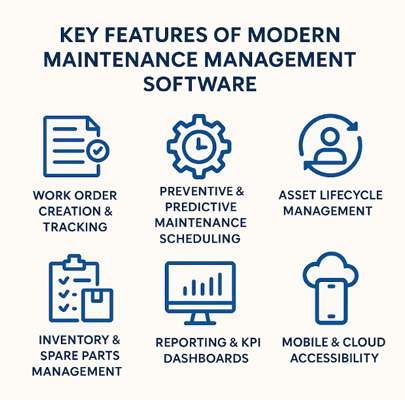
Here’s what separates state‑of‑the‑art maintenance management software from last decade’s spreadsheets:
| Feature | Description |
|---|---|
| Work Order Creation and Tracking | A solid CMMS lets anyone submit a request in seconds, auto‑assigns it to the right technician, and starts the clock. |
| Team Collaboration | When work orders, photos, and chat threads live in one mobile app, everyone stays on the same page.Faster updates mean supervisors can re‑prioritize on the fly, vendors know exactly when to arrive, and customers see issues resolved sooner. |
| Preventive and Predictive Maintenance Scheduling | Data analytics and Internet of Things (IoT) sensors flag early warning signs—heat, vibration, cycle counts—so you can act before a fault becomes a failure. |
| Asset Lifecycle Management | Every asset card captures purchase date, repair history, and performance trends. With that 360° view, finance teams can time replacements perfectly. |
| Inventory and Spare Parts Management | Smart inventory modules set reorder thresholds, track vendor lead times, and even swap parts between sites—slashing stockouts without tying up cash in dead stock. |
| Centralized Data and Documentation | A single source of truth simplifies OSHA‑style record‑keeping, makes ISO audits less painful, and gives new hires instant access to asset histories, manuals, and part catalogs. |
| Reporting and KPI Dashboards | Dashboards convert mountains of work‑order data into actionable metrics—MTTR, planned‑versus‑reactive ratio, parts spend. With weekly trend lines in plain view, it’s easy to prove ROI and secure next year’s budget. |
| Mobile and Cloud Accessibility | Field techs snap before‑and‑after photos, close work orders, and reorder parts—all from a phone. Cloud delivery means no VPN headaches and instant scalability. The result: faster first‑fix rates and happier frontline crews. |
| Integration with Other Systems | Best‑in‑class platforms sync with ERP for cost codes, pull sensor data from IoT gateways, and push workforce info from HR. |
| Scalability and Customization | Whether you’re running a single facility or a global network, today’s cloud‑first tools scale without the IT growing pains. Solutions such as eWorkOrders let you turn modules on or off, tailor user roles, and integrate with ERP or sensor stacks—so the system grows right alongside your business. |
Best Practices for Implementing Maintenance Management Software
Rolling out a new maintenance management software system needs to be done right. From the first demo to long-term optimization, a thoughtful, step-by-step implementation plan helps teams get the most out of their investment.
1. Conduct a Needs Assessment
Before jumping into a new platform, take a deep dive into your current processes. Where are the hold-ups? Are work orders getting lost? Is inventory always behind? Maybe analytics are nonexistent. List your must-haves—like mobile access, inventory tracking, or asset history—and nice-to-haves, such as advanced reporting or predictive maintenance.
Then, set clear goals. For example, aim to reduce average repair time by 20% within six months or cut emergency work orders in half. Having metrics tied to specific pain points keeps your implementation grounded and helps you measure success.
2. User Training and Adoption
A smooth rollout hinges on great training. Choose a solution with an intuitive interface, then invest in onboarding your team—from techs on the floor to the admin assigning work orders.
Make learning ongoing: tutorials, webinars, knowledge bases, and live support all make a difference. Encourage hands-on practice and create champions within each department who can support others along the way.
3. Data Migration and System Integration
If you’re moving from spreadsheets, paper records, or outdated systems, data migration needs to be done carefully. Clean your data first—ditch duplicates and outdated records. Then, work with your vendor to ensure a secure and accurate transfer into the new platform.
Also, check integration capabilities. Can the system sync with your ERP software? Can it pull in sensor data from IoT-enabled machines? Integrations eliminate silos and make your maintenance data even more powerful.
4. Establish Clear KPIs and Regular Reviews
Establish key performance indicators (KPIs) early, like average time to close a work order, asset uptime, or technician response time. Most systems come with built-in dashboards to make tracking easy.
Schedule regular reviews to assess progress, identify roadblocks, and adjust processes. Maintenance is dynamic—your software should be, too. Use your data not just to report, but to evolve.
5. Leverage Vendor Expertise
A great software provider offers guidance as well as tools. Platforms like eWorkOrders go beyond the basics, with services that include setup, data migration help, training, and ongoing support. Check out their services to see how their consulting and support offerings help teams hit the ground running and keep improving over time.
How eWorkOrders Delivers Smarter Operations

Founded in 1995, eWorkOrders has grown from a small family operation into a trusted leader in web‑based CMMS solutions. With 30 years of experience and thousands of clients worldwide, we’ve built our reputation on reliability, stability, and a user‑first approach.
Unlike venture‑capital‑backed competitors, our independence means you won’t face surprise price hikes, disruptive acquisitions, or shortcuts on service—just rock‑solid software and support designed to keep your operations humming.
Our services bring you hands‑on implementation, live and on‑demand training, and deep customization—so you hit the ground running and keep improving. Smart strategies and CMMS tools are key to cutting maintenance expenses. Energy providers use eWorkOrders to manage assets, as shown in these CMMS success stories from the energy sector.
Key Differentiators
- Award-Winning Ease of Use & Support: eWorkOrders boasts an average ease-of-use rating of 4.9 out of 5 on Capterra—well above the category average of 4.6—and earned multiple Best Ease of Use badges in 2023 across work order, preventive maintenance, and fleet maintenance categories.
- Comprehensive, Scalable Modules: From core work-order and preventive-maintenance tools to asset lifecycle management, spare-parts inventory, GIS mapping, electronic signatures, and robust API integrations, eWorkOrders adapts effortlessly whether you’re running a single facility or coordinating dozens of sites.
- Mobile-First, Cloud-Delivered: With true browser-based access and dedicated iOS/Android apps, technicians can submit tickets, review asset data, close work orders, and reorder parts directly from their smartphones—no VPN required.
- Customization and Integration: Tailor screens, reports, and workflows to your exact processes, then link maintenance data with ERP, IoT sensors, or HR systems via open APIs for a fully connected enterprise.
Proven Results
- High User Satisfaction: Over 900 verified reviews give eWorkOrders a 4.9/5 overall rating on Capterra, with property managers praising its intuitive interface and facilities supervisors lauding its reliability and mobile ease.
- Trusted by Household Brands: Honda, Siemens, KFC, McDonald’s, Detroit Zoo, and more trust us to streamline maintenance across hundreds of sites.
Want to see real results? Head over to our case studies page across industries, from senior living and manufacturing to airports and water treatment. Then book your demo to see how eWorkOrders can tailor smarter, data‑driven workflows to your exact needs.
FAQs
What is software maintenance management?
Software maintenance management refers to the use of digital tools to plan, schedule, and track all maintenance activities—preventive, corrective, and predictive—across an organization’s assets. By centralizing work orders, asset histories, and inventory data in one platform, teams can streamline workflows, reduce downtime, and make smarter, data‑driven decisions.
What is the best maintenance software?
The “best” solution varies by organization size, industry, and budget—but top‑tier platforms share intuitive interfaces, robust reporting, mobile access, and seamless integration capabilities. For many businesses, eWorkOrders stands out for its family‑owned stability, award‑winning ease of use, and scalable feature set that grows from single‑site shops to global enterprises.
What is CMMS and SAP?
A CMMS (Computerized Maintenance Management System) is dedicated software focused on managing maintenance work orders, assets, and spare‑parts inventory. SAP, by contrast, is a comprehensive ERP suite that includes maintenance management as one of its many modules—often called SAP PM (Plant Maintenance)—and integrates asset care into broader finance, procurement, and operations processes.
What are the 4 types of maintenance?
Maintenance strategies typically fall into four categories:
- Reactive (Run‑to‑Failure): Fixing equipment after it breaks.
- Preventive: Scheduled servicing based on time or usage intervals.
- Predictive: Using real‑time data and analytics to anticipate failures.
- Proactive (Reliability‑Centered): Addressing root causes to prevent faults before they occur.