Schedule a Free Demo
No obligation • Takes less than a minute
Work Order Management Software
Work Order Management Software is a centralized system that creates, assigns, tracks, and closes every maintenance job — replacing paper, email chains, and spreadsheets with a real-time record from first request to signed completion.
eWorkOrders CMMS gives maintenance managers real-time visibility into every open, overdue, and completed work order — across every facility, from any device — so every job gets done, documented, and closed on time.
No missed work orders. No lost requests. Just faster, more accountable maintenance management.
Customers Love Us!















Every Feature Visible Without Clicking
Real outputs — see what your team sees every day.
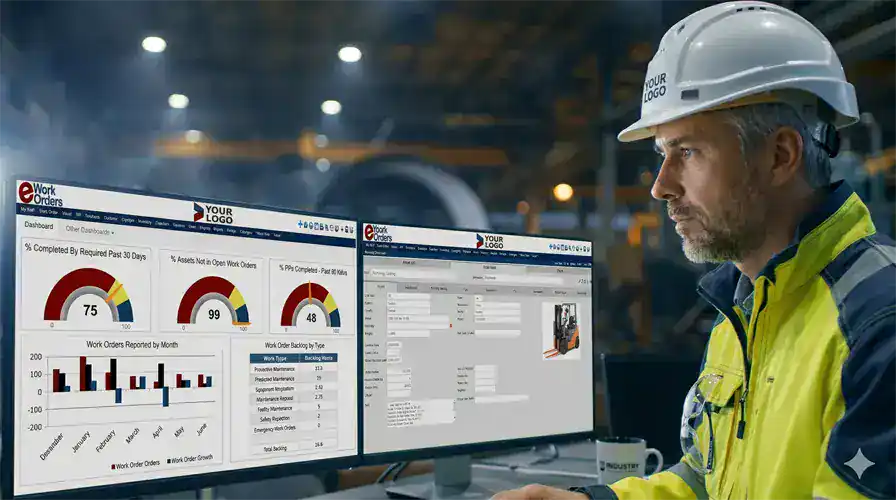
Every Work Order. Every Status. No Phone Calls Required
See every open, in-progress, and overdue work order across all your facilities on one screen — exactly what work order management software should do. Filter by priority, technician, asset, or location. Automatic alerts fire when jobs go overdue.
Every work order carries a complete activity log from creation to signed close — a permanent, searchable compliance record built automatically as your team works.
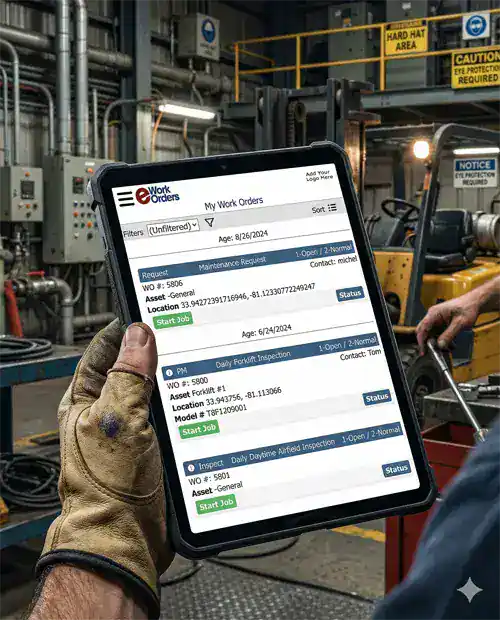
Technicians Get Everything Before They Leave the Shop
With eWorkOrders CMMS, work orders arrive on the technician's phone or tablet with full asset history, parts list, required checklist, and safety procedure attached. They close the job from the floor — log time, capture photos, scan QR codes, collect digital signatures. No paper. No desk trips.
Required checklist steps must be completed before any mobile work order can close. Every action is timestamped and creates a signed compliance record automatically.
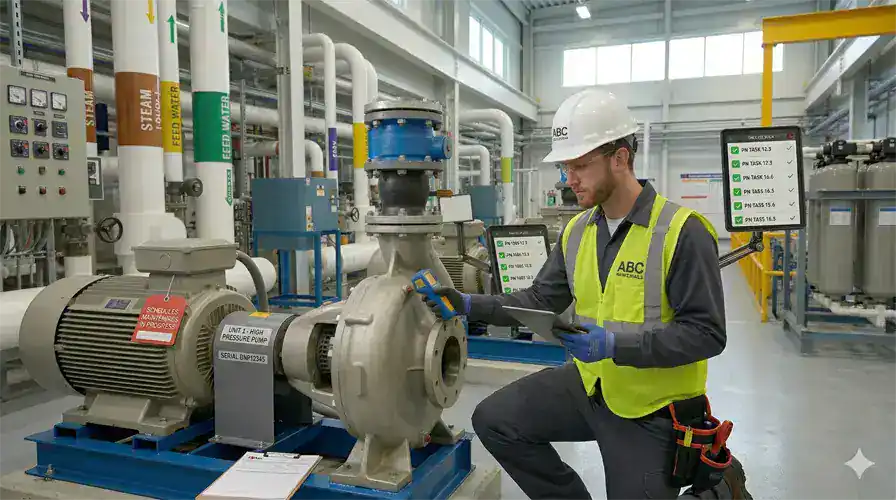
Work Orders That Create Themselves — Before Equipment Fails
With eWorkOrders preventive maintenance software, work orders fire automatically from calendar schedules, meter reading thresholds, or IoT condition triggers. The right technician gets the job with the full procedure and checklist — before failure happens.
According to Siemens' 2024 True Cost of Downtime report, the world's 500 biggest companies lose almost $1.4 trillion a year to unplanned downtime — and fixing before failure, the goal of any preventive maintenance program, reduces the need for replacement parts by up to 40%.[1] eWorkOrders makes sure your PMs never get missed — no manual creation, no forgotten recurring tasks.
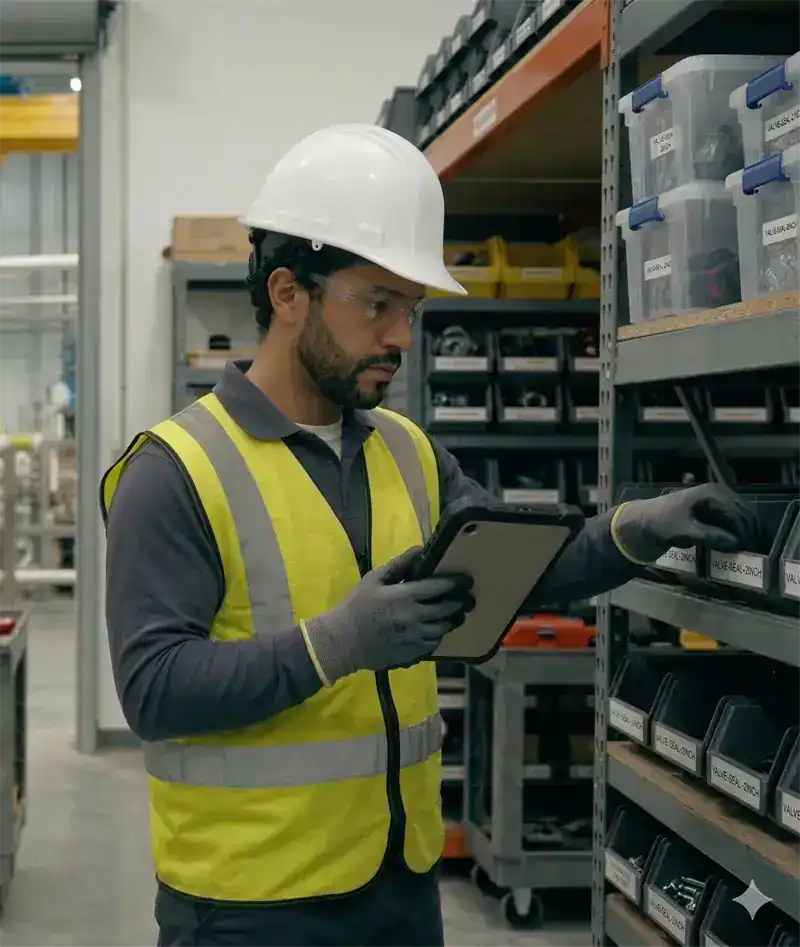
Know What Is in Stock Before the Technician Leaves the Shop
In eWorkOrders CMMS, parts inventory is built into every work order. Required parts identified and reserved automatically when the job is created. Technicians confirm stock on their phone or tablet before leaving. Inventory deducted automatically on close.
Unplanned downtime costs between $36,000 an hour in fast-moving consumer goods and $2.3 million an hour in automotive — and missing parts at the time of repair is one of the most preventable causes.[1] eWorkOrders eliminates that entirely with integrated spare parts inventory tied directly to your work orders.
What Is Work Order Management Software?
Work order management software (CMMS) is a centralized digital system that creates, assigns, tracks, and closes every maintenance job from a single platform. It replaces paper work orders, email chains, and spreadsheets with a real-time system where every job has a documented record from the moment a problem is reported to the moment a technician closes it with a digital signature.
For maintenance managers, it means complete visibility into every open job, every technician’s workload, and every asset’s maintenance history — without making a single phone call. In JLL's 2024 State of FM Technology survey of more than 230 facilities management practitioners, 56% expected their work order volumes to rise year over year.
What is CMMS? CMMS stands for Computerized Maintenance Management System — software that centralizes work orders, asset records, preventive maintenance schedules, parts inventory, and labor tracking into a single platform. CMMS software helps maintenance teams reduce equipment downtime, extend asset life, control maintenance costs, and maintain regulatory compliance. Grand View Research valued the global CMMS market at $1.3 billion in 2024 and projects an 11.1% compound annual growth rate through 2030.[2]
See eWorkOrders Running on Your Assets — Live Demo, No Commitment
Our US-based team builds every demo around your facility type, asset mix, and compliance requirements.
Work Order Types — Every Maintenance Scenario
eWorkOrders handles every work order type with its own priority logic, checklist structure, documentation requirements, and reporting classification.
| Work order type | Trigger | Priority | How eWorkOrders handles it |
|---|---|---|---|
| Preventive MaintenancePM | Time, meter, or condition schedule | Planned | Checklist + parts pre-loaded. PM compliance rate is calculated automatically so you can track it against your own target. |
| Corrective MaintenanceCM | Inspection findings (developing fault) | Planned / Scheduled | Linked to the originating inspection record. Highest-value WO type in mature maintenance programs. |
| Emergency / ReactiveEWO | Equipment failure | Immediate | Captures cost and downtime impact per event. Recurring patterns automatically flag assets for PM review. |
| Standard / RoutineSWO | Manual request | Non-critical | Full priority classification and asset linkage. Keeps non-urgent tasks organized without interrupting critical work queues. |
| InspectionsCompliance | Compliance schedule | Required | Required-field enforcement and digital signature captured on close. Findings automatically generate corrective work orders — no manual follow-up needed. |
| Service RequestsSR | Any staff member (no CMMS login required) | Varies | Converts to a full work order with asset linkage. Unlimited requesters included in all plans at no extra cost. |
Audit-ready documentation — automatically.
eWorkOrders automatically timestamps and stores every work order record — who performed the work, what steps were completed, parts used, and digital signatures. Your team gets the structured maintenance records needed to support FDA, OSHA, ISO, HACCP, and JCAHO reviews, generated as your team works — not assembled the week before an audit.
Every Work Order Capability Your Team Needs
From first service request to closed work order and the analytics that follow, eWorkOrders handles the complete lifecycle with no gaps, no paper, and no chasing status.
Create, update, and close work orders from any smartphone or tablet browser — at the equipment, without returning to a desk. Technicians see their queue, open assignments, and full asset history from one screen. Completions are real-time.
Any operator, tenant, or employee submits requests through the web portal, mobile app, QR code scan at the asset, or email — without a CMMS login. No user IDs to manage. Requests convert to work orders on approval, pre-linked to the correct asset.
Preventive maintenance work orders generate automatically on calendar, meter, or condition triggers — with the checklist loaded, parts reserved, and assigned technician notified. No manual scheduling. No forgotten PMs.
Required parts are identified in the PM template and reserved from inventory automatically. If stock is below the required quantity, a procurement alert fires before the work order date — preventing deferred PMs from parts unavailability.
Open work orders by priority, technician, location, and asset type — visible in real time without running a report. MTTR, MTBF, completion rate, backlog age, and PM compliance display on the maintenance dashboard automatically.
Every action is timestamped: creation, assignment, status changes, parts logged, checklist completion, supervisor approval, and closure. Required fields enforce documentation before closure. Electronic signatures capture technician and supervisor sign-off.
Emergency, urgent, routine, and planned work orders are each given a priority level. The dashboard sorts and highlights the most critical jobs automatically — so your team always addresses what matters most first. Overdue jobs trigger alerts before they become emergencies.
Every work order can have required steps attached — inspection procedures, safety requirements, OEM specifications — that must be completed before closure. The system enforces compliance automatically. Every item is timestamped and stored permanently in the audit trail.
Attach OEM manuals, engineering drawings, safety data sheets, invoices, and photos directly to any work order or asset. Technicians access everything in the field on their phone — no calling the office for a manual, no driving back to look something up.
Technicians log actual time from their phone. Labor costs calculate automatically by asset — building true cost-per-asset history that justifies maintenance budgets and capital replacement decisions.
eWorkOrders connects to your ERP, accounting software, IoT sensors, GIS, and more via API. Work order data flows automatically between systems — no duplicate entry, no manual exports.
AI analyzes your actual asset history and repair records to suggest troubleshooting steps, recommend parts, and propose the best-fit technician — reducing diagnostic time and improving first-time fix rates.
The 6 Stages of the Work Order Lifecycle
Every work order follows a defined lifecycle — tracked, time-stamped, and visible to the entire team in real time from creation to closed record.
A work order is generated when a maintenance need is identified — through a staff service request (web portal, QR scan, mobile, or email), a PM schedule trigger, or an emergency condition. Non-maintenance staff submit with no CMMS login required. The request captures asset ID, location, issue description, urgency, and any photos.
The work order is reviewed, priority confirmed, and resources allocated — labor, parts, tools, and estimated time. Parts are checked against inventory and reserved. The work order is scheduled based on priority, technician availability, and operational windows. Procurement alerts fire if stock is insufficient.
The work order is assigned to the right technician based on skill, shift, and proximity. The technician receives an instant mobile notification with the complete work order — asset history, checklist, required parts, and OEM documentation. Priority escalation alerts supervisors if high-priority work orders are not accepted within defined windows.
The technician performs the work at the asset — checking off each checklist item, logging parts used with part numbers and quantities, recording labor start and end time, attaching photos, and entering notes. All documentation is captured in real time from mobile. Required fields enforce complete records before the work order can progress to review.
Supervisor reviews the completed work order — verifying checklist completion, documentation, and parts logged. Electronic signature captures supervisor approval with a time-stamp. Any developing issues found during work generate corrective work orders immediately, linked to the asset and originating work order.
The work order closes with a complete time-stamped record. The asset's maintenance history updates immediately. MTBF, MTTR, cost-per-asset, and PM compliance rate recalculate automatically on your maintenance dashboard. Every completed job becomes operational intelligence — driving PM interval optimization, the repair-or-replace decision, and the compliance audit trail.
Why Maintenance Teams Choose eWorkOrders
Built for maintenance since 1995. Independent, US-based, and built for customers — not investors.
Starter ($380/mo) and Advanced ($480/mo) include unlimited users — add technicians without touching your budget. Enterprise plans are priced per user for large operations needing advanced controls, integrations, and additional enterprise features. See all plans →
Any number of operators, tenants, or employees submit work requests at no extra cost. No accounts to manage, no passwords to reset.
Your system is live within 24 hours of signup. Most teams complete data migration and go-live in 2–3 weeks. No months-long implementation.
Founded 1995. Built for customers, not investors. 120+ awards. 4.9 stars on Capterra. Decisions driven by what makes the product better.
When you call, a knowledgeable person picks up and responds within hours — not days. The primary reason customers stay and switch from larger platforms.
Enterprise-grade security with SSO, role-based permissions, complete audit trails, and one of the highest security ratings in the CMMS industry.
Common Work Order Management Challenges and How eWorkOrders Solves Them
Maintenance teams face daily operational challenges that impact productivity and equipment uptime. 82% of companies surveyed had experienced unplanned downtime over a three-year period (ServiceMax / Vanson Bourne), and Siemens puts the cost of a single lost hour at between $36,000 and $2.3 million depending on the industry. eWorkOrders work order management software addresses these bottlenecks with streamlined workflows, automated scheduling, and real-time tracking — giving maintenance managers full control over every work order from request to close.

Lost or Delayed Work Orders
Digital work orders ensure nothing gets lost in email chains or paper files. Real-time tracking shows exactly where every work order stands at all times.
56% of facilities management practitioners expected their work order volumes to increase year over year — more jobs to keep track of, not fewer (JLL, State of FM Technology 2024).
Delayed Communication
Automated notifications keep everyone informed. Technicians get instant updates on assignments, priority changes, and parts availability.
The average maintenance technician spends only 25–35% of their shift on actual hands-on repair work — the rest is lost to waiting for instructions, paperwork, and coordination (Advanced Technology Services).
Incomplete or Missing Data
Required fields and custom checklists ensure all critical information is captured. Standardized templates eliminate inconsistency across teams and shifts.
No Historical Record
Every work order is permanently stored with complete details — labor hours, parts used, and actions taken — creating a searchable history for every asset.
71% of decision makers surveyed did not have total awareness of when their assets were scheduled for maintenance (ServiceMax / Vanson Bourne, "After The Fall").
Work Order Management for Every Industry
The maintenance challenges are the same everywhere. Only the assets are different.
Track work orders across production lines and CNC equipment. Connect PMs to meter readings — not calendar guesswork. Trusted by Honda manufacturing operations.
Medical equipment, HVAC, and life safety work orders with automatic JCAHO-ready documentation generated on every closed job.
DTH Contract Services saved $150K+ annually managing Virginia DOT facilities.
Work orders on pumps, blowers, and treatment assets. EPA audit records ready at any time — not assembled the week before a site visit.
Full audit trail for fleet, facilities, and infrastructure. Used across 100+ Virginia DOT highway facilities by DTH Contract Services.
HACCP and FDA compliance documentation auto-generated on every closed work order. Trusted by McDonald's for equipment and sanitation tracking.
Proven Results — Real Customers
"I truly believe that if a company really wants to achieve success with a new CMMS solution, eWorkOrders is the one to go to. They will not disappoint you. The team works closely together and have exceeded our expectations."
"Creating and monitoring work orders is very intuitive and valuable. The ability to verify what work was done and what parts were used is priceless."

Jim

Efficient Maintenance & Cost Control with eWorkOrders at 400+ Franchise Restaurants
We are a franchise operator for over 400 restaurants, including KFC, Pizza Hut, Taco Bell, Tim Hortons, A&W, and Long John Silver’s. Our Account Manager, Norm Stepp, walked us through the eWorkOrders C...

Efficient Maintenance & Cost Control with eWorkOrders at 400+ Franchise Restaurants
We are a franchise operator for over 400 restaurants, including KFC, Pizza Hut, Taco Bell, Tim Hortons, A&W, and Long John Silver’s. Our Account Manager, Norm Stepp, walked us through the eWorkOrders CMMS software platform. Excellent! Norm, as well as most of the eWorkOrders team, are seasoned users of eWorkOrders. The implementation was quick and easy. During setup, Norm brought his expertise and provided some great recommendations and tips to help us get even more out of the system. It is a real benefit working with someone who has actually used the system. We were up and running very quickly, and even the non-technical customers found it extremely easy to put in service requests. eWorkOrders came with a lot of robust features at a very affordable price. Since using eWorkOrders we have:
• Streamlined our Maintenance Operations
• Controlled and Reduced Expenses
• Extended Equipment Lifecycle
• Increased Efficiency
• Managed and Controlled Contract Expenses
• Increased customer satisfaction
I can see why eWorkOrders is the Highest-rated CMMS software solution. It is excellent software! Excellent Team!
Jim

Aaron

eWorkOrders: Best CMMS for Easy Work Orders & Accurate Inventory
Creating and monitoring work orders is very intuitive and valuable. The ability to verify what work was done and what parts were used is priceless. The inventory and purchase orders are intuitive and ...

eWorkOrders: Best CMMS for Easy Work Orders & Accurate Inventory
Creating and monitoring work orders is very intuitive and valuable. The ability to verify what work was done and what parts were used is priceless. The inventory and purchase orders are intuitive and a must as well. Being able to track on-hand inventory and how it flows is extremely valuable.
We chose eWorkOrders due to its superior ability to record the purchase and tracking of inventory. Also, the work order information was much more detailed and easy to use than anything on the market. The tech support is amazing as well! They ALWAYS respond to any issue or suggestion that we have in a timely and professional manner.
The implementation of this system has allowed us to document the work we perform on our plant equipment, both for maintenance and for safety records. We can now historically track all parts used and time spent on assets. We also have detailed records of the company assets as well.
The inventory portion allows us to order and track inventory as well as accurately cost what we use and check vendor pricing.
Aaron

Don

Efficiently Manage 5,000 Work Orders per Year with This User-Friendly CMMS
This product does far more than we will ever use. We have produced almost 10,000 work orders in the past 2 years. It is very user-friendly.

Efficiently Manage 5,000 Work Orders per Year with This User-Friendly CMMS
This product does far more than we will ever use. We have produced almost 10,000 work orders in the past 2 years. It is very user-friendly.
Don
Ready to Take Control of Every Work Order?
Calculate exactly how much eWorkOrders could save your operation — free, no email required.
Common Questions About Work Order Management Software
Everything maintenance managers ask before evaluating a CMMS.
What is work order management software?
Work order management software is a digital system for creating, assigning, tracking, and closing maintenance work orders from a single platform. It replaces paper forms, shared spreadsheets, and email chains with a centralized system that gives maintenance managers real-time visibility into every job — who it's assigned to, what parts are needed, current status, and when it was completed. eWorkOrders handles the complete work order lifecycle from the first service request through closure and performance analytics.
How does eWorkOrders work order management work?
A work order is generated when a maintenance need is identified — through a staff service request, a PM schedule trigger, or an emergency condition. The system plans and schedules the job, assigns it to the right technician with full asset history and checklist attached, tracks execution in real time from mobile, captures supervisor approval and digital signature at close, and automatically updates asset history, KPIs, and the compliance audit trail. Every step is timestamped and searchable.
Can non-maintenance staff submit work orders?
Yes — any operator, tenant, or employee can submit a service request through the web portal, mobile app, QR code scan at the asset, or email without a CMMS login. Unlimited requesters are included in all plans at no extra cost. No user IDs to manage. Approved requests convert to work orders automatically, pre-linked to the correct asset.
What types of work orders does eWorkOrders support?
eWorkOrders handles all six work order types: Preventive Maintenance (auto-generated on time, meter, or condition triggers), Corrective Maintenance (planned from inspection findings), Emergency / Reactive (immediate response to failures), Standard / Routine (non-critical tasks), Inspections (compliance-driven with digital signature), and Service Requests (submitted by non-maintenance staff). Each type has its own priority logic, checklist structure, and reporting classification.
How much does eWorkOrders cost?
Starter ($380/mo) and Advanced ($480/mo) include unlimited users with flat monthly pricing — no per-seat fees on either plan. Enterprise is priced per user at $45–$120/user for large operations needing advanced inventory control, integrations, and additional enterprise features. Unlimited requesters are included at no extra cost on all plans. No implementation fees or long-term contracts.
How quickly can we get started?
Your system is live within 24 hours of signup. Most teams complete data migration and full go-live in 2 to 3 weeks. No IT project, no server installation, no months-long implementation. Our US-based onboarding team handles setup, data import, and training.
How does eWorkOrders support compliance and regulatory audits?
Every closed work order automatically creates a timestamped compliance record — who performed the work, what procedures were followed, which checklist steps were completed, what parts were used, and the technician's digital signature. FDA, OSHA, ISO, HACCP, and JCAHO documentation is generated as your team works — not assembled the week before an audit. Records are fully searchable by asset, date, technician, or work order type.
What KPIs does eWorkOrders track automatically?
MTTR, MTBF, Work Order Completion Rate, Planned Maintenance Percentage, Backlog by count and age, Emergency Work Order Rate, PM Compliance Rate, and Labor Utilization — all calculated automatically from your actual work order data. No spreadsheet required. The Society for Maintenance & Reliability Professionals publishes the standard formulas behind these metrics; eWorkOrders calculates them for you so you can set and track your own targets.
Does eWorkOrders integrate with existing systems?
Yes — eWorkOrders connects to ERP systems, accounting platforms, IoT sensors, GIS, and other business systems via API. Work order data flows automatically between systems with no duplicate entry. Several customers have integrated live runtime hours and alarms from their facility automation systems to auto-trigger work orders in eWorkOrders.
Work Order Management Resources
Guides, templates, and tools to help your maintenance team operate at world-class levels.













Take Control of Every Work Order
Join Honda, McDonald's, Virginia DOT, and thousands of maintenance teams running their operations on eWorkOrders. Get a live demo built around your assets and compliance requirements.
All third-party statistics are sourced from publicly available, independently published industry research and are quoted as each source states them. Capterra, G2, GetApp, and Software Advice badge imagery is the intellectual property of their respective owners, displayed consistent with each platform’s standard badge-use policies. eWorkOrders images used on this page are owned by Information Services Group LLC and used with permission. eWorkOrders® is a registered trademark of Information Services Group LLC. No competitor names or trademarks are referenced on this page. |
1. Siemens. The True Cost of Downtime 2024. |
2. Grand View Research. Computerized Maintenance Management System Market Report. |
3. ServiceMax / Vanson Bourne. After The Fall: The Costs, Causes & Consequences of Unplanned Downtime. |
4. JLL. State of Facilities Management Technology, 2024 (230+ FM practitioners). |
5. Advanced Technology Services. Wrench Time: average 25–35% of a shift.


