PLC Maintenance: A Practical Guide to Preventing Controller Failure
Programmable logic controllers rarely warn you before they fail — but the conditions that kill them are predictable, and a disciplined PM routine catches them early.
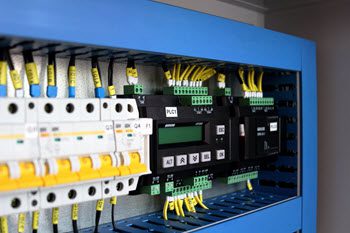
What is PLC maintenance?
We depend on automated technology to carry out many of our most important industrial activities, and the programmable logic controller (PLC) is the invention that made that level of automation possible. PLC maintenance is the scheduled inspection, cleaning, testing, and record-keeping that keeps a PLC running reliably in an industrial control system. Because a PLC governs the machinery around it, its failure doesn’t stop one component — it stops the line, the packaging cell, or the building system it controls.
Unlike a motor or a pump, a PLC has few moving parts, so operators often assume it needs no upkeep. That assumption is exactly why controllers fail unexpectedly. The real threats are slow and invisible: accumulated heat, conductive dust, loose terminals from vibration, and a lithium backup battery quietly counting down to zero.
What is a programmable logic controller (PLC)?
A programmable logic controller is an industrial computer that controls a system in an industrial organization. These systems have been adapted for the control of manufacturing processes — assembly lines, machines, robotic devices, or any activity that requires high reliability, ease of programming, and process fault diagnosis. Even large farming operations have adopted PLC systems for feed distribution, sophisticated enough to measure the exact amount of grain going to each individual animal.
PLCs monitor the inputs to a system and then make decisions about related outputs. Because they’re typically used to monitor motors or machines, they’re frequently the core of a predictive maintenance system, alerting organizations to possible issues before they result in significant breakdowns.
Types of PLCs
- Fixed integrated PLC — a single unit housing both the controller and I/O. Lower cost, but less flexible, less memory, harder to repair, and some versions require replacing the entire system if a component fails.
- Distributed PLC — a network connects the controller and I/O devices. Reduced space, higher reliability, easier maintenance, and greater flexibility, at a higher cost when used infrequently.
- Soft PLC — a fully embedded computer built with software technology. Easier to configure, supports many programming languages and sensors, lower production cost, but doesn’t come bundled with additional software.
- Modular PLC — separate modules for the controller and I/O inserted into a chassis. Greater storage, handles more complex processes, and functions in harsh environments, but configuration is more complex and pricier than a compact PLC.
How a PLC works
Each component of a PLC accepts inputs and regulates outputs, making it an input-output system. Logic programming, which takes place in the CPU, governs the interaction between inputs and outputs.
- Input monitoring — the PLC tracks relevant data inputs and feeds that information to the CPU, from IoT devices and robots to safety sensors and HMIs.
- Logic programming — the CPU is configured by engineers to recognize specific values and conditions and alter outputs according to preprogrammed rules, continually monitoring variables and acting on preset criteria.
- Output control — the PLC manages switches, motor starters, relays, and other devices based on the programmed logic, and can chain to other PLCs to coordinate larger systems.
- Compact vs. modular units — a compact PLC houses the CPU, inputs, and outputs in one device; a modular rack-mount system separates the I/O module from the CPU module, which can even sit in a different building.
The preventive maintenance tasks that matter most
Effective PLC preventive maintenance comes down to a short, repeatable checklist performed on a fixed interval. These tasks fit naturally into a broader preventive maintenance program alongside the equipment the controller runs.
- Clean the enclosure and vents. Blow out dust with dry, low-pressure air and confirm cooling fans and filters are clear. Dust is both a thermal blanket and, when conductive, a short-circuit risk.
- Check and torque connections. Vibration loosens terminal screws and I/O wiring over time. Retorque to spec and inspect for discoloration or corrosion.
- Verify power quality. Confirm supply voltage is within tolerance and that surge protection and grounding are intact.
- Test I/O and diagnostics. Review controller fault logs, confirm input/output status matches field devices, and note any modules reporting errors.
- Track the backup battery. Log battery voltage and install date so replacement happens on schedule, not after a memory loss.
- Back up the program. Keep a current copy of the ladder logic and firmware configuration off the machine, updated after every change.
Rule of thumb: replace PLC backup batteries on a fixed schedule — typically every 3 to 5 years per the manufacturer’s spec — rather than waiting for a low-battery fault. A dead battery during a power loss can wipe unsaved program memory.
Extended PLC maintenance checklist
Beyond the core tasks above, a thorough PM program covers this fuller list — how often each applies depends on your PLC’s environment:
- Program functionality: confirm the operating program is controlling the equipment or process as required.
- LED and status indicators: check regularly for fault or warning lights.
- Sensors: maintain per manufacturer recommendations.
- EMI sourcing: inspect local wiring for electromagnetic interference and keep low-level components away from high-current lines.
- Overall component condition: visually inspect the CPU and modules for wear, warping, or overheated parts (burnt scents, discoloration).
- Spare inventory: keep enough spares on hand to minimize downtime when a module fails.
- Filters: clean or replace ventilation filters regularly, and keep manuals, tools, and materials away from the enclosure.
- PLC inventory audit: keep an up-to-date list of every PLC in use.
- Calibration: calibrate input/output devices and circuit cards as required.
- Environmental monitoring: track humidity and temperature around the PLC continuously where possible.
- Module replacement: follow manufacturer instructions and cut power as directed when swapping worn I/O modules.
- Error history review: check scanning and error flags regularly and investigate the root cause early.
- Equipment placement: keep the PLC near the machine it controls and away from noise- or heat-generating equipment.
- Anomaly awareness: investigate patterns like frequently burned-out I/O devices for underlying power spikes or shorts.
Environmental factors: heat, dust, and vibration
The environment around a PLC is the single biggest driver of its lifespan. Most controllers are rated for roughly 0–60°C, but sustained operation near the top of that range accelerates capacitor and component aging dramatically. Enclosure cooling, ambient shop temperature, and blocked vents all deserve routine attention — a monitoring approach that fits well within condition-based maintenance, where readings trigger action instead of the calendar alone.
Dust and vibration compound the problem. Conductive dust bridges contacts and traps heat; vibration from nearby motors and presses works terminals loose and fatigues solder joints. Knowing which failure mode you’re guarding against tells you which preventive action to schedule.
| Failure mode | Typical cause | Preventive action |
|---|---|---|
| Overheating / component aging | Blocked vents, failed fan, high ambient temperature | Clean vents, verify cooling, monitor enclosure temperature |
| Memory loss | Depleted backup battery during power interruption | Scheduled battery replacement; keep off-machine program backups |
| Intermittent I/O faults | Loose terminals, vibration, corroded contacts | Retorque connections, inspect wiring, review diagnostic logs |
| Short circuit / contamination | Conductive dust, moisture, oil ingress | Seal enclosure, maintain filters, clean on schedule |
| Firmware instability | Outdated or mismatched firmware and modules | Apply vendor firmware updates in a controlled window; document versions |
Firmware, backups, and change control
Firmware and program management is where PLC maintenance separates disciplined shops from reactive ones. Firmware updates fix known bugs and security vulnerabilities, but they should be applied deliberately — reviewed against vendor release notes, tested where possible, and scheduled into a planned window rather than pushed live mid-shift. Every controller should have its firmware version documented so you know what’s running before you troubleshoot.
Program backups are just as critical. A current copy of the ladder logic, stored off the machine and refreshed after every change, turns a failed processor from a multi-day rebuild into a swap-and-restore. Pair backups with basic change control: log who changed what, when, and why. That history is part of good asset management — the controller is an asset with a service life, a maintenance record, and a replacement plan like any other.
Maintenance scheduling
How often a PLC needs preventive maintenance depends on its application and operating environment. Systems in harsh or high-vibration environments need more frequent attention. Everyday tasks like dusting or cleaning ventilation filters are best done on a routine basis, while other tasks — like backing up the PLC’s programming — are less dependent on environment and are frequently done twice a year.
Before scheduling preventive maintenance, carry out routine inspections first, then plan other procedures by time or usage. A computerized maintenance management system (CMMS) makes it simple to use historical data to build the best schedule — if a component tends to break every 8 to 9 months, you’d plan to replace it twice a year to avoid that breakdown.
Industry PLC applications
PLC systems are adaptable across many industries:
- Manufacturing production — analysis tools help plant managers with batch scheduling, logistics, and supplier timing, combining PLC sensor data with cloud computing for a more manufacturing-wide picture.
- Agriculture — modern agriculture relies on PLCs to automate seeding, irrigation, fertilizing, and harvesting equipment.
- Oil & gas — each well pad in the oil and gas industry requires its own PLC to run pumps, valves, and sensors, often tied together with an HMI.
- Glass manufacturers — PLCs and bus technologies control material ratios and workflows requiring exact quality control.
- HVAC — a PLC lets technicians access and automate systems remotely instead of relying on separate unique controllers for each operation.
- Food processing — PLCs monitor contaminant levels, control flow rates, and remotely operate valves in water treatment processes.
- Cement manufacturing — a PLC program ensures the right quality and quantity of raw materials during kiln mixing.
- Healthcare — PLC systems run central utility plants for remote monitoring and automated control of mechanical-electrical systems.
- Chemical, pharmaceutical, and nuclear plants — depend on PLCs for precise, reliable, automated control of complex production processes.
PLC risks to watch for
- I/O device and field device failure — a failed input or output device, often from a power fluctuation, can stop the entire system until an engineer traces the root cause.
- Ground integrity — correct grounding protects both the PLC and the maintenance team, and shields against electrical noise.
- Power problems — outages and fluctuations are the most common source of failure; backup power (including UPS systems) keeps essential operations running or allows a safe shutdown.
- Electrical noise interference — EMI from large motors starting up or lightning, and RFI from nearby transmitters, can cause erratic PLC behavior.
- Temperature problems — excessive heat is one of the biggest threats to electronic components and can cause the PLC to overheat and stop functioning.
- Corrupted memory — frequency interference and power outages can corrupt memory, making code unintelligible to the CPU.
Managing these risks takes a good preventive maintenance plan and the tools to stay on top of it — a CMMS helps facility engineers schedule inspections, monitor the operating environment, and ensure backup power is always in place.
Benefits of PLC systems
- Cost savings — PLCs are a long-term investment with a low likelihood of defect, and the cost typically recovers within a short period.
- Prolonged life and reliability — few moving parts make defects or damage unlikely.
- Increased productivity — properly programmed PLCs enable automation, minimize power consumption, and free up workforce for other tasks.
- Small footprint — solid-state design makes PLCs far more compact than hard-wired, electro-mechanical controllers.
- Flexibility — data stored across devices rather than a disjointed system makes it easy to expand by adding hardware as needed.
- Easy to maintain — a defined set of input and output devices makes problems simple to isolate and fix.
- Security — most PLC systems have strong safety and data-security measures built in.
Machines that use PLCs
PLC systems are at the heart of many critical technologies most of us don’t give a second thought to. Common mechanical systems managed by PLCs include:
| Air compressor | Conveyor belt | Laser cutter | Plastic injection molding machine |
| Air conditioning system | Cooling tower | Lathe | Press brake |
| Air handling unit | Crane | LED assembly machine | Printing machine |
| Asphalt plant | CNC lathe | Level sensor | Pump |
| Automatic door | CNC milling machine | Machining center | Robot arm |
| Automatic guided vehicle (AGV) | CNC plasma cutter | Measuring instrument | Robotics assembly line |
| Automatic labeling machine | CNC punch press | Metal cutting machine | Sawmill |
| Automatic packaging machine | CNC router | Metalworking machine | Shearing machine |
| Automatic palletizing robot | CNC waterjet cutter | Milling machine | Slitter |
| Automatic welding robot | Compressor | Motor control center (MCC) | Sorting machine |
| Bagging machine | Concrete mixer | Packaging machine | Stamping press |
| Bandsaw | Control panel | Paint booth | Steel rolling mill |
| Batch mixer | Die casting machine | Paper cutting machine | Temperature controller |
| Beverage bottling plant | Electric motor | Pick and place robot | Textile weaving machine |
| Blast furnace | Elevator | Plastic blow molding machine | Ultrasonic welding machine |
| Blow molding machine | Extrusion line | Plastic extrusion machine | Vacuum pump |
| Boiler | Fanuc robot | Plastic recycling machine | Valve |
| Bridge crane | Filling machine | Plastic thermoforming machine | Waterjet cutting machine |
| Bulk material handling equipment | Flow meter | Pneumatic cylinder | Welding machine |
| CNC boring mill | Furnace | Pressure sensor | Wind turbine |
| CNC drill press | Gearbox | Punch press | Wrapping machine |
| CNC flame cutter | Generator | Quality control equipment | Yarn spinning machine |
Schedule and track every PLC PM in one system
eWorkOrders schedules recurring PLC preventive maintenance, triggers battery and firmware tasks automatically, and logs the full service history against each controller as an asset — so nothing slips and every change is traceable. It also integrates with condition-monitoring vendors that auto-generate work orders inside the platform when readings drift. Trusted by teams at McDonald’s, Burger King, and ASSA ABLOY, with 31 years in business, 99.99% uptime, and a 4.9 rating on Capterra and G2. See it configured to your equipment in a single 90-minute session.
Frequently Asked Questions
How often should PLC maintenance be performed?
Most facilities run PLC preventive maintenance quarterly to semi-annually, with cleaning and visual inspection more frequent in dusty or high-vibration environments. Backup batteries follow a fixed replacement cycle — typically every 3 to 5 years per the manufacturer’s spec — regardless of the inspection interval.
What are the most common causes of PLC failure?
The leading causes are environmental: overheating from blocked vents or high ambient temperature, conductive dust causing shorts, vibration loosening I/O connections, and depleted backup batteries wiping program memory during a power loss. Most are preventable with routine inspection.
Do I need to update PLC firmware?
Yes, but deliberately. Firmware updates address known bugs and security vulnerabilities, so they shouldn’t be ignored — but apply them in a planned window, check vendor release notes for module compatibility, and document the version running on each controller.
How does a CMMS help with PLC maintenance?
A CMMS schedules recurring PLC PMs, automatically triggers battery and firmware tasks, and logs every inspection and change against the controller as a tracked asset. That gives you a complete service history for troubleshooting, audits, and planning replacements.
About the author: Janet Jaquis is a CMMS software specialist with over 8 years at eWorkOrders, where she develops educational content, technical guides, whitepapers, and implementation resources for maintenance management professionals. Her work covers preventive maintenance, work order management, asset reliability, inventory and spare parts, mobile maintenance, and CMMS implementation across manufacturing, healthcare, government, food and beverage, and facilities operations. Janet’s content is grounded in customer testimonials, case studies, industry research, and ongoing engagement with the eWorkOrders product team and customer base. Prior to eWorkOrders, she spent her career at AT&T in enterprise technology, working on the development and launch of AT&T WorldNet — one of the first major commercial internet services — and serving as Product Marketing Manager for AT&T WorldNet and AT&T Satellite Services. She holds a degree in Marketing and previously held PMP (Project Management Professional) certification.


